







Question: Name MGMT 434 SQL Assignment 1 F2018 Use the Northwind database to perform the following queries. 1 Display the count of suppliers (as NumberOfSuppliers) that
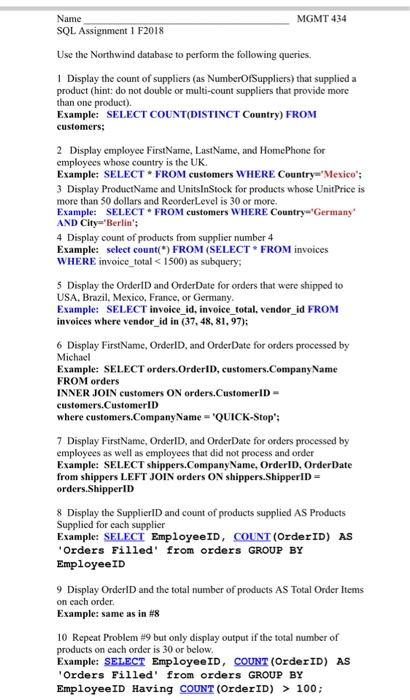
Name MGMT 434 SQL Assignment 1 F2018 Use the Northwind database to perform the following queries. 1 Display the count of suppliers (as NumberOfSuppliers) that supplied a product (hint: do not double or multi-count suppliers that provide more than one product). Example: SELECT COUNT(DISTINCT Country) FROM customers: 2 Display employee FirstName, LastName, and HomePhone for employees whose country is the UK Example: SELECT FROM customers WHERE Country "Mexico: 3 Display ProductName and UnitsInStock for products whose UnitPrice is more than 50 dollars and ReorderLevel is 30 or more. Example: SELECT FROM customers WHERE Country Germany AND City='Berlin'; 4 Display count of products from supplier number 4 Example: select count FROM (SELECT FROM invoices WHERE invoice total 1500) as subquery 5 Display the OrderlD and OrderDate for orders that were shipped to USA, Brazil, Mexico, France, or Germany Example: SELECT invoice id, invoice total, vendor id FROM invoices where vendor id in (37,48, 81,97); 6 Display FirstName, OrderlD, and OrderDate for orders processed by Michael Example: SELECT orders.OrderID, customers.Company Name FROM orders INNER JOIN customers ON orders CustomerID custemers.CustomerID where customers.Company Name QUICK-Stop; 7 Display FirstName, OrderlD, and OrderDate for orders processed by employees as well as employees that did not process and order Example: SELECT shippers.CompanyName, OrderID, OrderDate fron shippers LEFT JOIN orders ON shippers,ShipperlD orders.ShipperlD 8 Display the SupplierlD and count of products supplied AS Products Supplied for each supplier Example: SELECT EmployeeID, COUNT (OrderID) AS Orders Filled' rom orders GROUP BY EmployeeID 9 Display OrderID and the total number of products AS Total Order Items on each order. Example: same as in #8 10 Repeat Problem #9 but only display output if the total number of products on each order is 30 or below. Example: SELECT EmployeeID, COUNT (OrderID) AS Orders Filled' from orders GROUP BY EmployeeID Having COUNT (OrderID) > 100
Step by Step Solution
There are 3 Steps involved in it

Get step-by-step solutions from verified subject matter experts
 Study Help