







Question: Need an explanation please 1. [10] Define a function sumpower(p, as, ., a.) which accepts one or more arguments of type int. The first argument
![Need an explanation please 1. [10] Define a function sumpower(p, as,](https://dsd5zvtm8ll6.cloudfront.net/si.experts.images/questions/2024/09/66f31bfecd533_44666f31bfe5e71c.jpg)
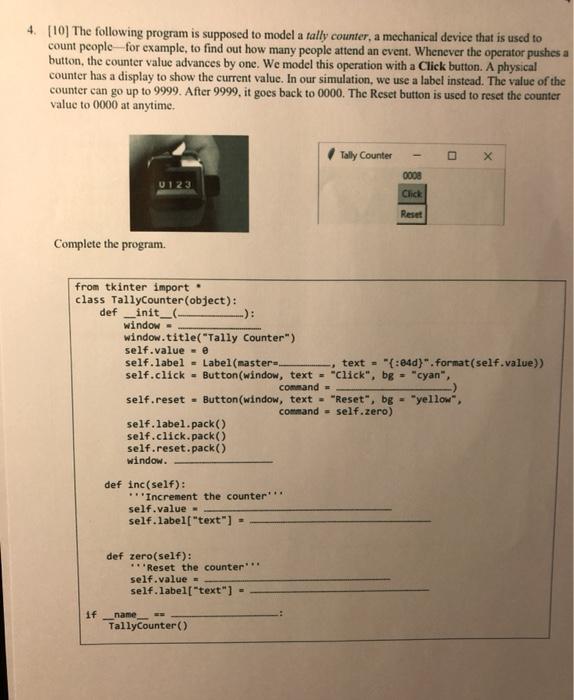
1. [10] Define a function sumpower(p, as, ., a.) which accepts one or more arguments of type int. The first argument p is the power or exponent. The value returned by the function is a tuple (a **p..... ..**p), a "*p+ ... + a. **p). If the arguments a, are not given, then the returned value is (1.0). Use a star-parameter. Examples: >>> sumPower(3) (0), e) >>> sumpower(3,2, -3,1) ([8, -27, 1), -18) >>> sumPower(2, -5, 3, 1, -7) ([25, 9, 1, 49), 84) >>> (x,y) - sumpower(2, -5, 3, 1, -7) >>> X (25, 9, 1, 49] >>> y 84 Answer: def sumpower(P, 'a): 4. [10] The following program is supposed to model a tally counter, a mechanical device that is used to count people for example, to find out how many people attend an event. Whenever the operator pushes a button, the counter value advances by one. We model this operation with a Click button. A physical counter has a display to show the current value. In our simulation, we use a label instead. The value of the counter can go up to 9999. After 9999, it goes back to 0000. The Reset button is used to reset the counter value to 0000 at anytime. Tally Counter X 0008 U123 Click Reset Complete the program from tkinter import class TallyCounter(object): def init window - window.title("Tally Counter") self.value - self.label - Label(master text = "{:84d)".Format(self.value)) self.click = Button(window, text = "Click", bg = "cyan", command self.reset - Button(window, text - "Reset", bg="yellow, command - self.zero) self.label.pack() self.click.pack() self.reset.pack) window. def inc(self): Increment the counter self.value- self. labelt "text") def zero(self): ***Reset the counter self.value = self.label["text") = if name TallyCounter()
Step by Step Solution
There are 3 Steps involved in it

Get step-by-step solutions from verified subject matter experts
 Study Help