







Question: need explanation about these entries in sage 50 software. Answer as soon as possible Challenge Exercise 03 C3B-2, China PAYABLES, RECEIVABLES, INVENTORY & SERVICES and
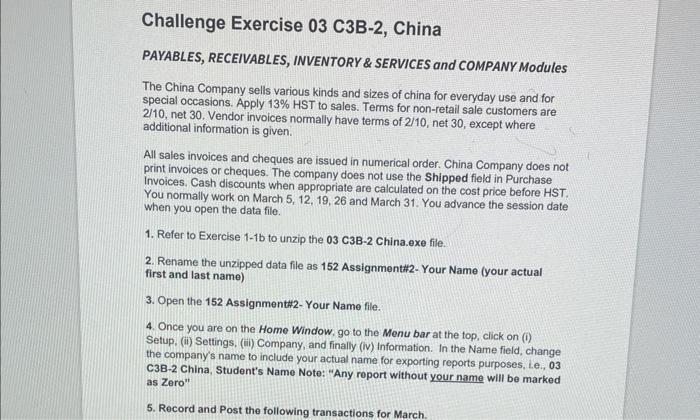
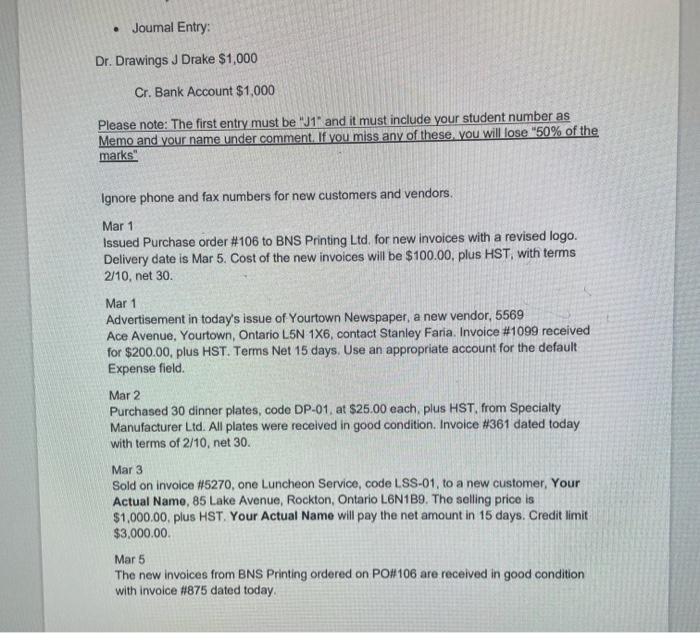
Challenge Exercise 03 C3B-2, China PAYABLES, RECEIVABLES, INVENTORY \& SERVICES and COMPANY Modules The China Company sells various kinds and sizes of china for everyday use and for special occasions. Apply 13% HST to sales. Terms for non-retail sale customers are 2/10, net 30 . Vendor invoices normally have terms of 2/10, net 30 , except where additional information is given. All sales invoices and cheques are issued in numerical order. China Company does not print invoices or cheques. The company does not use the Shipped field in Purchase Invoices, Cash discounts when appropriate are calculated on the cost price before HST. You normally work on March 5, 12, 19, 26 and March 31. You advance the session date when you open the data file. 1. Refer to Exercise 1-1b to unzip the 03 C3B-2 China.exe file. 2. Rename the unzipped data file as 152 Assignment\#22-Your Name (your actual first and last name) 3. Open the 152 Assignment\#2-Your Name file. 4. Once you are on the Home Window. go to the Menu bar at the top, click on (i) Setup, (ii) Settings, (iii) Company, and finally (iv) Information. In the Name field, change the company's name to include your actual name for exporting reports purposes, Le., 03 C3B-2 China, Student's Name Note: "Any report without your name will be marked as Zero" Dr. Drawings J Drake $1,000 Cr. Bank Account $1,000 Please note: The first entry must be " J1 and it must include your student number as Memo and your name under comment. If you miss any of these. you will lose "50\% of the marks" Ignore phone and fax numbers for new customers and vendors. Mar 1 Issued Purchase order \#106 to BNS Printing Ltd. for new invoices with a revised logo. Delivery date is Mar 5 . Cost of the new invoices will be $100.00. plus HST, with terms 2/10, net 30. Mar 1 Advertisement in today's issue of Yourtown Newspaper, a new vendor, 5569 Ace Avenue, Yourtown, Ontario L5N 1X6, contact Stanley Faria. Invoice \#1099 received for $200.00, plus HST. Terms Net 15 days. Use an appropriate account for the default Expense field. Mar 2 Purchased 30 dinner plates, code DP-01, at $25.00 each, plus HST, from Specialty Manufacturer Ltd. All plates were received in good condition. Invoice \#361 dated today with terms of 2/10, net 30 . Mar 3 Sold on invoice \#5270, one Luncheon Service, code LSS-01, to a new customer, Your Actual Name, 85 Lake Avenue, Rockton, Ontario L6N1B9. The solling price is $1,000.00, plus HST. Your Actual Name will pay the net amount in 15 days. Credit limit $3,000.00. Mar5 The new invoices from BNS Printing ordered on PO\#\#106 are received in good condition with invoice #875 dated today. Challenge Exercise 03 C3B-2, China PAYABLES, RECEIVABLES, INVENTORY \& SERVICES and COMPANY Modules The China Company sells various kinds and sizes of china for everyday use and for special occasions. Apply 13% HST to sales. Terms for non-retail sale customers are 2/10, net 30 . Vendor invoices normally have terms of 2/10, net 30 , except where additional information is given. All sales invoices and cheques are issued in numerical order. China Company does not print invoices or cheques. The company does not use the Shipped field in Purchase Invoices, Cash discounts when appropriate are calculated on the cost price before HST. You normally work on March 5, 12, 19, 26 and March 31. You advance the session date when you open the data file. 1. Refer to Exercise 1-1b to unzip the 03 C3B-2 China.exe file. 2. Rename the unzipped data file as 152 Assignment\#22-Your Name (your actual first and last name) 3. Open the 152 Assignment\#2-Your Name file. 4. Once you are on the Home Window. go to the Menu bar at the top, click on (i) Setup, (ii) Settings, (iii) Company, and finally (iv) Information. In the Name field, change the company's name to include your actual name for exporting reports purposes, Le., 03 C3B-2 China, Student's Name Note: "Any report without your name will be marked as Zero" Dr. Drawings J Drake $1,000 Cr. Bank Account $1,000 Please note: The first entry must be " J1 and it must include your student number as Memo and your name under comment. If you miss any of these. you will lose "50\% of the marks" Ignore phone and fax numbers for new customers and vendors. Mar 1 Issued Purchase order \#106 to BNS Printing Ltd. for new invoices with a revised logo. Delivery date is Mar 5 . Cost of the new invoices will be $100.00. plus HST, with terms 2/10, net 30. Mar 1 Advertisement in today's issue of Yourtown Newspaper, a new vendor, 5569 Ace Avenue, Yourtown, Ontario L5N 1X6, contact Stanley Faria. Invoice \#1099 received for $200.00, plus HST. Terms Net 15 days. Use an appropriate account for the default Expense field. Mar 2 Purchased 30 dinner plates, code DP-01, at $25.00 each, plus HST, from Specialty Manufacturer Ltd. All plates were received in good condition. Invoice \#361 dated today with terms of 2/10, net 30 . Mar 3 Sold on invoice \#5270, one Luncheon Service, code LSS-01, to a new customer, Your Actual Name, 85 Lake Avenue, Rockton, Ontario L6N1B9. The solling price is $1,000.00, plus HST. Your Actual Name will pay the net amount in 15 days. Credit limit $3,000.00. Mar5 The new invoices from BNS Printing ordered on PO\#\#106 are received in good condition with invoice #875 dated today
Step by Step Solution
There are 3 Steps involved in it

Get step-by-step solutions from verified subject matter experts
 Study Help