







Question: Need Formulas for grey cells plz? NORMSINV function Returns the inverse of the standard normal cumulative distribution. The distribution has a mean of zero and
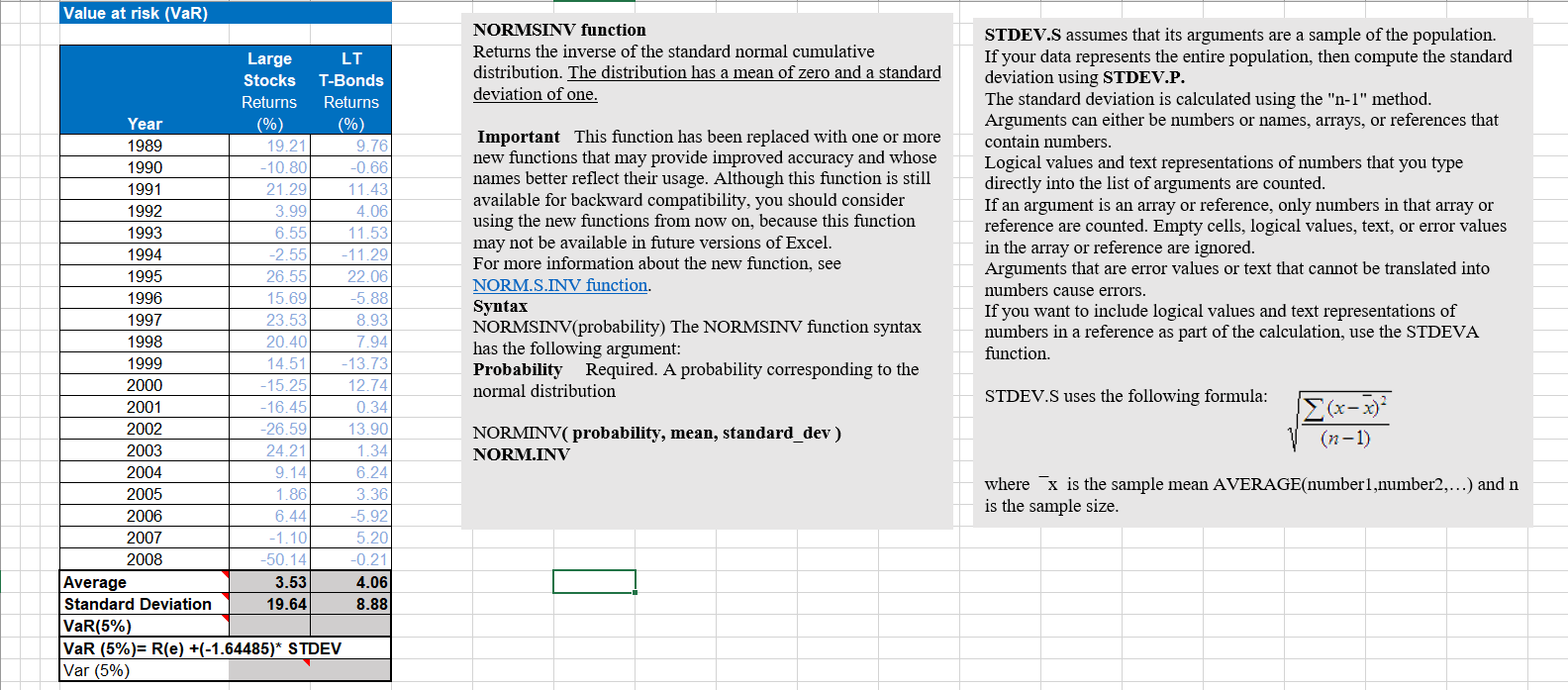
Need Formulas for grey cells plz?
NORMSINV function Returns the inverse of the standard normal cumulative distribution. The distribution has a mean of zero and a standard deviation of one. Important This function has been replaced with one or more new functions that may provide improved accuracy and whose names better reflect their usage. Although this function is still available for backward compatibility, you should consider using the new functions from now on, because this function may not be available in future versions of Excel. For more information about the new function, see NORM.S.INV function. Syntax NORMSINV(probability) The NORMSINV function syntax has the following argument: Probability Required. A probability corresponding to the normal distribution NORMINV ( probability, mean, standard_dev ) NORM.INV STDEV.S assumes that its arguments are a sample of the population. If your data represents the entire population, then compute the standard deviation using STDEV.P. The standard deviation is calculated using the " n1 " method. Arguments can either be numbers or names, arrays, or references that contain numbers. Logical values and text representations of numbers that you type directly into the list of arguments are counted. If an argument is an array or reference, only numbers in that array or reference are counted. Empty cells, logical values, text, or error values in the array or reference are ignored. Arguments that are error values or text that cannot be translated into numbers cause errors. If you want to include logical values and text representations of numbers in a reference as part of the calculation, use the STDEVA function. STDEV.S uses the following formula: (n1)(xx)2 where x is the sample mean AVERAGE(number1,number 2, ) and n is the sample size
Step by Step Solution
There are 3 Steps involved in it

Get step-by-step solutions from verified subject matter experts
 Study Help