







Question: Need help answering A. 1) Run netstat -an from the command prompt on your computer a. Consider the following output. How is the output you
Need help answering A.
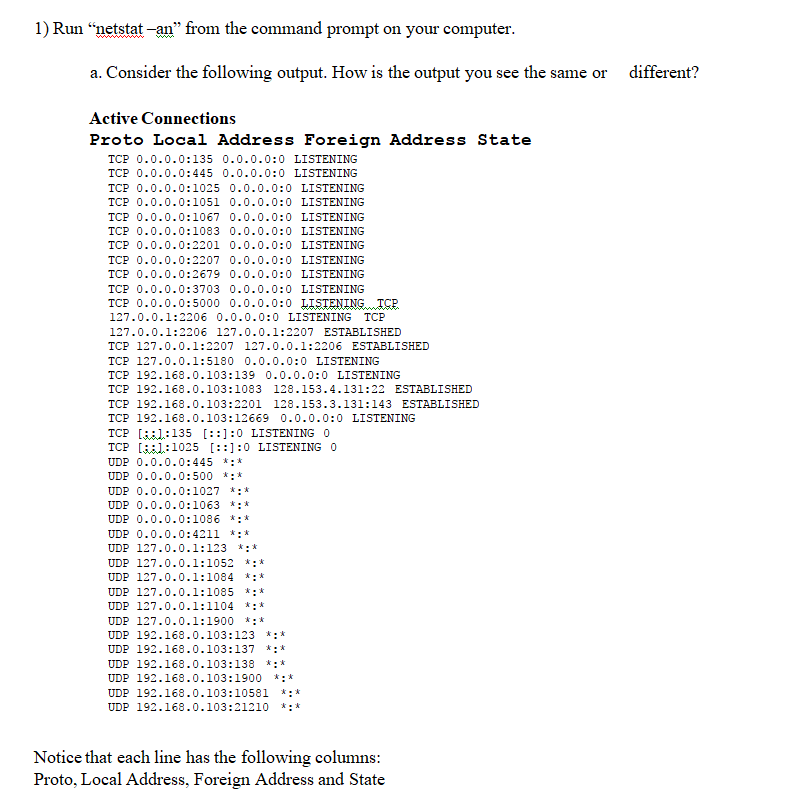
1) Run "netstat -an" from the command prompt on your computer a. Consider the following output. How is the output you see the same or different? Active Connections Proto Local Address Foreign Address State TCP 0.0.0.0:135 0.0.0.0:0 LISTENING TCP 0.0.0.0:445 0.0.0.0:0 LISTENING TCP 0.0.0.0:1025 0.0.0.0:0 LISTENING TCP 0.0.0.0:1051 0.0.0.0:0 LISTENING TCP 0.0.0.0:1067 0.0.0.0:0 LISTENING TCP 0.0.0.0:1083 0.0.0.0:0 LISTENING TCP 0.0.0.0:2201 0.0.0.0:0 LISTENING TCP 0.0.0.0:2207 0.0.0.0:0 LISTENING TCP 0.0.0.0:2679 0.0.0.0:0 LISTENING TCP 0.0.0.0:3703 0.0.0.0:0 LISTENING TCP 0.0.0.0:5000 0.0.0.0:0 127.0.0.1:2206 0.0.0.0:0 LISTENING TCP 127 . 0 . 0 . 1 : 2206 127001: 2207 ESTABLISHED TCP 127 . 0 . 0 . 1 : 2207 127001: 2206 ESTABLISHED TCP 127.0.0.1:5180 0.0.0.0:0 LISTENING TCP 192.168.0.103:139 0.0.0.0:0 LISTENING TCP 192.168.0.103:1083 128.153.4.131:22 ESTABLISHED TCP 192.168.0.103:2201 128.153.3.131:143 ESTABLISHED TCP 192.168.0.103:12669 0.0.0.0:0 LISTENING TCP [551:135 [:]:0 LISTENING 0 TCP l:1025 [:]:0 LISTENING 0 UDP 0.0.0.0:445*:* UDP 0.0.0.0:500 *:* UDP 0.0.0.0:1027*:* UDP 0.0.0.0:1063*:* UDP 0.0.0.0:1086*:* UDP 0.0.0.0:4211*:* UDP 127.0.0.1:123 *:* UDP 127.0.0.1:1052 *:* UDP 127.0.0.1:1084 *:* UDP 127.0.0.1:1085 *:* UDP 127.0.0.1:1104 *:* UDP 127.0.0.1:1900 *:* UDP 192.168.0.103:123 *:* UDP 192.168.0.103:137*:* UDP 192.168.0.103:138 *:* UDP 192.168.0.103:1900 *: * UDP 192.168.0.103:10581 *:* UDP 192.168.0.103:21210 *:* Notice that each line has the following columns Proto. Local Address, Foreign Address and State
Step by Step Solution
There are 3 Steps involved in it

Get step-by-step solutions from verified subject matter experts
 Study Help