







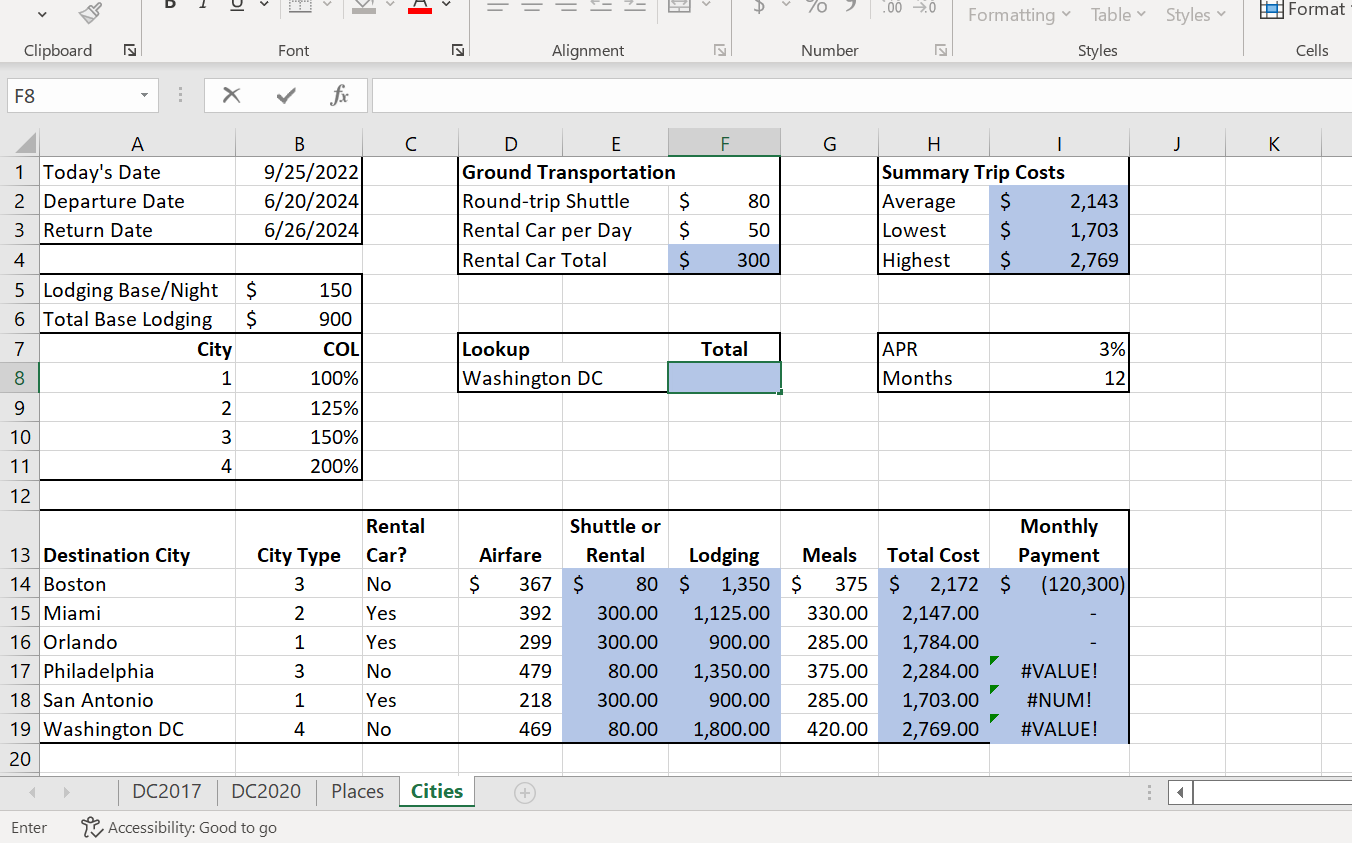
Question: Need help asap In cell I14, insert the PMT function. Divide the APR (cell I7) by the number of months in a year (cell I8).
Need help asap
In cell I14, insert the PMT function. Divide the APR (cell I7) by the number of months in a year (cell I8). The term is one year (12 months). Use a cell reference. The Total Cost for the city is the present value. Use relative and mixed (or absolute) references correctly. Make sure the result is a positive value. Copy the function from cell I14 to the range I15:I19 and maintain the original border formatting.
In cell F8, insert the XLOOKUP function that looks up the city in cell D8, compares it to the Destination City range and returns the applicable Total Cost. Use appropriate ranges. Enter Boston in cell D8 to make sure the function returns the correct value.
Enter {2? Accessibility: Good to go Enter {2? Accessibility: Good to go
Step by Step Solution
There are 3 Steps involved in it

Get step-by-step solutions from verified subject matter experts
 Study Help