







Question: Need Help coding in HTML. I was asked to update the addToCart function with the following instructions below. I have also pasted the code for
Need Help coding in HTML. I was asked to update the addToCart function with the following instructions below. I have also pasted the code for this to implemented on. Thanks.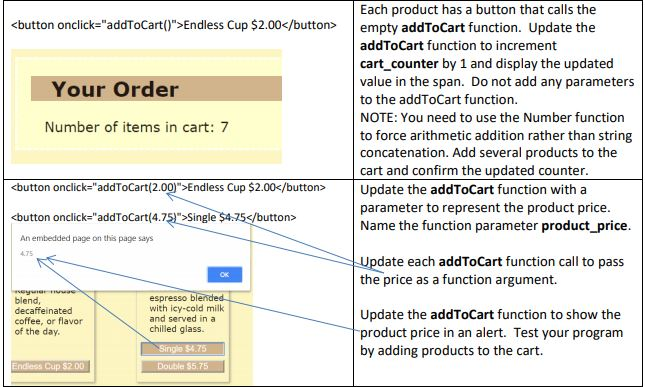
Script Code:
function initialize_cart() { //initialize session variable sessionStorage.cart_counter = 0; //display variable value in web page span element cart_counter.innerHTML = sessionStorage.cart_counter; sessionStorage.cart_total = 0; cart_total.innerHTML = sessionStorage.cart_total; }
Main Code where addToCart function is used:
Indulge in our locally roasted free-trade coffee and enjoy the aroma, the smooth taste, the caffeine! Join our Mug Club and get a 10% discount on each cup of coffee you purchase — ask the barista for details.Coffee at JavaJam
Just Java
Regular house blend, decaffeinated coffee, or flavor of the day.
Iced Cappuccino
Sweetened espresso blended with icy-cold milk and served in a chilled glass.
Cafe au Lait
House blended coffee infused into a smooth, steamed milk.
Your Order
Number of items in cart:
Total Cost:
Each product has a button that calls the empty addToCart function. Update the addToCart function to increment cart counter by 1 and display the updated value in the span. Do not add any parameters to the addToCart function. NOTE: You need to use the Number function to force arithmetic addition rather than string concatenation. Add several products to the cart and confirm the updated counter. Your Order Number of items in cart: 7 button onclick-"addToCart(2.00)">Endless Cup $2.00bt Update the addToCart function with a parameter to represent the product price. Name the function parameter product_price.
Step by Step Solution
There are 3 Steps involved in it

Get step-by-step solutions from verified subject matter experts
 Study Help