







Question: Need help figuring this program out. This is what i have so far. ---------------------------------------------------Ricochet user interface ----------------------------------------------------------------------------------------------------------------------------------- using System; using System.Drawing; using System.Windows.Forms; using System.Timers;
Need help figuring this program out. This is what i have so far.
---------------------------------------------------Ricochet user interface -----------------------------------------------------------------------------------------------------------------------------------
using System;
using System.Drawing;
using System.Windows.Forms;
using System.Timers;
public class Ricochet_interface_form : Form
{ //Declare data about the UI:
private const int formwidth = 1000; //Preferred size: 1600;
private const int formheight = 900; //Preferred size: 1200;
private const int titleheight = 40;
private const int graphicheight = 800;
private const int lowerpanelheight = formheight - titleheight - graphicheight;
//Declare data about the ball:
private const double ball_radius = 8.5;
private double ball_linear_speed_pix_per_sec;
private double ball_linear_speed_pix_per_tic;
private double ball_direction_x;
private double ball_direction_y;
private double ball_delta_x;
private double ball_delta_y;
private const double ball_center_initial_coord_x = (double)formwidth*0.65;
private const double ball_center_initial_coord_y = (double)graphicheight/2.0 + titleheight;
private double ball_center_current_coord_x;
private double ball_center_current_coord_y;
private double ball_upper_left_current_coord_x;
private double ball_upper_left_current_coord_y;
//Declare data about the motion clock:
private static System.Timers.Timer ball_motion_control_clock = new System.Timers.Timer();
private const double ball_motion_control_clock_rate = 43.5; //Units are Hz
//Declare data about the refresh clock;
private static System.Timers.Timer graphic_area_refresh_clock = new System.Timers.Timer();
private const double graphic_refresh_rate = 23.3; //Units are Hz = #refreshes per second
//Declare data about title message
private Font style_of_message = new System.Drawing.Font("Arial",10,FontStyle.Regular);
private String title = "Ricochet";
private Brush writing_tool = new SolidBrush(System.Drawing.Color.Black);
private Point title_location = new Point(formwidth/2-15,10);
//Declare buttons: there will probably be only one button
private Button start_button = new Button();
private Point start_location = new Point(formwidth/10,titleheight+graphicheight+6);
public Ricochet_interface_form(double speed,double v,double w) //The constructor of this class
{ //Set the title of this form.
Text = "Ricochet Motion";
System.Console.WriteLine("formwidth = {0}. formheight = {1}.",formwidth,formheight);
//Set the initial size of this form
Size = new Size(formwidth,formheight);
//Set the background color of this form
BackColor = Color.Green;
//Save the two incoming parameters into local variables.
ball_linear_speed_pix_per_sec = speed;
ball_direction_x = v;
ball_direction_y = w;
//Compute fixed values needed for motion in a straight line; some trigonometry is required.
//To understand why it works you should draw some right triangles, and the math will be more clear.
ball_linear_speed_pix_per_tic = ball_linear_speed_pix_per_sec/ball_motion_control_clock_rate;
double hypotenuse_squared = ball_direction_x*ball_direction_x + ball_direction_y*ball_direction_y;
double hypotenuse = System.Math.Sqrt(hypotenuse_squared);
ball_delta_x = ball_linear_speed_pix_per_tic * ball_direction_x / hypotenuse;
ball_delta_y = ball_linear_speed_pix_per_tic * ball_direction_y / hypotenuse;
//Set starting values for the ball
ball_center_current_coord_x = ball_center_initial_coord_x;
ball_center_current_coord_y = ball_center_initial_coord_y;
System.Console.WriteLine("Initial coordinates: ball_center_current_coord_x = {0}. ball_center_current_coord_y = {1}.",
ball_center_current_coord_x,ball_center_current_coord_y);
//Set up the motion clock. This clock controls the rate of update of the coordinates of the ball.
ball_motion_control_clock.Enabled = false;
//Assign a handler to this clock.
ball_motion_control_clock.Elapsed += new ElapsedEventHandler(Update_ball_position);
//Set up the refresh clock.
graphic_area_refresh_clock.Enabled = false; //Initially the clock controlling the rate of updating the display is stopped.
//Assign a handler to this clock.
graphic_area_refresh_clock.Elapsed += new ElapsedEventHandler(Update_display);
//Set properties of the button (or maybe buttons)
start_button.Text = "Go";
start_button.Size = new Size(60,20);
start_button.Location = start_location;
start_button.BackColor = Color.LimeGreen;
Controls.Add(start_button);
start_button.Click += new EventHandler(All_systems_go);
}//End of constructor
protected override void OnPaint(PaintEventArgs ee)
{ Graphics graph = ee.Graphics;
graph.FillRectangle(Brushes.Pink,0,0,formwidth,titleheight);
graph.FillRectangle(Brushes.Yellow,0,titleheight+graphicheight,formwidth,titleheight+graphicheight);
graph.DrawString(title,style_of_message,writing_tool,title_location);
ball_upper_left_current_coord_x = ball_center_current_coord_x - ball_radius;
ball_upper_left_current_coord_y = ball_center_current_coord_y - ball_radius;
graph.FillEllipse(Brushes.Red,(int)ball_upper_left_current_coord_x,(int)ball_upper_left_current_coord_y,
(float)(2.0*ball_radius),(float)(2.0*ball_radius));
//The next statement calls the method with the same name located in the super class.
base.OnPaint(ee);
}
protected void All_systems_go(Object sender,EventArgs events)
{//The refreshclock is started.
Start_graphic_clock(graphic_refresh_rate);
//The motion clock is started.
Start_ball_clock(ball_motion_control_clock_rate);
}
protected void Start_graphic_clock(double refresh_rate)
{ double actual_refresh_rate = 1.0; //Minimum refresh rate is 1 Hz to avoid a potential division by a number close to zero
double elapsed_time_between_tics;
if(refresh_rate > actual_refresh_rate)
actual_refresh_rate = refresh_rate;
elapsed_time_between_tics = 1000.0/actual_refresh_rate; //elapsedtimebetweentics has units milliseconds.
graphic_area_refresh_clock.Interval = (int)System.Math.Round(elapsed_time_between_tics);
graphic_area_refresh_clock.Enabled = true; //Start clock ticking.
}
protected void Start_ball_clock(double update_rate)
{ double elapsed_time_between_ball_moves;
if(update_rate
elapsed_time_between_ball_moves = 1000.0/update_rate; //1000.0ms = 1second.
//The variable elapsed_time_between_ball_moves has units "milliseconds".
ball_motion_control_clock.Interval = (int)System.Math.Round(elapsed_time_between_ball_moves);
ball_motion_control_clock.Enabled = true; //Start clock ticking.
}
protected void Update_display(System.Object sender, ElapsedEventArgs evt)
{ Invalidate(); //This creates an artificial event so that the graphic area will repaint itself.
//System.Console.WriteLine("The motion clock ticked and the time is {0}", evt.SignalTime); //Debug statement; remove it later.
if(!ball_motion_control_clock.Enabled)
{graphic_area_refresh_clock.Enabled = false;
System.Console.WriteLine("The graphical area is no longer refreshing. You may close the window.");
}
}
protected void Update_ball_position(System.Object sender, ElapsedEventArgs evt)
{ ball_center_current_coord_x += ball_delta_x;
ball_center_current_coord_y -= ball_delta_y; //The minus sign is due to the upside down nature of the C# system.
//System.Console.WriteLine("The motion clock ticked and the time is {0}", evt.SignalTime);//Debug statement; remove later.
//Determine if the ball has made a collision with the right wall.
if((int)System.Math.Round(ball_center_current_coord_x + ball_radius) >= formwidth)
ball_delta_x = -ball_delta_x;
//Determine if the ball has made a collision with the lower wall
//if(ball_center_current_coord_y .....) //Determine if the ball has made a collision with the left wall
//if(ball_center_current_coord_y .....)
//Determine if the ball has made a collision with the upper wall
//if(ball_center_current_coord_x .....)
//The next statement checks to determine if the ball has traveled beyond the four boundaries. The statement may be
if((int)System.Math.Round(ball_center_current_coord_y - ball_radius) >= titleheight + graphicheight)
{ball_motion_control_clock.Enabled = false;
graphic_area_refresh_clock.Enabled = false;
System.Console.WriteLine("The clock controlling the ball has stopped.");
}
}//End of method Update_ball_position
}//End of class Ricochet_interface_form
----------------------------------------------------------------------------------------------------------------------------------------------------------------------------------------------------------
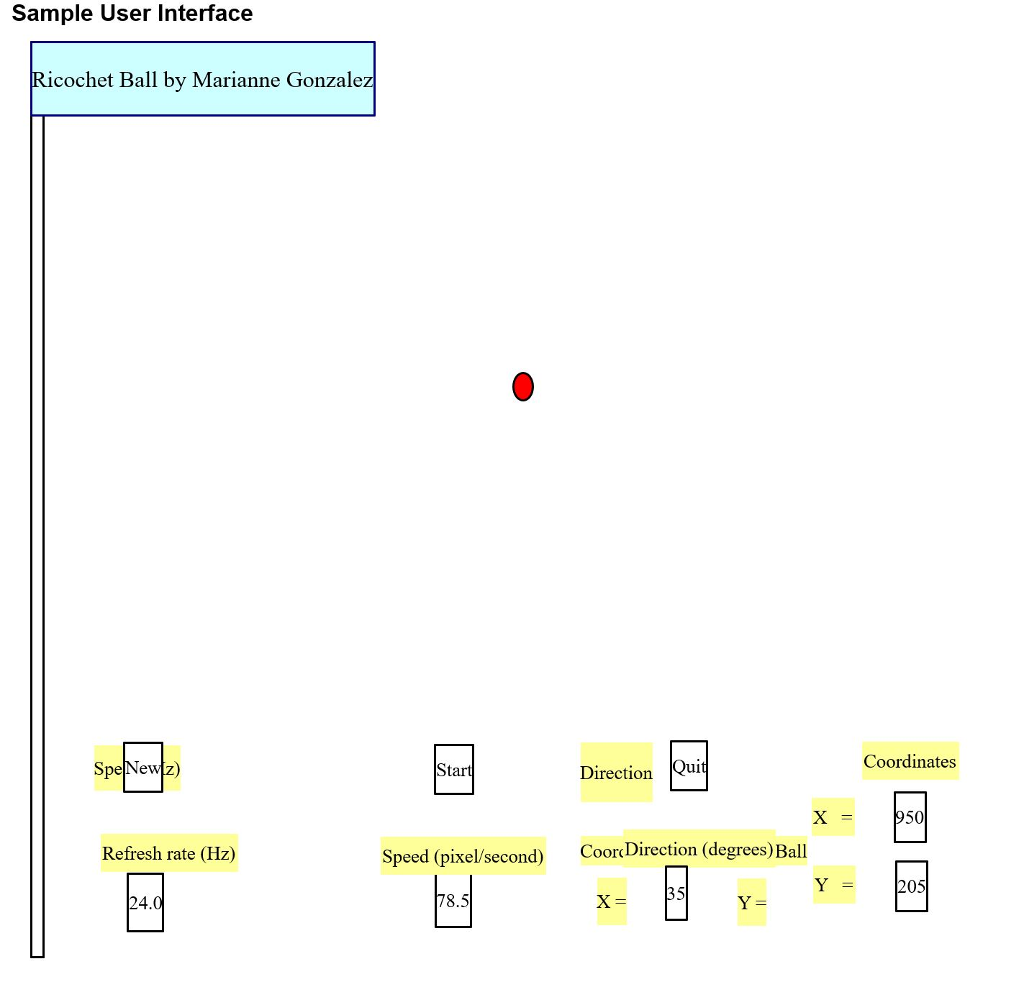
Sample User Interface Ricochet Ball by Marianne Gonzalez SpeNewlz) Start Directiont Quit Coordinates 50 Refresh rate (Hz) Speed (pixel/second) CoorDirection (degrees) Ball 205 24.0 78.5 Sample User Interface Ricochet Ball by Marianne Gonzalez SpeNewlz) Start Directiont Quit Coordinates 50 Refresh rate (Hz) Speed (pixel/second) CoorDirection (degrees) Ball 205 24.0 78.5
Step by Step Solution
There are 3 Steps involved in it

Get step-by-step solutions from verified subject matter experts
 Study Help