







Question: Need help for B. Answer for A is below: def average_numbers_in_file(filename): # Open the file for reading with open(filename, 'r') as f: # Initialize a
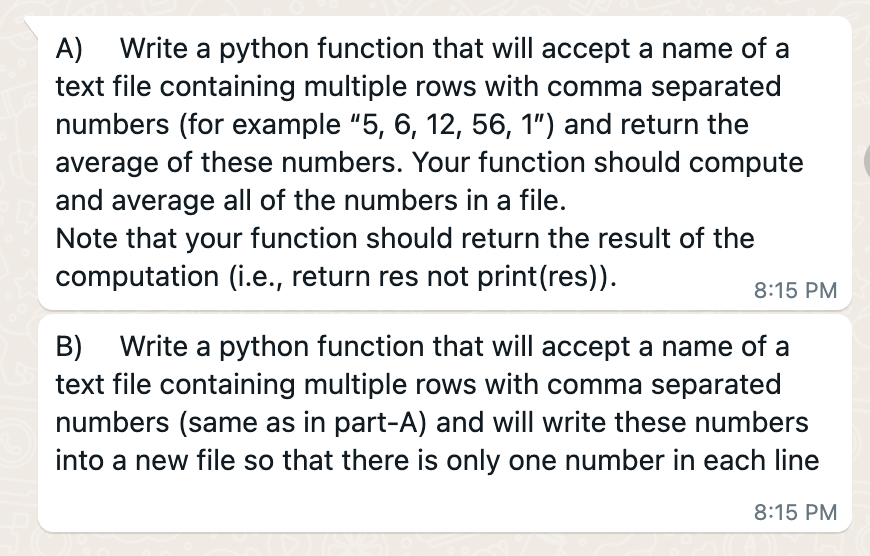
Need help for B. Answer for A is below:
def average_numbers_in_file(filename): # Open the file for reading with open(filename, 'r') as f: # Initialize a variable to hold the total sum of the numbers total_sum = 0 # Initialize a variable to hold the number of numbers read num_numbers = 0 # Read each line in the file for line in f: # Split the line into a list of numbers numbers = line.split(',') # Convert the strings to integers and add them to the total sum total_sum += sum(int(x) for x in numbers) # Increment the number of numbers num_numbers += len(numbers) # Return the average of the numbers return total_sum / num_numbersA) Write a python function that will accept a name of a text file containing multiple rows with comma separated numbers (for example " 5,6,12,56,1 ") and return the average of these numbers. Your function should compute and average all of the numbers in a file. Note that your function should return the result of the computation (i.e., return res not print(res)). B) Write a python function that will accept a name of a text file containing multiple rows with comma separated numbers (same as in part-A) and will write these numbers into a new file so that there is only one number in each line
Step by Step Solution
There are 3 Steps involved in it
1 Expert Approved Answer
Step: 1 Unlock

Question Has Been Solved by an Expert!
Get step-by-step solutions from verified subject matter experts
Step: 2 Unlock
Step: 3 Unlock
 Study Help