







Question: Need help in my Visual Basic Program im stuck on Team ranking button i have attached the screen short so can you tell me what
Need help in my Visual Basic Program im stuck on Team ranking button i have attached the screen short so can you tell me what I'm doing wrong. And need help to get the code for the 3 functions listed below so it can help me to do rest of the code.
This project wil l read a fi le that contai n s csv records into a String array when array (teams) is created. Thi s will be a class level array. Tl1e file should be named ''tcams.txt''. This file will have records for NFL team stats and will be in the
This project shou]d contain 3 functions as described below:
- WinPercentage function that will calculate the team seasonal winning Percentage (wins/total games * 100%).
- SeasonOutcom e Function that will state if the team had a ''Winning'' or ''Losi ng'' season. If the team had the same number of wins as they did losses, indicate this by returning ''Even ''.
- DataOk Function that wil l be u sed with Query 3 (below) to insure that the user did select a team name from the lstTeams li stbox.
btnRankings button click event: Create rankingsQuery that selects all teams in ascending year, descending wins order. Display the year, team name, number of wins and losses in lstDisplay.
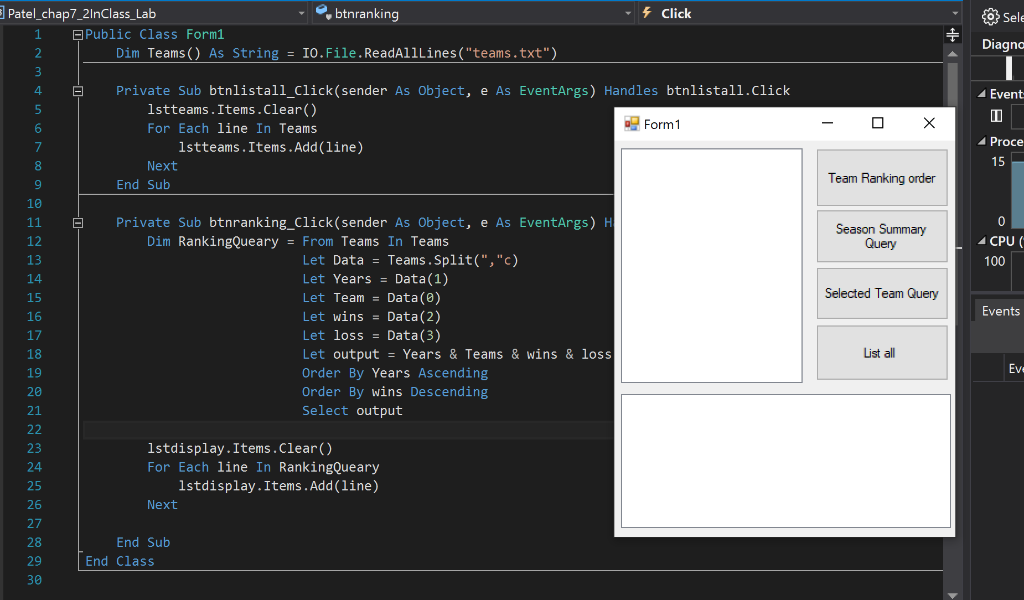
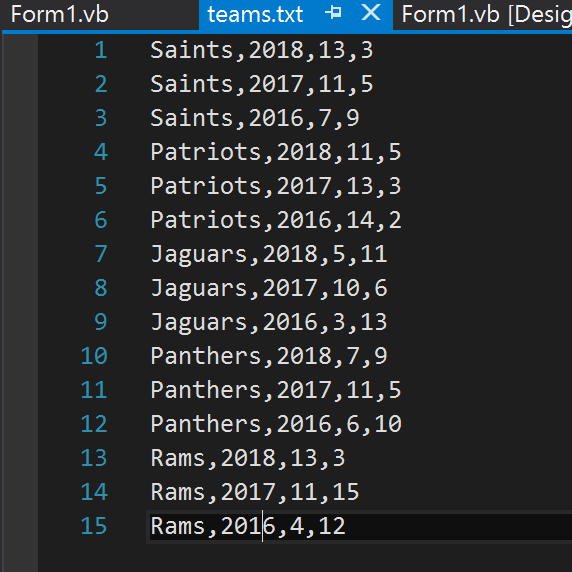
Patel_chap7_2InClass_Lab btnranking Click Public Class Form1 Diagna Dim Teams) As StringI0O.File.ReadAlllines("teams.txt" 4 Private Sub btnlistall_Click(sender As Object, e As EventArgs) Handles btnlistall.click Event lstteams.Items.clear() For Each line In Teams Form1 Proce lstteams. Items.Add (line) Next End Sub Team Ranking order 10 Private Sub btnranking_Click (sender As Object, e As EventArgs) H Season Summary 12 13 CPU 100 Dim RankingQuearyFrom Teams In Teams Let Data = Teams, Split(", "c) Let Years = Data(1) Let TeamData(0) Let wins Data(2) Let loss Data(3) Let output Years & Teams & wins& loss Order By Years Ascending Order By wins Descending Select output Selected Team Query 15 16 17 18 19 20 21 Events List all 23 24 25 26 27 28 29 30 lstdisplay.Items.Clear() For Each line In RankingQueary lstdisplay.Items.Add(line) Next End Sub End Class Form 1.vb teams.txt Form1.vb [Desig 1 Saints, 2018,13,3 2 Saints, 2017,11,5 3 Saints, 2016,7,9 4 Patriots,2018,11,5 5 Patriots, 2017,13,3 6 Patriots, 2016,14,2 7 Jaguars, 2018,5,11 8 Jaguars, 2017,10,6 9 Jaguars, 2016,3,13 10 Panthers, 2018,7,9 11 Panthers,2017,11,5 12 Panthers,2016,6,10 13 Rams, 2018,13,3 14 Rams, 2017,11,15 15 Rams, 2016,4,12
Step by Step Solution
There are 3 Steps involved in it

Get step-by-step solutions from verified subject matter experts
 Study Help