







Question: need help on how to input the correct formula asap! - Cell Reference: Allows you to referto data from another cell in the worksheet. From
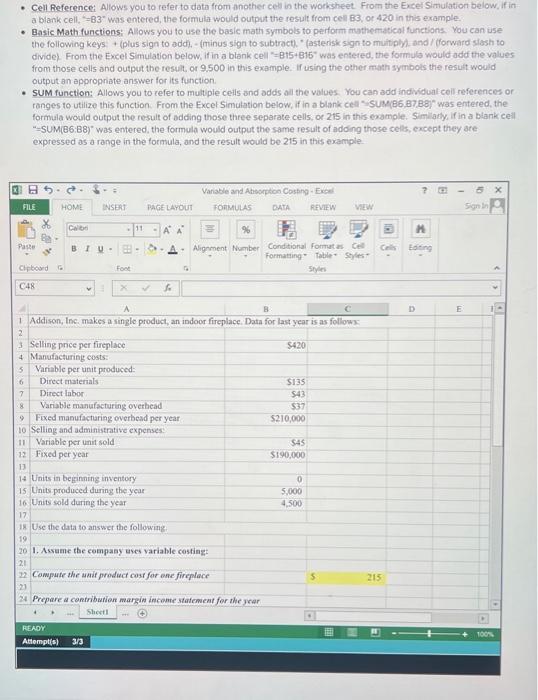
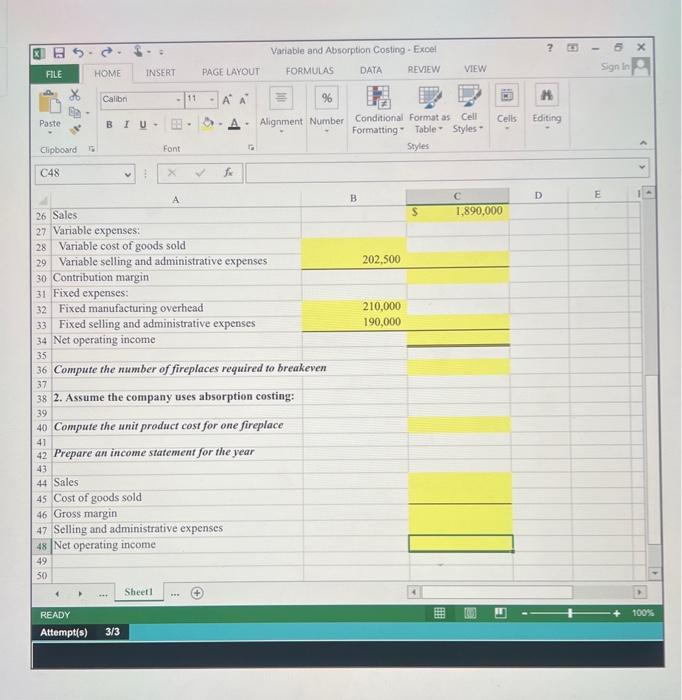
- Cell Reference: Allows you to referto data from another cell in the worksheet. From the Excel Simulation below, if in a blank cell, =83 was entered, the formula would output the result from cel B3, or 420 in this example. - Basic Math functions: Alows you to use the basic math symbols to perform mathermatical functions. You can use the following keys: + (plus sign to addh, - (minus sign to subtract). "(asterisk sign to muitiply) and / forward siash to dividel From the Excel Simulation below, if in a blank cell "= =15+815" was entered, the formula would add the values from those cells and output the restlit, or 9.500 in this example. If using the other math symbols the result would output an appropriate answer for its function. - SUM function: Allows you to refer to mult ple cels and adds all the values. You can add individual cell references or ranges to utilize this function. From the Excef Simulation below, if in a blank cell "isUM(B6,87, Bef " was entered, the formula would output the result of odding those three separate cells, or 215 in this example. Similaty, if in a blank cell "=SUM(BG:B8)" was entered, the formula would output the same result of adding those cells, except they are expressed as a range in the formula, and the result would be 215 in this example
Step by Step Solution
There are 3 Steps involved in it

Get step-by-step solutions from verified subject matter experts
 Study Help