







Question: NEED HELP ON PYTHON Dart Board Problem Description You have been contacted by a school sports department to help them with scoring their online dart
NEED HELP ON PYTHON
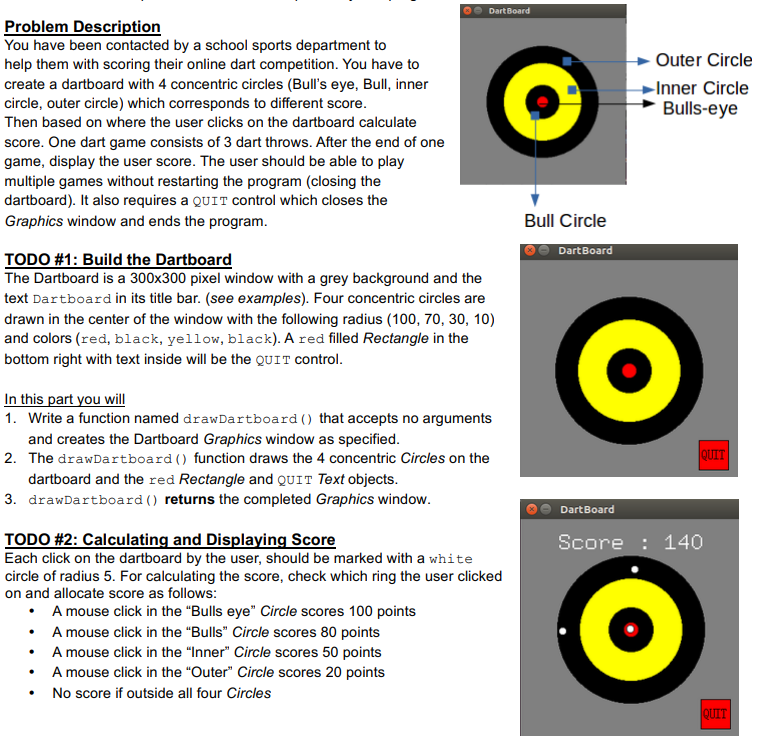
Dart Board Problem Description You have been contacted by a school sports department to help them with scoring their online dart competition. You have to create a dartboard with 4 concentric circles (Bull's eye, Bull, inner circle, outer circle) which corresponds to different score Then based on where the user clicks on the dartboard calculate score. One dart game consists of 3 dart throws. After the end of one game, display the user score. The user should be able to play multiple games without restarting the program (closing the dartboard). It also requires a QUIT control which closes the Graphics window and ends the programm Outer Circle Inner Circle Bulls-eye Bull Circle DartBoard TODO #1: Build the Dartboard The Dartboard is a 300x300 pixel window with a grey background and the text Dartboard in its title bar. (see examples). Four concentric circles are drawn in the center of the window with the following radius (100, 70, 30, 10) and colors (red, black, yellow, black). A red filled Rectangle in the bottom right with text inside will be the QUIT control In this part you will 1. Write a function named drawDartboard ) that accepts no arguments and creates the Dartboard Graphics window as specified 2. The drawDartboard () function draws the 4 concentric Circles on the dartboard and the red Rectangle and QUIT Text objects 3. drawDartboard ) returns the completed Graphics window DartBoard TODO #2: Calculating and Displaying Score Each click on the dartboard by the user, should be marked with a white circle of radius 5. For calculating the score, check which ring the user clicked on and allocate score as follows Score: 140 A mouse click in the "Bulls eye" Circle scores 100 points A mouse click in the "Bulls" Circle scores 80 points A mouse click in the "Inner" Circle scores 50 points A mouse click in the "Outer" Circle scores 20 points No score if outside all four Circles
Step by Step Solution
There are 3 Steps involved in it

Get step-by-step solutions from verified subject matter experts
 Study Help