







Question: Need help on this UserEntryProgram java program. The first picture contains the instructions from the first program and the second picture contains instructions for the
Need help on this UserEntryProgram java program. The first picture contains the instructions from the first program and the second picture contains instructions for the revised version. I need help on the revised version. I have also include the code from the first version.
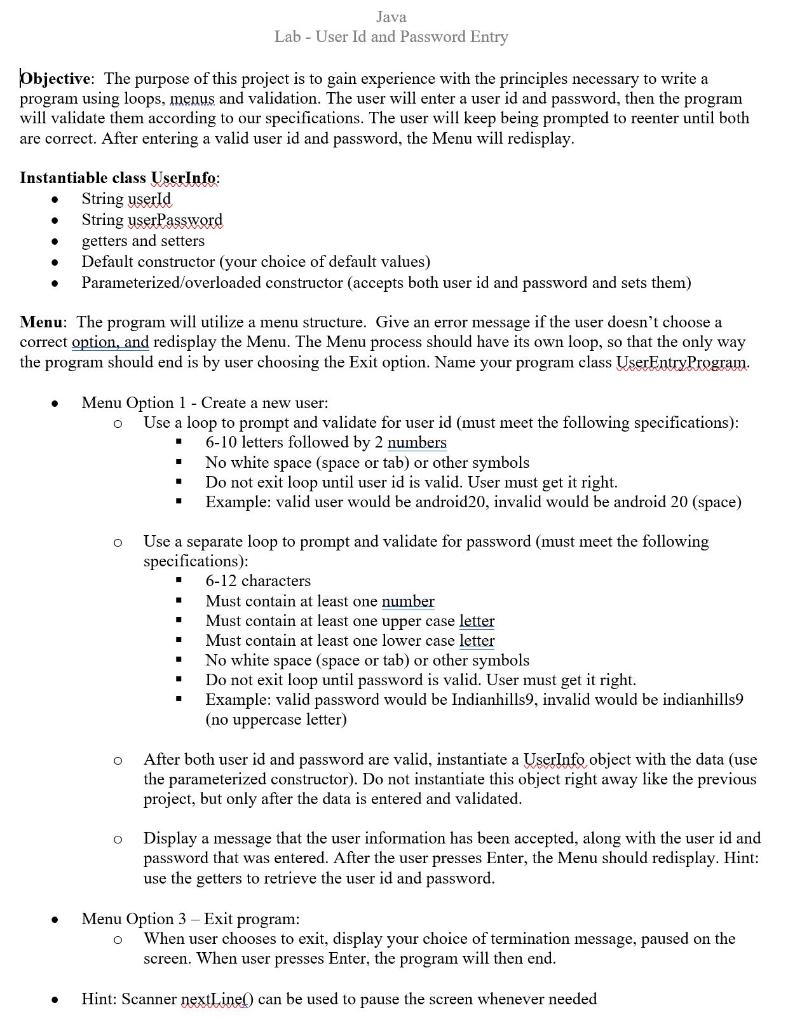
**************************************************************************************************************************************************************************
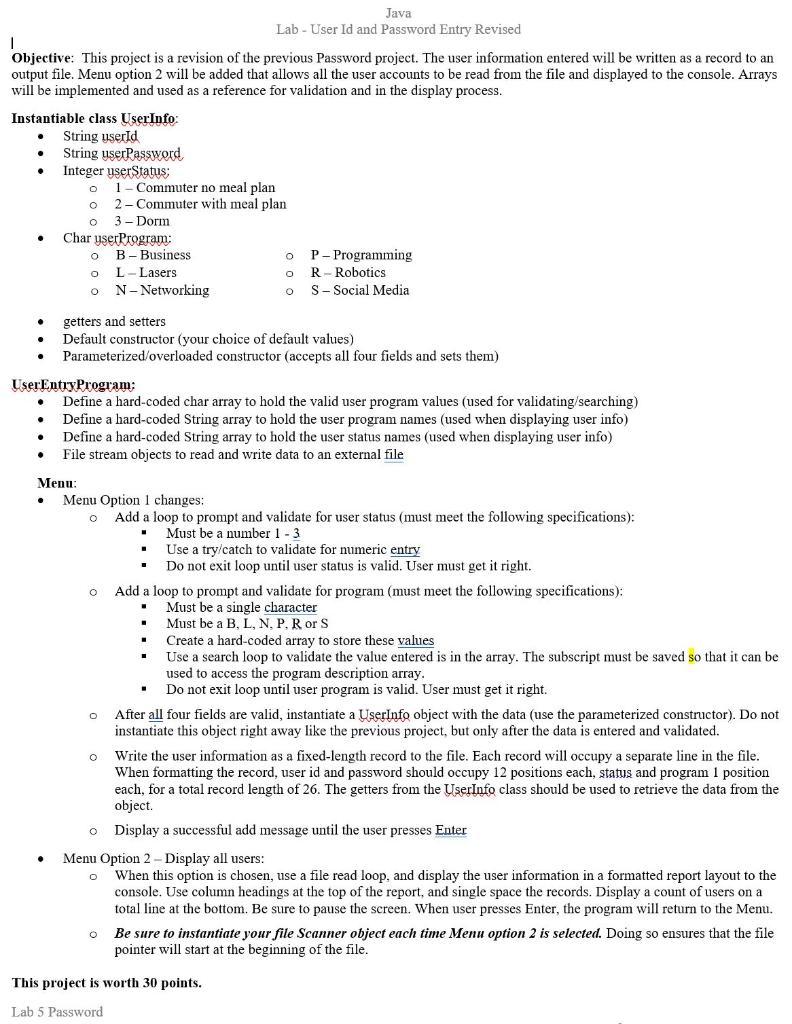
JAVA CODE BELOW FROM FIRST VERSION, IT HAS BEEN TESTED AND IT DOES WORK.
/* This Program will ask the user to enter a user id and password, then the program will validate them according to our specifications. The user will keep being prompted to reenter the user id and password until both are correct. After entering a valid user id and password, the Menu will re=display. STUDENT NAME HERE 01-29-2020 */ import java.util.*; class UserEntryProgram { public static void main(String args[]) { UserInfo user = null; Scanner sc = new Scanner(System.in); int ch = 1; String id, password; while(ch!=3) { //Loop for both the Username and Password displayMenu(); //displayMenu Method Below ch = sc.nextInt(); if(ch==1)//If the User chooses Choice one, the program continues { idSpecificationMsg(); //idSpecificationMsg Method Below sc.nextLine();//skip or go to the new line id = sc.nextLine(); while(!validateId(id)) //validateId Boolean Method Below { System.out.print("Try another User ID name: "); id = sc.nextLine(); } passwordSpecificationMsg(); //passwordSpecificationMsg Method Below password = sc.nextLine(); while(!validatePassword(password)) //validatePassword Boolean Method Below { System.out.print("Try another password please: "); password = sc.nextLine(); } user = new UserInfo(id,password); //UserInfo is stored in the UserInfo.java file. System.out.println("User information was accepted"); System.out.println("User ID: "+user.getUserId()); //Getters for the User ID in the UserInfo.java file System.out.println("User Password: "+user.getUserPassword()); //Getters for the Password in the UserInfo.java file sc.nextLine();//hold the screen } else if(ch==3) { terminateMsg(); //Termination Method, the program will then end with a message sc.nextLine();//skip or goes to the new line option sc.nextLine();//holds / pauses the screen } else { System.out.println("ERROR!! Wrong option, please enter 1 or 3. "); //Informs the user if the option chosen was chosen. } }//End of While Loop for Username and Password }//End of Main Method static void displayMenu() { //this method displays the menu on the screen. System.out.println(" *****************************"); System.out.println("1- Create a new user."); System.out.println("3- Exit program."); System.out.print("Enter your choice (1-3): "); } static boolean validateId(String id) { //method to validate userID //returns true if it passes all validation tests else false int i,l=id.length(),c=0; if(l>12) //Length must be greater than 12 characters { return false; //length greater than 12 } int last1,last2; last1 = id.charAt(l-1); last2 = id.charAt(l-2); if(last157 || last257) //last 2 characters are not number return false; for(i=0;iisLetter(id.charAt(i))) //remaining top characters are not alphabet return false; c++; } if(c12) //Length must be greater than 12 characters { return false;//length greater than 12 } if(lisLetterOrDigit(password.charAt(i))) //space or other characters are present return false; if(Character.isUpperCase(password.charAt(i))) //checks for UpperCase letters cU++; if(Character.isLowerCase(password.charAt(i))) //Checks for LowerCase Letters cL++; if(Character.isDigit(password.charAt(i))) //checks if password has any numeric digits. cD++; } if(cU==0) return false;//if no upper case letters if(cL==0) return false;//if no lower case letters if(cD==0) return false;//if no digits present return true;//return true if all criterias met. }//End of method to validate user password static void idSpecificationMsg() { //this method displays id specifications System.out.println(" ! Your id should be of 6-10 letters followed by 2 numbers."); System.out.println("! No whitespaces or tab or special characters allowed."); System.out.print("Enter your User ID: "); } static void passwordSpecificationMsg() { //this method displays password specifications System.out.println(" ! Your password should be 6-12 characters long."); System.out.println("! It must contain atleast 1 number."); System.out.println("! It must contain atleast 1 lower case character."); System.out.println("! It must contain atleast 1 upper case characters."); System.out.println("! No whitespaces or tab or special characters allowed."); System.out.print("Enter your User Password: "); } static void terminateMsg() { System.out.println(" Program Terminated! Please press enter to end the program. "); } } *******************************************************************************
class UserInfo { private String userId; private String userPassword; public UserInfo() //Default / Overloaded Constructor { this.userId = "pogboom08"; this.userPassword = "1LubToDab"; } public UserInfo(String userId, String userPassword) //Parameterized Constructor { this.userId = userId; this.userPassword = userPassword; } public String getUserId() //Gets the User ID { return this.userId; } public String getUserPassword() //Gets the User Password { return this.userPassword; } }
Java Lab - User Id and Password Entry Objective: The purpose of this project is to gain experience with the principles necessary to write a program using loops, menus and validation. The user will enter a user id and password, then the program will validate them according to our specifications. The user will keep being prompted to reenter until both are correct. After entering a valid user id and password, the Menu will redisplay. Instantiable class UserInfo: String userld String userPassword getters and setters Default constructor (your choice of default values) Parameterized/overloaded constructor (accepts both user id and password and sets them) Menu: The program will utilize a menu structure. Give an error message if the user doesn't choose a correct option, and redisplay the Menu. The Menu process should have its own loop, so that the only way the program should end is by user choosing the Exit option. Name your program class UserEntry Program. . Menu Option 1 - Create a new user: o Use a loop to prompt and validate for user id (must meet the following specifications): 6-10 letters followed by 2 numbers No white space (space or tab) or oth symbols Do not exit loop until user id is valid. User must get it right. Example: valid user would be android20, invalid would be android 20 (space) O Use a separate loop to prompt and validate for password (must meet the following specifications): 6-12 characters Must contain at least one number Must contain at least one upper case letter Must contain at least one lower case letter No white space (space or tab) or other symbols Do not exit loop until password is valid. User must get it right. Example: valid password would be Indianhills9, invalid would be indianhills9 (no uppercase letter) O After both user id and password are valid, instantiate a UserInfo object with the data (use the parameterized constructor). Do not instantiate this object right away like the previous project, but only after the data is entered and validated. o Display a message that the user information has been accepted, along with the user id and password that was entered. After the user presses Enter, the Menu should redisplay. Hint: use the getters to retrieve the user id and password. Menu Option 3 Exit program: When user chooses to exit, display your choice of termination message, paused on the screen. When user presses Enter, the program will then end. O Hint: Scanner nextLinel) can be used to pause the screen whenever needed Java Lab - User Id and Password Entry Revised Objective: This project is a revision of the previous Password project. The user information entered will be written as a record to an output file. Menu option 2 will be added that allows all the user accounts to be read from the file and displayed to the console. Arrays will be implemented and used as a reference for validation and in the display process. Instantiable class UserInfo: String userId String userPassword Integer userStatus: 1 - Commuter no meal plan 2 - Commuter with meal plan 3- Dorm Charyser Program: B-Business P-Programming L - Lasers R- Robotics N - Networking S-Social Media . o O o o O o 0 getters and setters Default constructor (your choice of default values) Parameterized/overloaded constructor (accepts all four fields and sets them) User Entry Program: Define a hard-coded char array to hold the valid user program values (used for validating/searching) Define a hard-coded String array to hold the user program names (used when displaying user info) Define a hard-coded String array to hold the user status names (used when displaying user info) File stream objects to read and write data to an external file Menu: Menu Option 1 changes: Add a loop to prompt and validate for user status (must meet the following specifications): Must be a number 1 - 3 Use a try/catch to validate for numeric entry Do not exit loop until user status is valid. User must get it right. Add a loop to prompt and validate for program (must meet the following specifications): Must be a single character Must be a B, L, N, P, R or S Create a hard-coded array to store these values Use a search loop to validate the value entered is in the array. The subscript must be saved so that it can be used to access the program description array. Do not exit loop until user program is valid. User must get it right. After all four fields are valid, instantiate a UserInfo object with the data (use the parameterized constructor). Do not instantiate this object right away like the previous project, but only after the data is entered and validated. o Write the user information as a fixed-length record to the file. Each record will occupy a separate line in the file. When formatting the record, user id and password should occupy 12 positions each, status and program 1 position each, for a total record length of 26. The getters from the UserInfo class should be used to retrieve the data from the object Display a successful add message until the user presses Enter Menu Option 2 - Display all users: When this option is chosen, use a file read loop, and display the user information in a formatted report layout to the console. Use column headings at the top of the report, and single space the records. Display a count of users on a total line at the bottom. Be sure to pause the screen. When user presses Enter, the program will return to the Menu. Be sure to instantiate your file Scanner object each time Menu option 2 is selected. Doing so ensures that the file pointer will start at the beginning of the file. . 0 O This project is worth 30 points. Lab 5 Password Java Lab - User Id and Password Entry Objective: The purpose of this project is to gain experience with the principles necessary to write a program using loops, menus and validation. The user will enter a user id and password, then the program will validate them according to our specifications. The user will keep being prompted to reenter until both are correct. After entering a valid user id and password, the Menu will redisplay. Instantiable class UserInfo: String userld String userPassword getters and setters Default constructor (your choice of default values) Parameterized/overloaded constructor (accepts both user id and password and sets them) Menu: The program will utilize a menu structure. Give an error message if the user doesn't choose a correct option, and redisplay the Menu. The Menu process should have its own loop, so that the only way the program should end is by user choosing the Exit option. Name your program class UserEntry Program. . Menu Option 1 - Create a new user: o Use a loop to prompt and validate for user id (must meet the following specifications): 6-10 letters followed by 2 numbers No white space (space or tab) or oth symbols Do not exit loop until user id is valid. User must get it right. Example: valid user would be android20, invalid would be android 20 (space) O Use a separate loop to prompt and validate for password (must meet the following specifications): 6-12 characters Must contain at least one number Must contain at least one upper case letter Must contain at least one lower case letter No white space (space or tab) or other symbols Do not exit loop until password is valid. User must get it right. Example: valid password would be Indianhills9, invalid would be indianhills9 (no uppercase letter) O After both user id and password are valid, instantiate a UserInfo object with the data (use the parameterized constructor). Do not instantiate this object right away like the previous project, but only after the data is entered and validated. o Display a message that the user information has been accepted, along with the user id and password that was entered. After the user presses Enter, the Menu should redisplay. Hint: use the getters to retrieve the user id and password. Menu Option 3 Exit program: When user chooses to exit, display your choice of termination message, paused on the screen. When user presses Enter, the program will then end. O Hint: Scanner nextLinel) can be used to pause the screen whenever needed Java Lab - User Id and Password Entry Revised Objective: This project is a revision of the previous Password project. The user information entered will be written as a record to an output file. Menu option 2 will be added that allows all the user accounts to be read from the file and displayed to the console. Arrays will be implemented and used as a reference for validation and in the display process. Instantiable class UserInfo: String userId String userPassword Integer userStatus: 1 - Commuter no meal plan 2 - Commuter with meal plan 3- Dorm Charyser Program: B-Business P-Programming L - Lasers R- Robotics N - Networking S-Social Media . o O o o O o 0 getters and setters Default constructor (your choice of default values) Parameterized/overloaded constructor (accepts all four fields and sets them) User Entry Program: Define a hard-coded char array to hold the valid user program values (used for validating/searching) Define a hard-coded String array to hold the user program names (used when displaying user info) Define a hard-coded String array to hold the user status names (used when displaying user info) File stream objects to read and write data to an external file Menu: Menu Option 1 changes: Add a loop to prompt and validate for user status (must meet the following specifications): Must be a number 1 - 3 Use a try/catch to validate for numeric entry Do not exit loop until user status is valid. User must get it right. Add a loop to prompt and validate for program (must meet the following specifications): Must be a single character Must be a B, L, N, P, R or S Create a hard-coded array to store these values Use a search loop to validate the value entered is in the array. The subscript must be saved so that it can be used to access the program description array. Do not exit loop until user program is valid. User must get it right. After all four fields are valid, instantiate a UserInfo object with the data (use the parameterized constructor). Do not instantiate this object right away like the previous project, but only after the data is entered and validated. o Write the user information as a fixed-length record to the file. Each record will occupy a separate line in the file. When formatting the record, user id and password should occupy 12 positions each, status and program 1 position each, for a total record length of 26. The getters from the UserInfo class should be used to retrieve the data from the object Display a successful add message until the user presses Enter Menu Option 2 - Display all users: When this option is chosen, use a file read loop, and display the user information in a formatted report layout to the console. Use column headings at the top of the report, and single space the records. Display a count of users on a total line at the bottom. Be sure to pause the screen. When user presses Enter, the program will return to the Menu. Be sure to instantiate your file Scanner object each time Menu option 2 is selected. Doing so ensures that the file pointer will start at the beginning of the file. . 0 O This project is worth 30 points. Lab 5 Password
Step by Step Solution
There are 3 Steps involved in it

Get step-by-step solutions from verified subject matter experts
 Study Help