







Question: Need help to do this one Description 1. Create an HTML page. Name it your first name, followed by a dash, and then project1. Example:
Need help to do this one 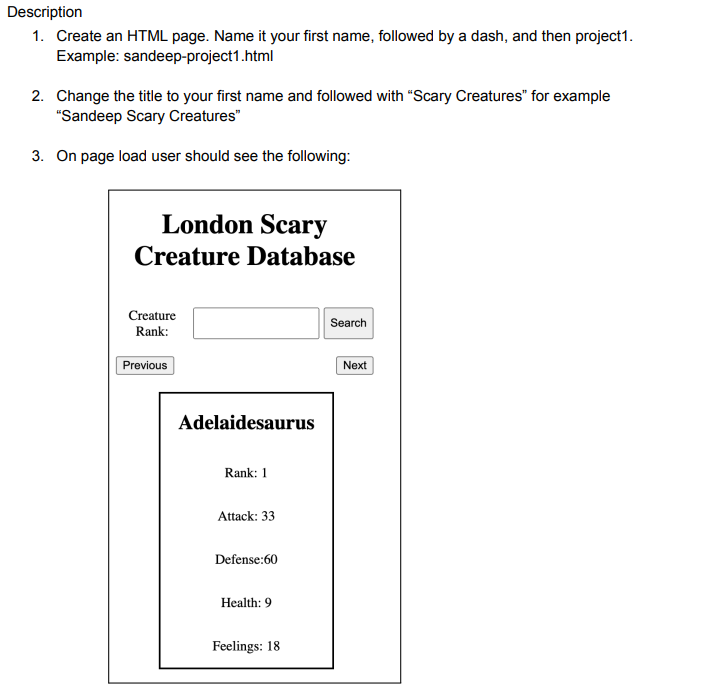
Description 1. Create an HTML page. Name it your first name, followed by a dash, and then project1. Example: sandeep-project1.html 2. Change the title to your first name and followed with "Scary Creatures" for example "Sandeep Scary Creatures" 3. On page load user should see the following: 4. Fetch creatures' data from https://gist.githubusercontent.com/sandeep728/c7402151ee87f3b89bd272c97b8e6b37/r aw/c934af6afe49f0aa66a61a8dc49c3d44fa95978a/london-cards 5. By default, the creature with rank 1 should be displayed. 6. Users should be able to display data for a creature by searching its rank. 7. If a creature with enter rank is not found, show an alert with an appropriate message. 8. User should be able to navigate through the list by clicking on the Next and Previous buttons. 9. Clicking the next button will show the creature with the next rank and clicking on the previous button with show the previous creature. 10. If the current creature is of the first rank, the previous button should be disabled 11. If the current creature is of the last rank, the next button should be disabled 12. The design doesn't have to be the same, feel free to use your imagination. 13. Write Clean and readable Code a. Make sure variables are named so their purpose is clear. Example: rather than using var n; or var p; name them var empName; and var province; b. Make sure to reformate code using IDE tools. For webstorm, Go to "Code" and select "Reformat Code". For VSCode use "prettier" extension c. Be consistent in your code. single quotes or double quotes, snake_case or camelCase, etc
Step by Step Solution
There are 3 Steps involved in it

Get step-by-step solutions from verified subject matter experts
 Study Help