







Question: Need help trying to solve this program in Java. My current problem is trying display the game data. int die; @Override public String rollDie() {
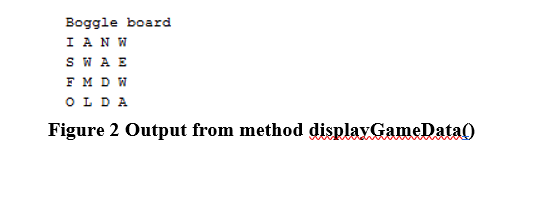
Need help trying to solve this program in Java. My current problem is trying display the game data.
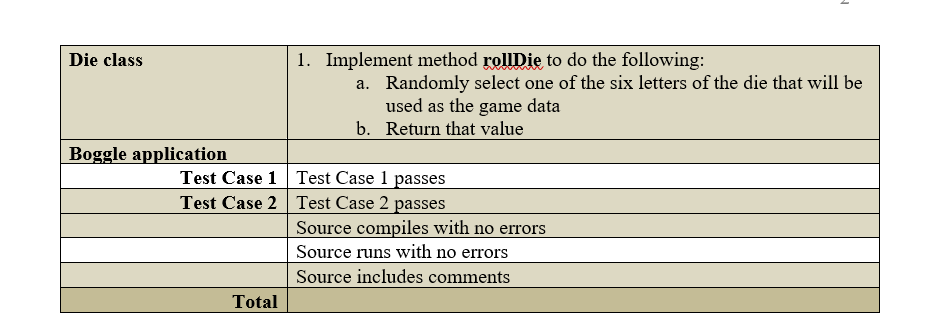
int die; @Override public String rollDie() { // randomly select one letter from the array list // return that value for (int counter = 0; counter
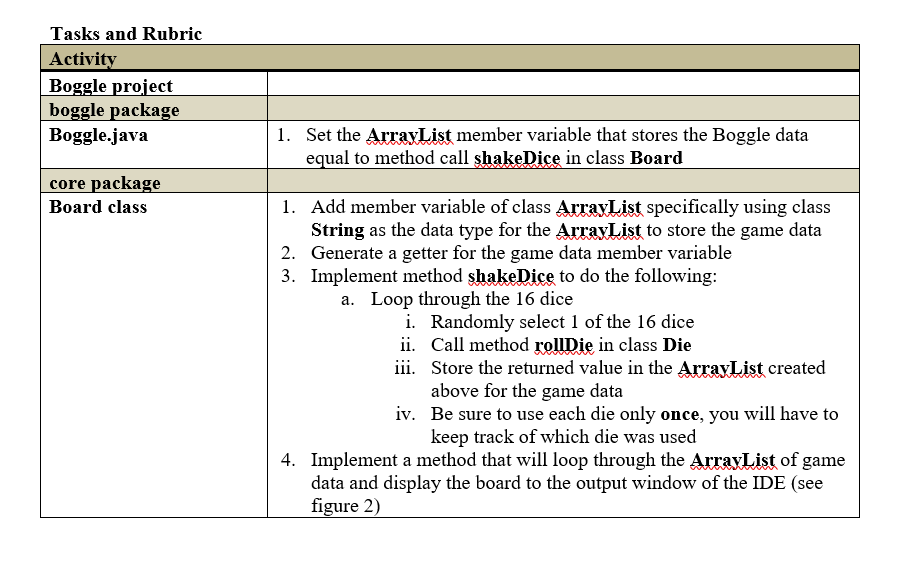
// Method, where we create the board of our game public class Board implements IBoard { // stores the letter data from the data file ArrayList boggleData; // stores the dictionary data ArrayList dictionaryData; // collection of dice ArrayList boggleDice; // Array list to store game data ArrayList gameData; public Board(ArrayList diceData, ArrayList dictionary){ boggleData = diceData; dictionaryData = dictionary; boggleDice = new ArrayList(); } int dice; @Override public void shakeDice(int[] ar){ // loop trough the 16 dice // rancomly select one die // keep track of which die was selected // roll the die by calling method rollDie in class Die // store that value in our new member variable that has the game data Die roll; for(int i = ar.length; i
@Override public void populateDice() { Die die;// new data type Die int counter = 0; // Create an instance of class String, locally called value //loop through the contents of container names letters // loop 16 times for die for(int dice = 0; dice
/** * @return the gameData */ public ArrayList getGameData() { return gameData; }
public class Boggle { // Array list to store data value of each die private static ArrayList boggleData = new ArrayList(); // Array list to store data of the dictionary file private static ArrayList dictionaryData = new ArrayList(); // name of the boggle data file using relative pathing private static String dataFileName = new String("../data/BoggleData.txt"); // name of the dictionary file using relative pathing private static String dictionaryFileName = new String("../data/Dictionary.txt");
/** * @param args the command line arguments */ private static ArrayList shakeDice = new ArrayList(); public static void main(String[] args) { System.out.println("Welcome to Boggle!"); JOptionPane.showMessageDialog(null, "Let's play Boggle!"); // read in dice data file ReadDataFile data = new ReadDataFile(dataFileName); data.populateData(); //read in the dictionary file ReadDataFile dictionary = new ReadDataFile(dictionaryFileName); dictionary.populateData(); // create an instance of Board parsing the boggleData //Board board = new Board(data.getData(), dictionary.getData()); //board.populateDice(); System.out.println("There are " + dictionary.getData().size() + " entries in the dictionary."); } }
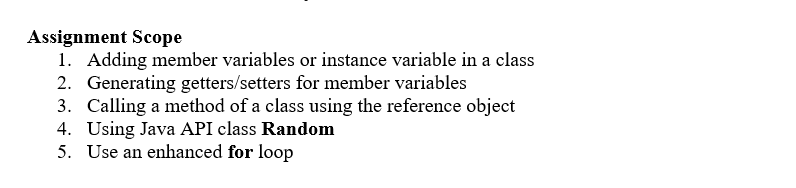
Assignment Scope l. Adding member variables or instance variable in a class 2. Generating getters setters for member variables 3. Calling a method of a class using the reference object 4. Using Java API class Random 5. Use an enhanced for loop
Step by Step Solution
There are 3 Steps involved in it

Get step-by-step solutions from verified subject matter experts
 Study Help