







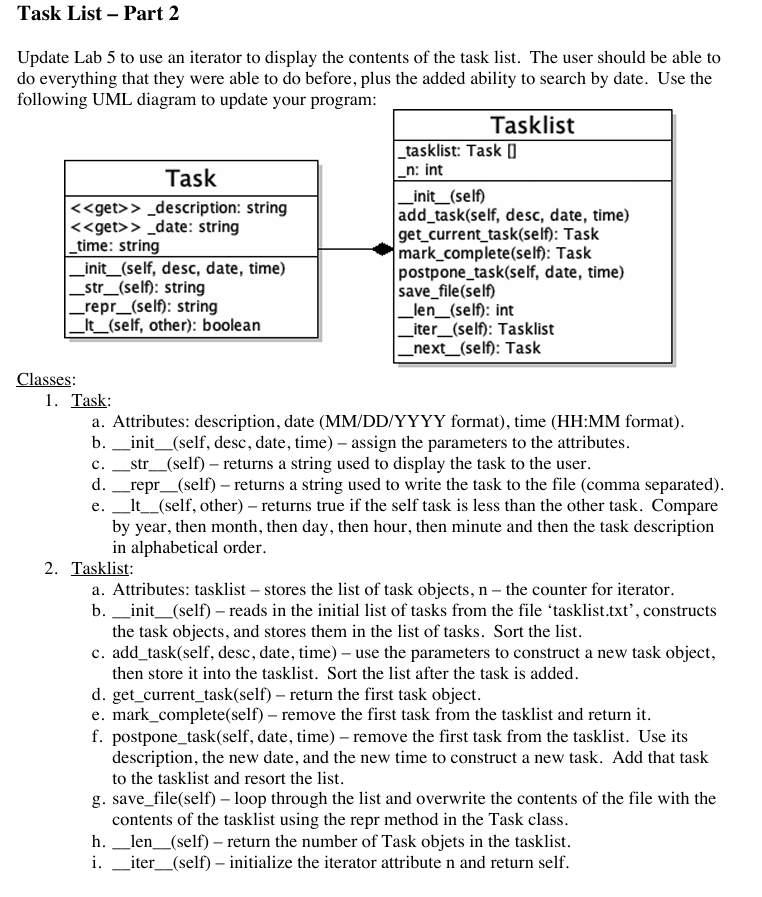
Question: Need help with a python assignment Here is the task.py I currently have: class Task: Shows the format for each file Attributes:
Need help with a python assignment
Here is the task.py I currently have:
class Task:
Shows the format for each file
Attributes:
desc str: description of the task
date str: due date of the task formatted in MMDDYYYY
time str: time the task is due formatted in HH:MM
def initself desc, date, time:
self.description desc
self.date date
self.time time
def getdescriptionself:
return self.description
def strself:
return fselfdescription Due: selfdate at selftime
def reprself:
return fselfdescriptionselfdateselftime
def ltself other:
selfdatetime fselfdateselftime
otherdatetime fotherdateothertime
return selfdatetime otherdatetime
Here is the main.py:
from task import Task
def mainmenu:
print Display current task"
print Mark current task complete"
print Postpone current task"
print Add new task"
print Save and quit"
choice intinputEnter choice:
return choice
def readfile:
Reads the designated file and adds them to a list"""
tasks
try:
with opentasklisttxtr as file:
for line in file:
desc, date, time line.stripsplit
task Taskdesc date, time
tasks.appendtask
#Exception made just in case no file is found.
except FileNotFoundError:
pass
return sortedtasks
def writefiletasklist:
Writes to the tasklist.txt file"""
with opentasklisttxtw as file:
for task in tasklist:
file.writereprtask
def getdate:
Retrieves the month, day and year when asked"""
while True:
try:
month inputEnter month: zfill
day inputEnter day: zfill
year inputEnter year:
month, day, year intmonth intday intyear
if month and day and year :
return fmonth:day:year
else:
printInvalide date. Please enter a valid date."
except ValueError:
printInvalid input. Please enter numbers only."
def gettime:
Retrieves the time in military hours"""
while True:
try:
hour inputEnter hour: zfill
minute inputEnter minute: zfill
#Conditions for Time
hour, minute inthour intminute
if hour and minute :
return fhour::minute:
else:
printInvalid time. Please enter a valid time."
#If the user inputs an str
except ValueError:
printInvalid input. please enter numbers only."
def main:
Defines a list"""
tasklist readfile
while True:
print
Tasklist
printYou have", lentasklist "tasks."
#Shows the menu & asks for the input from one of choices
choice mainmenu
#Shows the current task on the list.
if choice :
if tasklist:
printCurrent task is:
printtasklist
else:
printAll tasks finished."
#Marks the current task for completion & removes it from the list.
elif choice :
if tasklist:
printMarking current task as complete:"
printtasklistpop
else:
printAll tasks finished."
#Postpones the task and asks for a new date and time for the task.
elif choice :
if tasklist:
printPostponing task:"
printtasklist
newdate getdate
newtime gettime
task tasklist.pop
newtask Tasktaskdescription, newdate, newtime
tasklist.appendnewtask
tasklist.sort
else:
printAll tasks finished."
#Creates a new task.
elif choice :
desc inputEnter a task:
date getdate
time gettime
newtask Taskdesc date, time
tasklist.appendnewtask
tasklist.sort
#Saves the items of the list to the tasklist.txt file even if empty.
elif choice :
writefiletasklist
printSaving and exiting."
break
#When the choice input is not a value stated from to
else:
printInvalid choice. Please choose a number listed."
if namemain:
main
Step by Step Solution
There are 3 Steps involved in it
1 Expert Approved Answer
Step: 1 Unlock

Question Has Been Solved by an Expert!
Get step-by-step solutions from verified subject matter experts
Step: 2 Unlock
Step: 3 Unlock
 Study Help