







Question: need help with codes and need to use the pin from the pin reference pls python only 9. Two LEDs blinking on-off + printing on-off:
need help with codes and need to use the pin from the pin reference pls python only 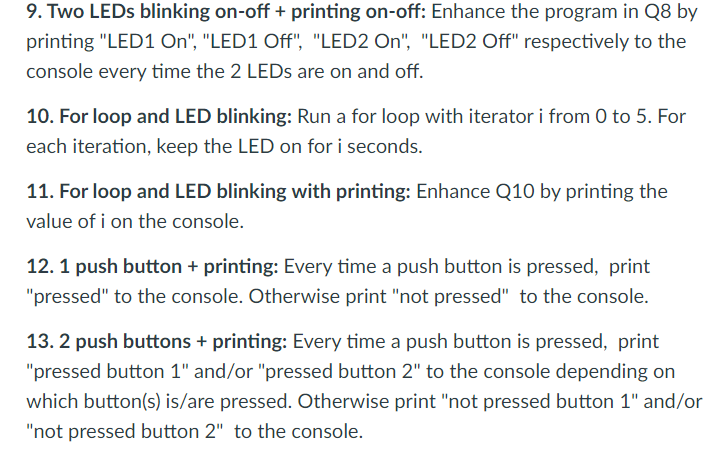
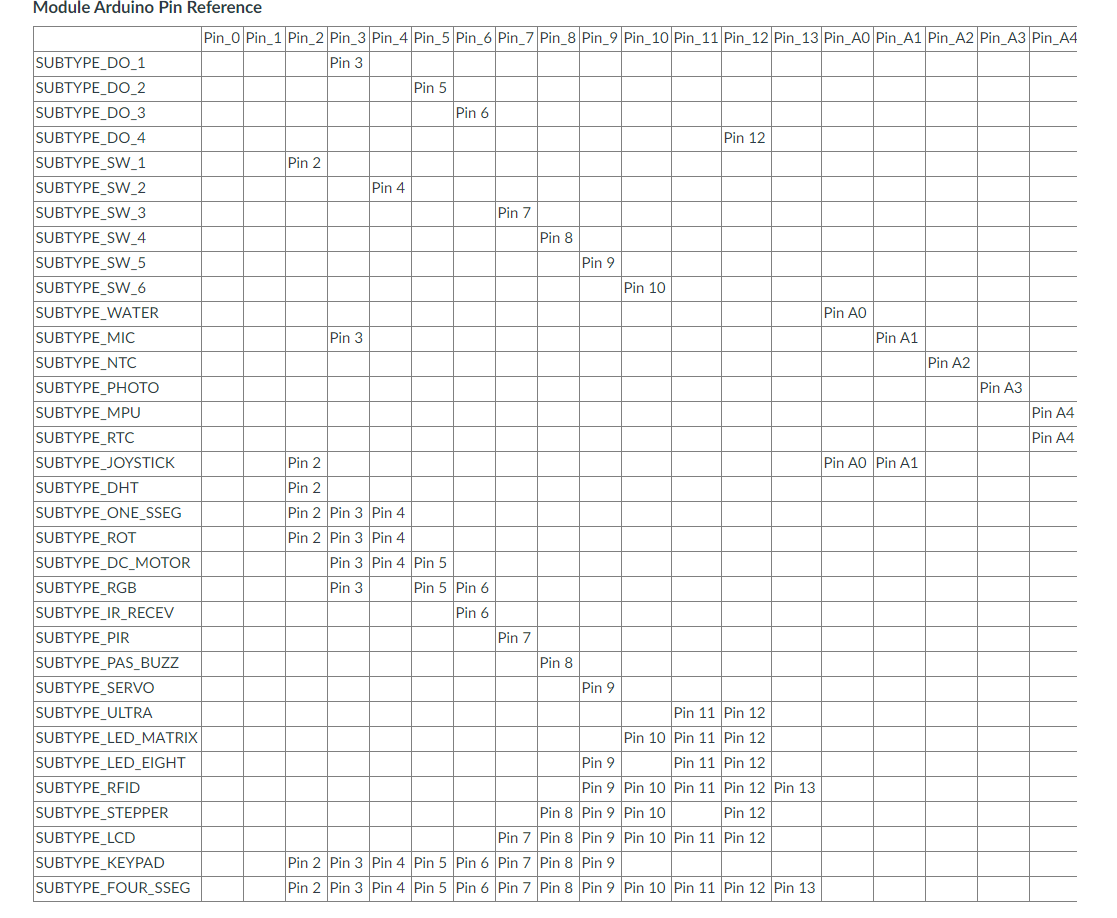
9. Two LEDs blinking on-off + printing on-off: Enhance the program in Q8 by printing "LED1 On", "LED1 Off", "LED2 On", "LED2 Off" respectively to the console every time the 2 LEDs are on and off. 10. For loop and LED blinking: Run a for loop with iterator i from 0 to 5. For each iteration, keep the LED on for i seconds. 11. For loop and LED blinking with printing: Enhance Q10 by printing the value of i on the console. 12. 1 push button + printing: Every time a push button is pressed, print "pressed" to the console. Otherwise print "not pressed" to the console. 13.2 push buttons + printing: Every time a push button is pressed, print "pressed button 1" and/or "pressed button 2" to the console depending on which button(s) is/are pressed. Otherwise print "not pressed button 1" and/or "not pressed button 2" to the console. Pin 6 Module Arduino Pin Reference Pin_0 Pin_1 Pin_2 Pin_3 Pin_4 Pin_5 Pin_6 Pin_7 Pin_8 Pin_9 Pin_10 Pin_11 Pin_12 Pin_13 Pin_AO Pin_A1 Pin_A2 Pin_A3 Pin_A4 SUBTYPE_DO_1 Pin 3 SUBTYPE_DO_2 Pin 5 SUBTYPE_DO_3 SUBTYPE_DO_4 Pin 12 SUBTYPE_SW_1 Pin 2 SUBTYPE_SW_2 Pin 4 SUBTYPE_SW_3 Pin 7 SUBTYPE SW_4 Pin 8 SUBTYPE_SW_5 Pin 9 SUBTYPE_SW_6 Pin 10 SUBTYPE WATER Pin AO SUBTYPE_MIC Pin 3 Pin A1 SUBTYPE_NTC Pin A2 SUBTYPE PHOTO Pin A3 SUBTYPE_MPU Pin A4 SUBTYPE RTC Pin A4 SUBTYPE_JOYSTICK Pin 2 Pin AO Pin A1 SUBTYPE_DHT Pin 2 SUBTYPE_ONE_SSEG Pin 2 Pin 3 Pin 4 SUBTYPE_ROT Pin 2 Pin 3 Pin 4 SUBTYPE_DC_MOTOR Pin 3 Pin 4 Pin 5 SUBTYPE_RGB Pin 3 Pin 5 Pin 6 SUBTYPE_IR_RECEV Pin 6 SUBTYPE PIR Pin 7 SUBTYPE_PAS_BUZZ Pin 8 SUBTYPE SERVO Pin 9 SUBTYPE_ULTRA Pin 11 Pin 12 SUBTYPE_LED_MATRIX Pin 10 Pin 11 Pin 12 SUBTYPE_LED_EIGHT Pin 9 Pin 11 Pin 12 SUBTYPE_RFID Pin 9 Pin 10 Pin 11 Pin 12 Pin 13 SUBTYPE STEPPER Pin 8 Pin 9 Pin 10 Pin 12 SUBTYPE_LCD Pin 7 Pin 8 Pin 9 Pin 10 Pin 11 Pin 12 SUBTYPE_KEYPAD Pin 2 Pin 3 Pin 4 Pin 5 Pin 6 Pin 7 Pin 8 Pin 9 SUBTYPE FOUR_SSEG Pin 2 Pin 3 Pin 4 Pin 5 Pin 6 Pin 7 Pin 8 Pin 9 Pin 10 Pin 11 Pin 12 Pin 13 9. Two LEDs blinking on-off + printing on-off: Enhance the program in Q8 by printing "LED1 On", "LED1 Off", "LED2 On", "LED2 Off" respectively to the console every time the 2 LEDs are on and off. 10. For loop and LED blinking: Run a for loop with iterator i from 0 to 5. For each iteration, keep the LED on for i seconds. 11. For loop and LED blinking with printing: Enhance Q10 by printing the value of i on the console. 12. 1 push button + printing: Every time a push button is pressed, print "pressed" to the console. Otherwise print "not pressed" to the console. 13.2 push buttons + printing: Every time a push button is pressed, print "pressed button 1" and/or "pressed button 2" to the console depending on which button(s) is/are pressed. Otherwise print "not pressed button 1" and/or "not pressed button 2" to the console. Pin 6 Module Arduino Pin Reference Pin_0 Pin_1 Pin_2 Pin_3 Pin_4 Pin_5 Pin_6 Pin_7 Pin_8 Pin_9 Pin_10 Pin_11 Pin_12 Pin_13 Pin_AO Pin_A1 Pin_A2 Pin_A3 Pin_A4 SUBTYPE_DO_1 Pin 3 SUBTYPE_DO_2 Pin 5 SUBTYPE_DO_3 SUBTYPE_DO_4 Pin 12 SUBTYPE_SW_1 Pin 2 SUBTYPE_SW_2 Pin 4 SUBTYPE_SW_3 Pin 7 SUBTYPE SW_4 Pin 8 SUBTYPE_SW_5 Pin 9 SUBTYPE_SW_6 Pin 10 SUBTYPE WATER Pin AO SUBTYPE_MIC Pin 3 Pin A1 SUBTYPE_NTC Pin A2 SUBTYPE PHOTO Pin A3 SUBTYPE_MPU Pin A4 SUBTYPE RTC Pin A4 SUBTYPE_JOYSTICK Pin 2 Pin AO Pin A1 SUBTYPE_DHT Pin 2 SUBTYPE_ONE_SSEG Pin 2 Pin 3 Pin 4 SUBTYPE_ROT Pin 2 Pin 3 Pin 4 SUBTYPE_DC_MOTOR Pin 3 Pin 4 Pin 5 SUBTYPE_RGB Pin 3 Pin 5 Pin 6 SUBTYPE_IR_RECEV Pin 6 SUBTYPE PIR Pin 7 SUBTYPE_PAS_BUZZ Pin 8 SUBTYPE SERVO Pin 9 SUBTYPE_ULTRA Pin 11 Pin 12 SUBTYPE_LED_MATRIX Pin 10 Pin 11 Pin 12 SUBTYPE_LED_EIGHT Pin 9 Pin 11 Pin 12 SUBTYPE_RFID Pin 9 Pin 10 Pin 11 Pin 12 Pin 13 SUBTYPE STEPPER Pin 8 Pin 9 Pin 10 Pin 12 SUBTYPE_LCD Pin 7 Pin 8 Pin 9 Pin 10 Pin 11 Pin 12 SUBTYPE_KEYPAD Pin 2 Pin 3 Pin 4 Pin 5 Pin 6 Pin 7 Pin 8 Pin 9 SUBTYPE FOUR_SSEG Pin 2 Pin 3 Pin 4 Pin 5 Pin 6 Pin 7 Pin 8 Pin 9 Pin 10 Pin 11 Pin 12 Pin 13
Step by Step Solution
There are 3 Steps involved in it

Get step-by-step solutions from verified subject matter experts
 Study Help