







Question: Need help with converting JSON to CSV (part 4) and then parts 5-7! ---- CODE: import os from requests import get import json import csv
Need help with converting JSON to CSV (part 4) and then parts 5-7! 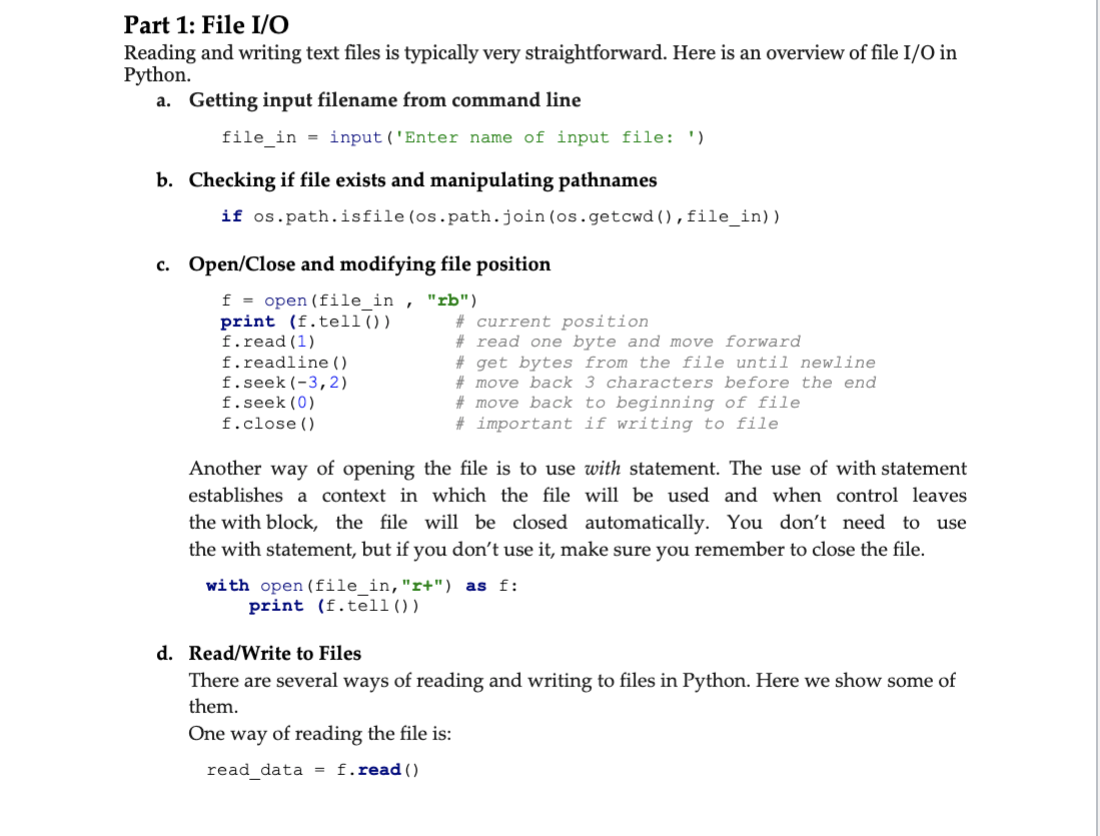
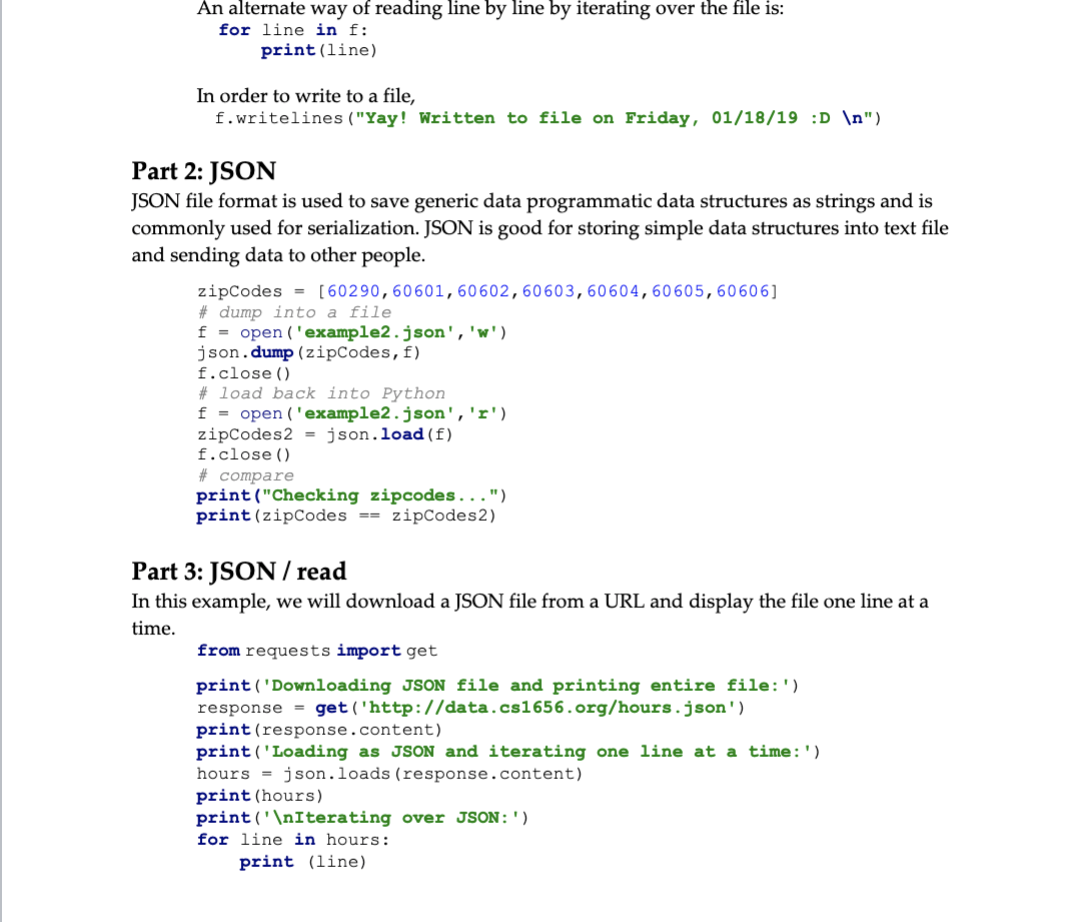
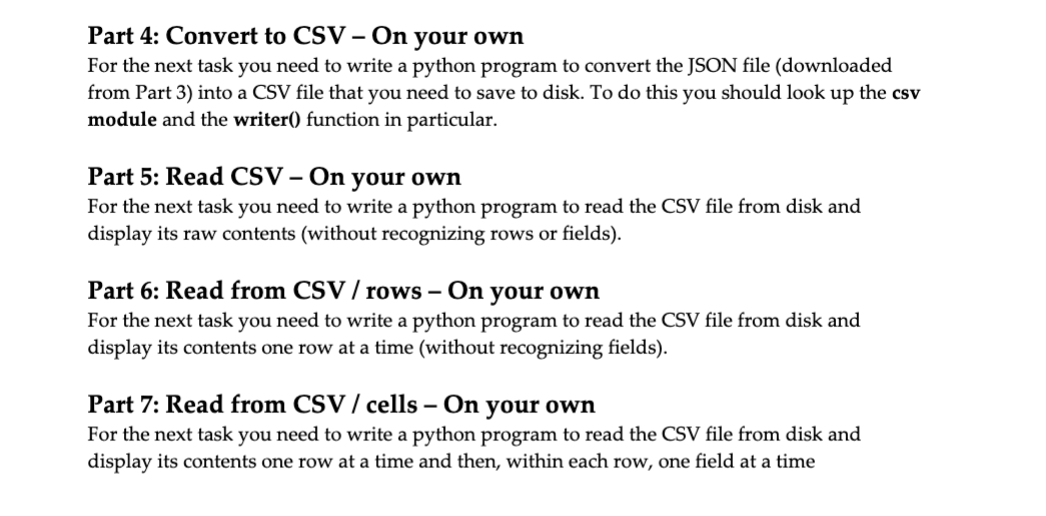
----
CODE:
import os from requests import get import json import csv import ssl ssl._create_default_https_context = ssl._create_unverified_context
class Task(object): def __init__(self): self.response = get('http://db.cs.pitt.edu/courses/cs1656/data/hours.json', verify=False) self.hours = json.loads(self.response.content)
def part4(self): #write output to hours.csv csv.writer= csv.writer (self_hours)
def part5(self): #write output to 'part5.txt' #write raw contents into file - copy the file f = open('part5.txt', 'w')
def part6(self): #write output to 'part6.txt' f = open('part6.txt', 'w')
def part7(self): #write output to 'part7.txt' f = open('part7.txt', 'w')
if __name__ == '__main__': task = Task() task.part4() task.part5() task.part6() task.part7()
----
need help with part 4-7!!
Part 1: File I/O Reading and writing text files is typically very straightforward. Here is an overview of file I/O in Python. a. Getting input filename from command line file_in = input ('Enter name of input file: ') b. Checking if file exists and manipulating pathnames if os.path.isfile (os.path.join(os.getcwd(), file_in)) c. Open/Close and modifying file position f = open(file in, "rb") print (f.tell()) # current position f.read (1) # read one byte and move forward f.readline () # get bytes from the file until newline f.seek (-3,2) # move back 3 characters before the end f. seek (0) # move back to beginning of file f.close() # important if writing to file Another way of opening the file is to use with statement. The use of with statement establishes a context in which the file will be used and when control leaves the with block, the file will be closed automatically. You don't need to use the with statement, but if you don't use it, make sure you remember to close the file. with open (file_in, "r+") as f: print (f.tell()) d. Read/Write to Files There are several ways of reading and writing to files in Python. Here we show some of them. of reading the file is: read_data = f.read() One way An alternate way of reading line by line by iterating over the file is: for line in f: print(line) In order to write to a file, f.writelines ("Yay! Written to file on Friday, 01/18/19 :D ") Part 2: JSON JSON file format is used to save generic data programmatic data structures as strings and is commonly used for serialization. JSON is good for storing simple data structures into text file and sending data to other people. zipCodes = [60290,60601, 60602,60603, 60604,60605, 60606] # dump into a file f = open('example2.json', 'w') json. dump (zipCodes, f) f.close() # load back into Python f = open('example2.json', 'r') zipCodes 2 = json.load(f) f.close() # compare print("Checking zipcodes...") print (zipCodes == zipCodes2) Part 3: JSON / read In this example, we will download a JSON file from a URL and display the file one line at a time. from requests import get print('Downloading JSON file and printing entire file:') response = get('http://data.cs1656.org/hours.json') print (response.content) print('Loading as JSON and iterating one line at a time:') hours = json.loads (response.content) print (hours) print(" Iterating over JSON :') for line in hours: print (line) Part 4: Convert to CSV - On your own For the next task you need to write a python program to convert the JSON file (downloaded from Part 3) into a CSV file that you need to save to disk. To do this you should look up the csv module and the writer() function in particular. Part 5: Read CSV - On your own For the next task you need to write a python program to read the CSV file from disk and display its raw contents (without recognizing rows or fields). Part 6: Read from CSV/ rows On your own For the next task you need to write a python program to read the CSV file from disk and display its contents one row at a time (without recognizing fields). Part 7: Read from CSV/ cells - On your own For the next task you need to write a python program to read the CSV file from disk and display its contents one row at a time and then, within each row, one field at a time Part 1: File I/O Reading and writing text files is typically very straightforward. Here is an overview of file I/O in Python. a. Getting input filename from command line file_in = input ('Enter name of input file: ') b. Checking if file exists and manipulating pathnames if os.path.isfile (os.path.join(os.getcwd(), file_in)) c. Open/Close and modifying file position f = open(file in, "rb") print (f.tell()) # current position f.read (1) # read one byte and move forward f.readline () # get bytes from the file until newline f.seek (-3,2) # move back 3 characters before the end f. seek (0) # move back to beginning of file f.close() # important if writing to file Another way of opening the file is to use with statement. The use of with statement establishes a context in which the file will be used and when control leaves the with block, the file will be closed automatically. You don't need to use the with statement, but if you don't use it, make sure you remember to close the file. with open (file_in, "r+") as f: print (f.tell()) d. Read/Write to Files There are several ways of reading and writing to files in Python. Here we show some of them. of reading the file is: read_data = f.read() One way An alternate way of reading line by line by iterating over the file is: for line in f: print(line) In order to write to a file, f.writelines ("Yay! Written to file on Friday, 01/18/19 :D ") Part 2: JSON JSON file format is used to save generic data programmatic data structures as strings and is commonly used for serialization. JSON is good for storing simple data structures into text file and sending data to other people. zipCodes = [60290,60601, 60602,60603, 60604,60605, 60606] # dump into a file f = open('example2.json', 'w') json. dump (zipCodes, f) f.close() # load back into Python f = open('example2.json', 'r') zipCodes 2 = json.load(f) f.close() # compare print("Checking zipcodes...") print (zipCodes == zipCodes2) Part 3: JSON / read In this example, we will download a JSON file from a URL and display the file one line at a time. from requests import get print('Downloading JSON file and printing entire file:') response = get('http://data.cs1656.org/hours.json') print (response.content) print('Loading as JSON and iterating one line at a time:') hours = json.loads (response.content) print (hours) print(" Iterating over JSON :') for line in hours: print (line) Part 4: Convert to CSV - On your own For the next task you need to write a python program to convert the JSON file (downloaded from Part 3) into a CSV file that you need to save to disk. To do this you should look up the csv module and the writer() function in particular. Part 5: Read CSV - On your own For the next task you need to write a python program to read the CSV file from disk and display its raw contents (without recognizing rows or fields). Part 6: Read from CSV/ rows On your own For the next task you need to write a python program to read the CSV file from disk and display its contents one row at a time (without recognizing fields). Part 7: Read from CSV/ cells - On your own For the next task you need to write a python program to read the CSV file from disk and display its contents one row at a time and then, within each row, one field at a time
Step by Step Solution
There are 3 Steps involved in it

Get step-by-step solutions from verified subject matter experts
 Study Help