







Question: Need help with following in C# Visual Studio 2017 please. Body Mass Index. Calculate BMI. Thank you! The calculator will take the height and weight
Need help with following in C# Visual Studio 2017 please. Body Mass Index. Calculate BMI. Thank you!
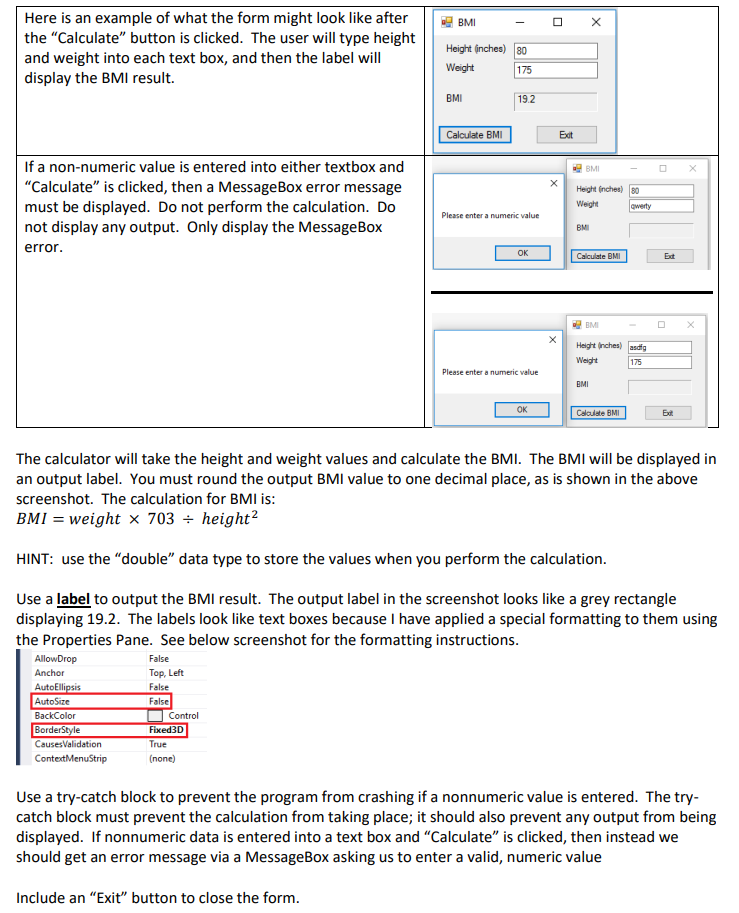
The calculator will take the height and weight values and calculate the BMI. The BMI will be displayed in an output label. You must round the output BMI value to one decimal place, as is shown in the above screenshot. The calculation for BMI is: BMI=weight703height2 HINT: use the "double" data type to store the values when you perform the calculation. Use a label to output the BMI result. The output label in the screenshot looks like a grey rectangle displaying 19.2. The labels look like text boxes because I have applied a special formatting to them using the Properties Pane. See below screenshot for the formatting instructions. Use a try-catch block to prevent the program from crashing if a nonnumeric value is entered. The trycatch block must prevent the calculation from taking place; it should also prevent any output from being displayed. If nonnumeric data is entered into a text box and "Calculate" is clicked, then instead we should get an error message via a MessageBox asking us to enter a valid, numeric value Include an "Exit" button to close the form
Step by Step Solution
There are 3 Steps involved in it

Get step-by-step solutions from verified subject matter experts
 Study Help