







Question: Need help with Intro to Computer Science 2 (Python) problem: Implement the function processAnimals () that takes as a parameter the name of an input
Need help with Intro to Computer Science 2 (Python) problem:
Implement the function processAnimals() that takes as a parameter the name of an input file. The input file contains zero or more lines with the format: species, language, age where species is a string representing an animal's species, language is a string representing an animal's language, and age is an integer representing an animal's age. The items on each line are separated by commas.
The processAnimals() function should read all lines in the file, creating an Animal object for each line and placing the object into a list. The function also displays to the screen the result of calling speak() on each object in the list it created. The function returns the list of objects created or an empty list if the file didn't contain any lines. Don't forget to close the input file. If your function cannot open the input file it should display a message to that effect and return an empty list. The information below shows how you would call the function processAnimals() on an example file. The file empty.txt is empty and the file none.txt does not exist. Please note that your implementation should work on any file with the specified format, not just the one provided as a test case:
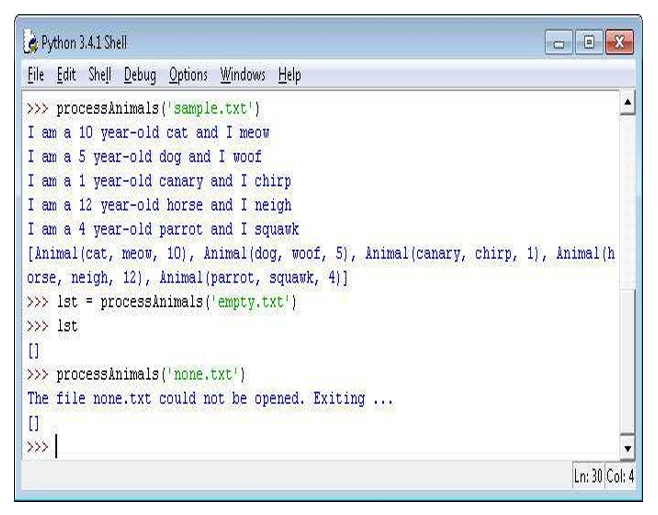
sample.txt =
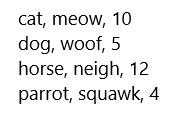
Python 3.4.1 Shell File Edit Shell Debug Options Windows Help processAnimals (1 sample,txt I am a 10 year-old cat and I meov I am a 5 year-old dog and I woof I am a 1 year-old canary and I chirp I am a 12 year-old horse and I neigh I am a 4 year-old parrot and I squawk [Animal (cat, meow, 10 Animal (dog, Woof, 5), Animal (canary, chirp, 1), Animal (h orse, neigh, 12), Animal (parrot, squawk, 4)] lst process Animals empty,txt lst process Animals none .txt!) The file none.txt could not be opened. Exiting... Ln: 30 Col: 4
Step by Step Solution
There are 3 Steps involved in it

Get step-by-step solutions from verified subject matter experts
 Study Help