







Question: Need help with make product - update inventory part. without making any major change to getPartsInCodes function. (set, list, dict are not allowed) Is there
Need help with "make product" - update inventory part.
without making any major change to getPartsInCodes function. (set, list, dict are not allowed)
Is there any way to get the output of getPartsInCodes function into a list in main function?
def getPartsInCode(productCode): currCh = productCode[0] countCh = 1 for i in range(1,len(productCode)): nextCh = productCode[i] if nextCh == currCh: countCh += 1 else: print(f"{countCh}{currCh}") countCh = 1 currCh = nextCh #end For Loop print(f"{countCh}{currCh} ")
elif opt == "4": #Make Product #fout = open("transaction.txt","a") pCode = input("Enter the product code: ").upper() spCode = "".join(sorted(pCode)) if spCode in productList: makeQty = int(input("Enter quantity to make: ")) if makeQty > 0: string = getPartsInCode(spCode) print(productList) print(f"{makeQty} products of {spCode} is successfully made.")
else: print(f"Invalid quantity {makeQty}.") # fout.write(f" make{spCode} is successfully made.") else: print(f"Invalid product code {pCode}.")
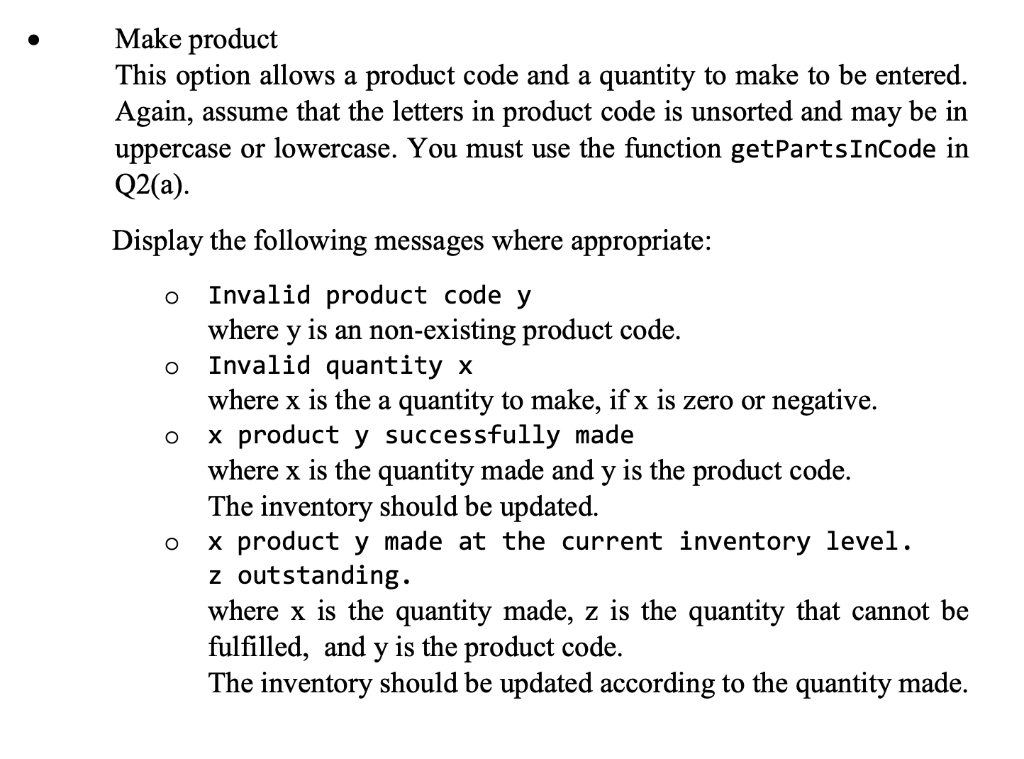
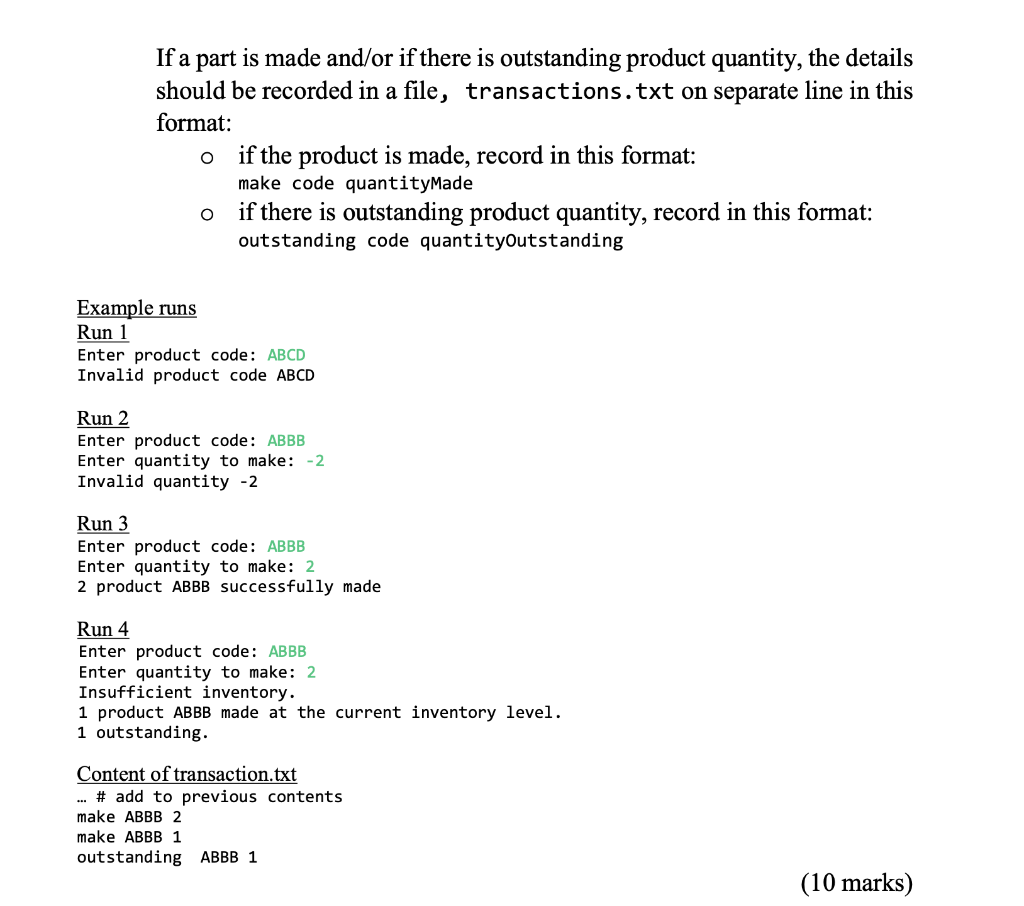
o Make product This option allows a product code and a quantity to make to be entered. Again, assume that the letters in product code is unsorted and may be in uppercase or lowercase. You must use the function getPartsInCode in Q2(a). Display the following messages where appropriate: Invalid product code y where y is an non-existing product code. Invalid quantity x where x is the a quantity to make, if x is zero or negative. x product y successfully made where x is the quantity made and y is the product code. The inventory should be updated. x product y made at the current inventory level. z outstanding. where x is the quantity made, z is the quantity that cannot be fulfilled, and y is the product code. The inventory should be updated according to the quantity made. O o O If a part is made and/or if there is outstanding product quantity, the details should be recorded in a file, transactions.txt on separate line in this format: if the product is made, record in this format: make code quantityMade if there is outstanding product quantity, record in this format: outstanding code quantityOutstanding O O Example runs Run 1 Enter product code: ABCD Invalid product code ABCD Run 2 Enter product code: ABBB Enter quantity to make: -2. Invalid quantity -2 Run 3 Enter product code: ABBB Enter quantity to make: 2 2 product ABBB successfully made Run 4 Enter product code: ABBB Enter quantity to make: 2 Insufficient inventory. 1 product ABBB made at the current inventory level. 1 outstanding Content of transaction.txt ... # add to previous contents make ABBB 2 make ABBB 1 outstanding ABBB 1 (10 marks) o Make product This option allows a product code and a quantity to make to be entered. Again, assume that the letters in product code is unsorted and may be in uppercase or lowercase. You must use the function getPartsInCode in Q2(a). Display the following messages where appropriate: Invalid product code y where y is an non-existing product code. Invalid quantity x where x is the a quantity to make, if x is zero or negative. x product y successfully made where x is the quantity made and y is the product code. The inventory should be updated. x product y made at the current inventory level. z outstanding. where x is the quantity made, z is the quantity that cannot be fulfilled, and y is the product code. The inventory should be updated according to the quantity made. O o O If a part is made and/or if there is outstanding product quantity, the details should be recorded in a file, transactions.txt on separate line in this format: if the product is made, record in this format: make code quantityMade if there is outstanding product quantity, record in this format: outstanding code quantityOutstanding O O Example runs Run 1 Enter product code: ABCD Invalid product code ABCD Run 2 Enter product code: ABBB Enter quantity to make: -2. Invalid quantity -2 Run 3 Enter product code: ABBB Enter quantity to make: 2 2 product ABBB successfully made Run 4 Enter product code: ABBB Enter quantity to make: 2 Insufficient inventory. 1 product ABBB made at the current inventory level. 1 outstanding Content of transaction.txt ... # add to previous contents make ABBB 2 make ABBB 1 outstanding ABBB 1 (10 marks)
Step by Step Solution
There are 3 Steps involved in it

Get step-by-step solutions from verified subject matter experts
 Study Help