







Question: Need help with simple C++ lab. Most of the code is givin, just need to modify inventory.cpp. Included all code given though. Thanks. Inventor.cpp (the
Need help with simple C++ lab. Most of the code is givin, just need to modify inventory.cpp. Included all code given though. Thanks.
Inventor.cpp (the one that needs finishing)
#include#include #include #include "inventory.h" //---------------------------------------------------------------------------- // askNewItem //---------------------------------------------------------------------------- // asks the user for information on a new item and adds it to the inventory void inventory::askNewItem() { string name, taxYorN; int number; double price; cout > number >> price >> name >> taxYorN; // TO DO: add the data to the inventory } // askNewItem() //---------------------------------------------------------------------------- // addItem //---------------------------------------------------------------------------- // given data for a new item, checks to see if there is enough room and if so, // adds it to the inventory void inventory::addItem(int num, string name, double price, string taxable){ if (numItems > num >> price >> taxYorN >> name; while (num != -1) { // TO DO: add data just read to the inventory f >> num >> price >> taxYorN >> name; } f.close(); } // read() //---------------------------------------------------------------------------- // lookup //---------------------------------------------------------------------------- void inventory::lookup() { int num; cout > num; // TO DO: search for the number just found // TO DO: determine if the number was found; finish the coditional expression if ( ) { cout
Inventory.h:
#pragma once //---------------------------------------------------------------------------- // class inventory //---------------------------------------------------------------------------- // Describes a list of items for sale at a store, vendor, etc. //---------------------------------------------------------------------------- #include "item.h" const int MAX_ITEMS = 20; class inventory { public: void askNewItem(); void addItem(int num, string name, double price, string taxable); item getItem(int num); void print(); void read(); void lookup(); private: int search(int num); item items[MAX_ITEMS]; int numItems = 0; };
MAIN:
#include#include "inventory.h" using namespace std; int main() { inventory inv; int choice; inv.read(); do { cout > choice; switch (choice) { case 1: inv.print(); break; case 2: inv.askNewItem(); break; case 3: inv.lookup(); break; case 0: break; default: cout
Item.h:
#pragma once //---------------------------------------------------------------------------- // class item //---------------------------------------------------------------------------- // Describes an item that is for sale by a vendor, store, etc. // The item has a name and price, and may be taxable or not. //---------------------------------------------------------------------------- #includeusing namespace std; const double SALES_TAX_RATE = 0.06; class item { public: void set(int num, string itemName, double itemPrice, string isTaxable); // for convenience void setName(string itemName); void setPrice(double itemPrice); void setNumber(int num); void setNotTaxable(); void setTaxable(); int getNumber(); string getName(); double getPrice(); double getPriceWithTax(); bool isTaxable(); // "is" instead of "get", but same thing private: string name = ""; double price = 0.0; bool taxable = true; int number; };
Item.cpp:
#include#include "item.h" //---------------------------------------------------------------------------- // short sets/gets //---------------------------------------------------------------------------- void item::setNumber(int num) { number = num; } void item::setNotTaxable() { taxable = false; } void item::setTaxable() { taxable = true; } int item::getNumber() { return number; } string item::getName() { return name; } double item::getPrice() { return price; } bool item::isTaxable() { return taxable; } void item::setName(string itemName) { name = itemName; } //---------------------------------------------------------------------------- // set() //---------------------------------------------------------------------------- void item::set(int num, string itemName, double itemPrice, string isTaxable) { setNumber(num); setName(itemName); setPrice(itemPrice); if (isTaxable == "N") setNotTaxable(); else setTaxable(); } // set() //---------------------------------------------------------------------------- // setPrice //---------------------------------------------------------------------------- void item::setPrice(double itemPrice) { if (itemPrice
Text Data File:
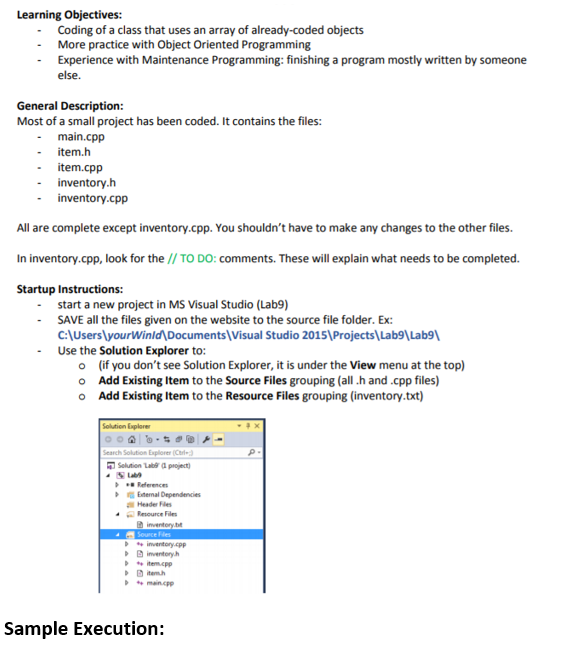
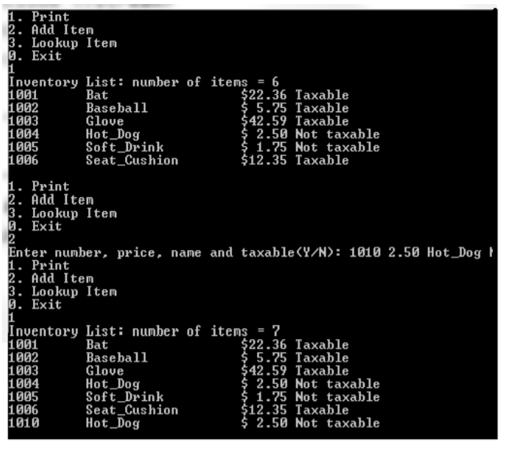
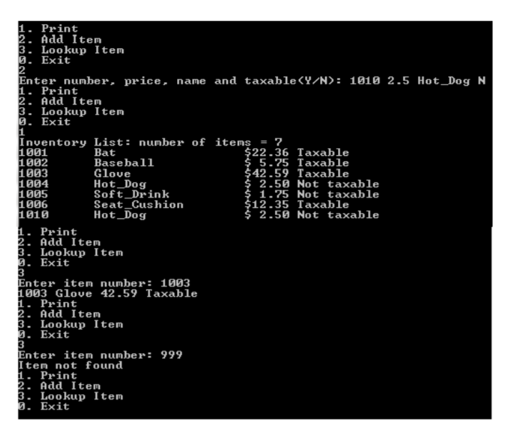
1001 22.36 Y Bat 1002 5.75 Y Baseball 1003 42.59 Y Glove 1004 2.50 N Hot_Dog 1005 1.75 N Soft_Drink 1006 12.35 Y Seat_Cushion -1 0.00 N END_OF_DATALearning Objectives: - Coding of a class that uses an array of already-coded objects More practice with Object Oriented Programming Experience with Maintenance Programming: finishing a program mostly written by someone else. General Description: Most of a small project has been coded. It contains the files: -main.cpp item.h item.cpp inventory.h inventory.cpp All are complete except inventory.cpp. You shouldn't have to make any changes to the other files. In inventory.cpp, look for the // TO DO: comments. These will explain what needs to be completed. Startup Instructions: start a new project in MS Visual Studio (Lab9) SAVE all the files given on the website to the source file folder. Ex: C:\UserslyourWinld Documents Visual Studio 2015 Projects Lab9\ Lab9 -Use the Solution Explorer to: o (if you don't see Solution Explorer, it is under the View menu at the top) o Add Existing Item to the Source Files grouping (all.h and.cpp files) o Add Existing Item to the Resource Files grouping (inventory.txt) Search Solution Explorer Cl Resource File nventory.bt Sample Execution
Step by Step Solution
There are 3 Steps involved in it
1 Expert Approved Answer
Step: 1 Unlock

Question Has Been Solved by an Expert!
Get step-by-step solutions from verified subject matter experts
Step: 2 Unlock
Step: 3 Unlock
 Study Help