







Question: Need help with this Java Assignment You will be working from this UML class diagram. Person -name: String +Person(name: String) +getName(): String +setName(name: String): void
Need help with this Java Assignment
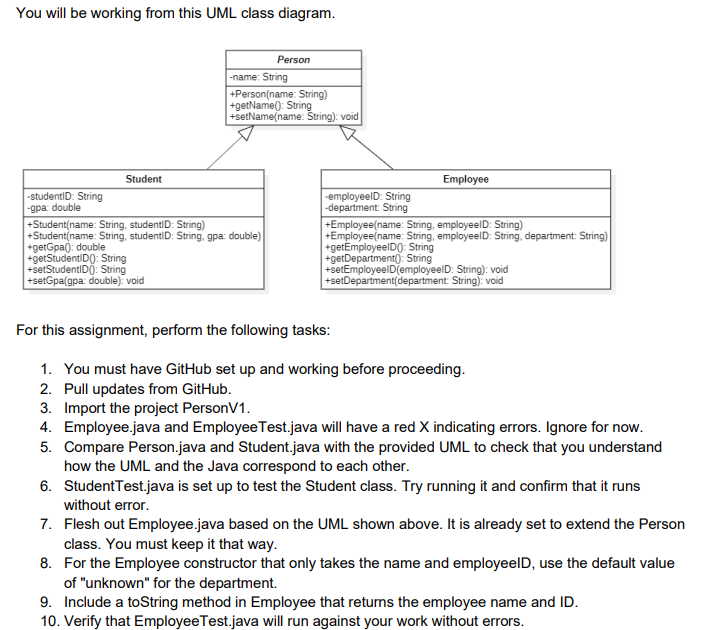

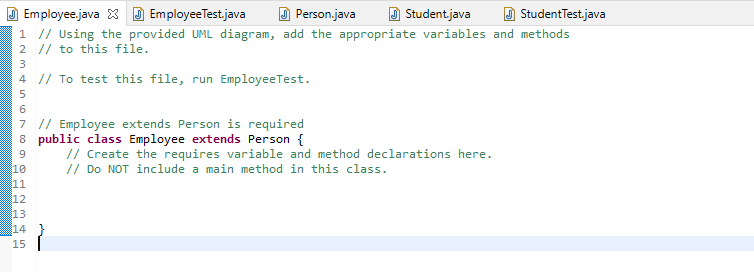
You will be working from this UML class diagram. Person -name: String +Person(name: String) +getName(): String +setName(name: String): void Student -studentID: String -9pa: double +Student(name: String, studentID: String) +Student(name: String, studentID: String, gpa: double) +getGpa(): double +getStudentID(): String +setStudentIDO: String +setGpagpa: double): void Employee -employeeld: String -department: String +Employee(name: String, employeeID: String) +Employee(name: String, employeelD: String, department: String) +getEmployeelDO: String +getDepartment): String +setEmployeeID(employeeld: String): void setDepartment(department: String): void For this assignment, perform the following tasks: 1. You must have GitHub set up and working before proceeding. 2. Pull updates from GitHub. 3. Import the project PersonV1. 4. Employee.java and Employee Test.java will have a red X indicating errors. Ignore for now. 5. Compare Person.java and Student.java with the provided UML to check that you understand how the UML and the Java correspond to each other. 6. Student Test.java is set up to test the Student class. Try running it and confirm that it runs without error. 7. Flesh out Employee.java based on the UML shown above. It is already set to extend the Person class. You must keep it that way. 8. For the Employee constructor that only takes the name and employeeld, use the default value of "unknown" for the department. 9. Include a toString method in Employee that returns the employee name and ID. 10. Verify that Employee Test.java will run against your work without errors. 11. Commit the changes to Employee.java to GitHub. 12. Submit the Canvas assignment with the word ready to indicate your work should be pulled from GitHub and graded. J Employee.java X Employee Test.java J Person.java J Student.java J StudentTest.java 1 // Using the provided UML diagram, add the appropriate variables and methods 2 // to this file. 3 4 // to test this file, run EmployeeTest. 5 6 7 // Employee extends Person is required 8 public class Employee extends Person { // Create the requires variable and method declarations here. // DO NOT include a main method in this class. 9 10 11 12 13 14 15
Step by Step Solution
There are 3 Steps involved in it

Get step-by-step solutions from verified subject matter experts
 Study Help