







Question: Need help with this Python code! Please leave comments so I can learn why you did what you did. Please help! thank you!! Program Specifications
Need help with this Python code! Please leave comments so I can learn why you did what you did. Please help! thank you!!
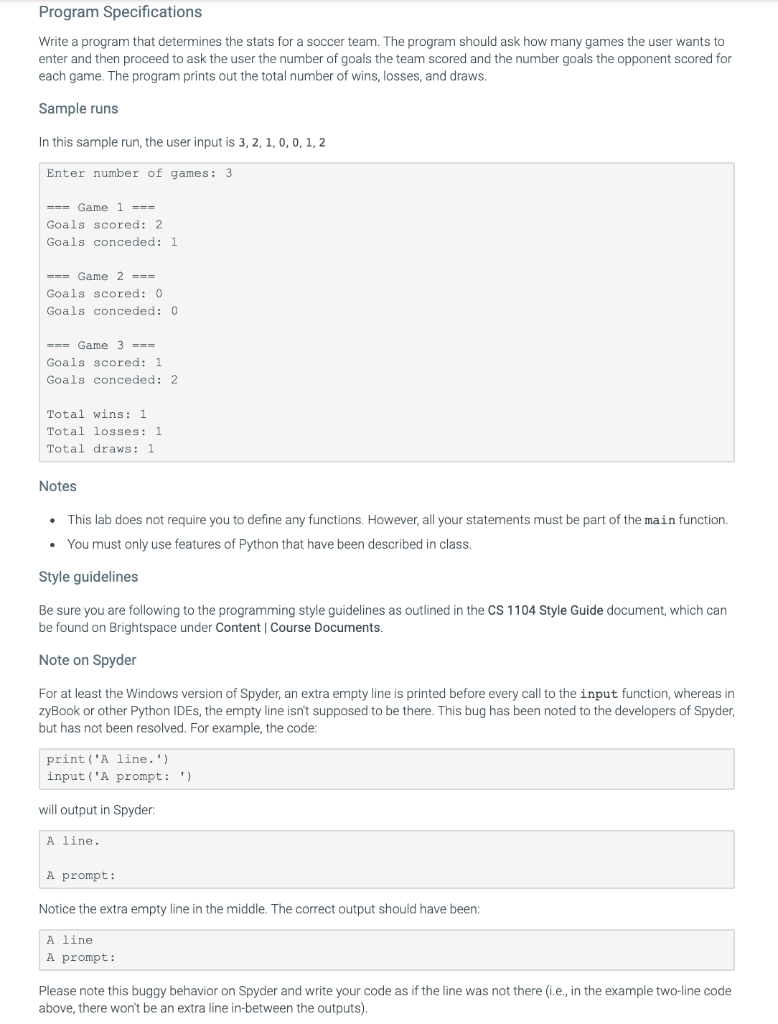
Program Specifications Write a program that determines the stats for a soccer team. The program should ask how many games the user wants to enter and then proceed to ask the user the number of goals the team scored and the number goals the opponent scored for each game. The program prints out the total number of wins, losses, and draws Sample runs In this sample run, the user input is 3,2,1,0,0,1,2 Enter number of games: 3 === Game 1 === Goals scored: 2 Goals conceded: 1 === Game 2 === Goals scored: 0 Goals conceded: 0 === Game 3 === Goals scored: 1 Goals conceded: 2 Total wins: 1 Total losses: 1 Total draws: 1 Notes This lab does not require you to define any functions. However, all your statements must be part of the main function. . You must only use features of Python that have been described in class. Style guidelines Be sure you are following to the programming style guidelines as outlined in the CS 1104 Style Guide document, which can be found on Brightspace under Content Course Documents. Note on Spyder For at least the Windows version of Spyder, an extra empty line is printed before every call to the input function, whereas in zyBook or other Python IDEs, the empty line isn't supposed to be there. This bug has been noted to the developers of Spyder, but has not been resolved. For example, the code: print('Aline.') input('A prompt:') will output in Spyder: A line. A prompt: Notice the extra empty line in the middle. The correct output should have been: A line A prompt: Please note this buggy behavior on Spyder and write your code as if the line was not there (ie, in the example two-line code above, there won't be an extra line in-between the outputs)
Step by Step Solution
There are 3 Steps involved in it

Get step-by-step solutions from verified subject matter experts
 Study Help