







Question: Need help with this. This requires you to explore more information on macros. Since most Excel users are not programmers who know VBA code, this
Need help with this.
This requires you to explore more information on macros. Since most Excel users are not programmers who know VBA code, this gives you more practice on recording macros without writing any VBA code.
If you do not have PowerPoint on your computer, you may download the PowerPoint viewer for free athttp://www.microsoft.com/en-us/download/details.aspx?id=13
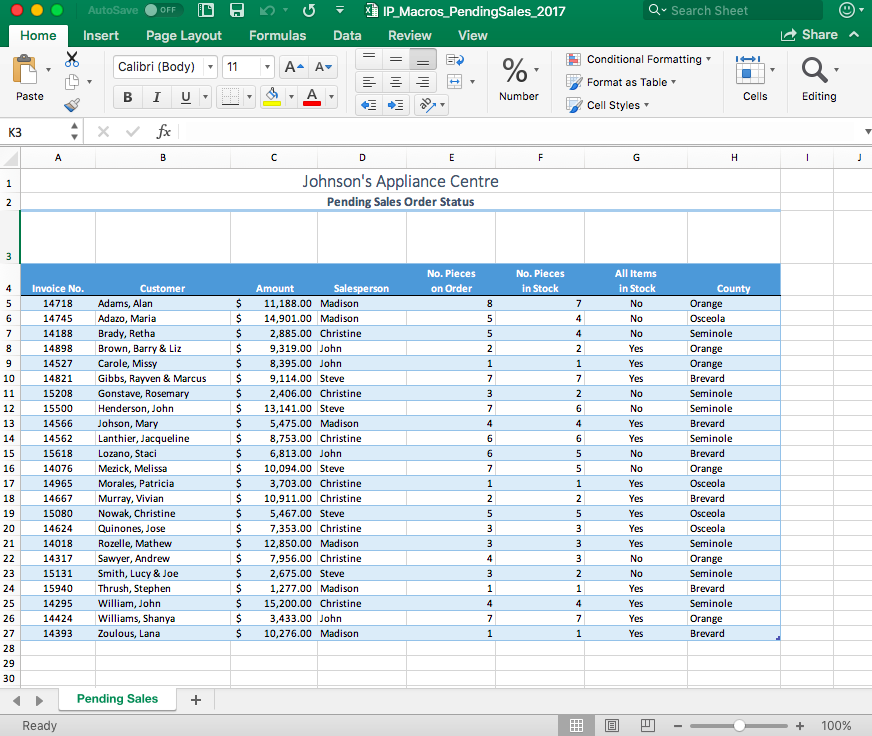
You work in the office of Johnson's Appliance Center. Part of your job is to keep track of all pending sales orders and use this information to help your sales staff get jobs on the Delivery Schedule as soon as all items needed for the order are in stock. This Excel file is kept on the company server so all salespersons (Madison, Christine,Steve and John) can access it. However, the sales staff are not fluent in Excel and have trouble filtering the data to show just the orders that they need to schedule.
Open theIP_Macros_PendingSales_2017.xlsxfile.
To assist the sales staff, make a macro for each of the four salespersons (Madison, Christine,Steve and John)that does the following:
- Filters the list for their name in the Salesperson column
- Shows Yes in the All Items in Stock column
- Sorts the results by County in descending order.
After creating the macros, add a button near the top of the worksheet around row 3 for each salesperson so they can run the report.
Last, make a macro that resets the list to show all orders and add a button to run this macro in row 3 too. Add a Show All button at the top of the worksheet.
Format the worksheet to print professionally.
I took a screenshot because it kept saying file not supported.
Step by Step Solution
There are 3 Steps involved in it

Get step-by-step solutions from verified subject matter experts
 Study Help