







Question: Need help with Unix please Exercise 2.1 Simple Makefile Using the source code downloaded from the eLcarning website, run the included bash script to build
Need help with Unix please
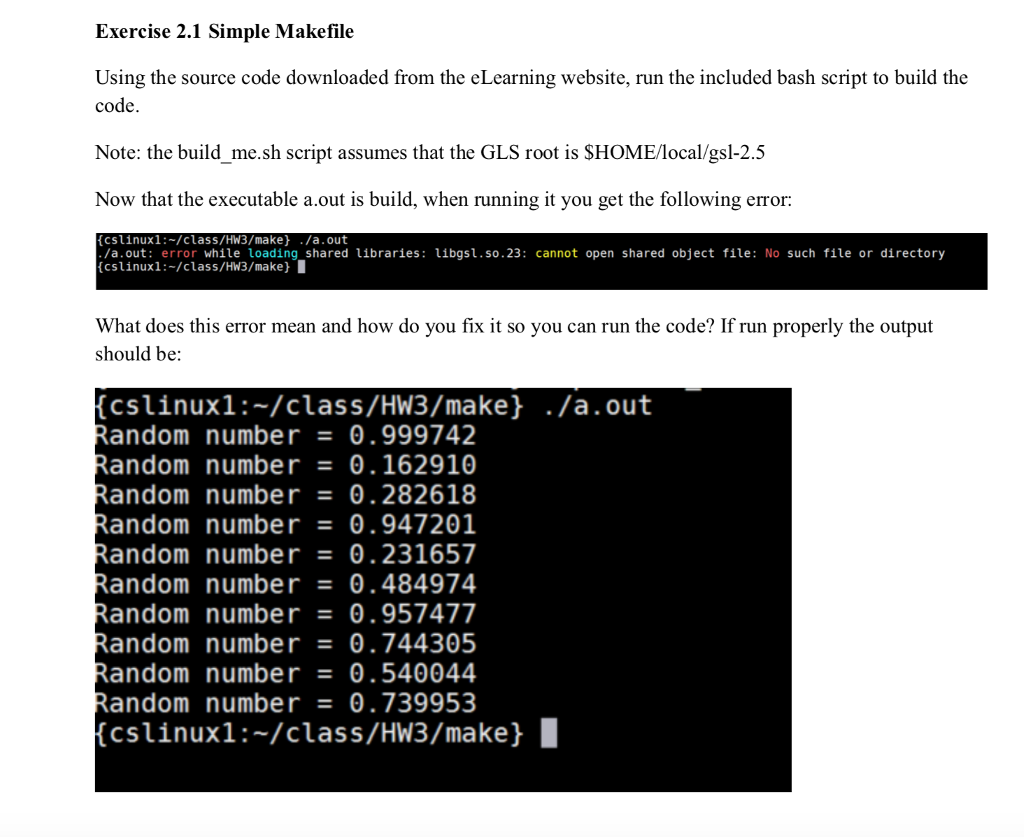
Exercise 2.1 Simple Makefile Using the source code downloaded from the eLcarning website, run the included bash script to build the code Note: the build_me.sh script assumes that the GLS root is SHOME/local/gsl-2.5 Now that the executable a.out is build, when running it you get the following error: (cslinux1:-/class/Hw3/make)./a.out a.out: error whie loading shared Libraries: ibgs1.so.23: cannot open shared object file: No such file or directory [cslinuxi :-/class/HW3/make) What does this error mean and how do you fix it so you can run the code? If run properly the output should be: cslinux1:-/class/Hw3/make ./a.out Random number0.999742 Random number-0.162910 Random number-0.282618 andom number0.947201 andom number0.231657 andom number0.484974 andom number-0.957477 andom number0.744305 andom number0.540044 andom number0.739953 (cslinuxl:-/class/HW3/make} I Exercise 2.1 Simple Makefile Using the source code downloaded from the eLcarning website, run the included bash script to build the code Note: the build_me.sh script assumes that the GLS root is SHOME/local/gsl-2.5 Now that the executable a.out is build, when running it you get the following error: (cslinux1:-/class/Hw3/make)./a.out a.out: error whie loading shared Libraries: ibgs1.so.23: cannot open shared object file: No such file or directory [cslinuxi :-/class/HW3/make) What does this error mean and how do you fix it so you can run the code? If run properly the output should be: cslinux1:-/class/Hw3/make ./a.out Random number0.999742 Random number-0.162910 Random number-0.282618 andom number0.947201 andom number0.231657 andom number0.484974 andom number-0.957477 andom number0.744305 andom number0.540044 andom number0.739953 (cslinuxl:-/class/HW3/make}
Step by Step Solution
There are 3 Steps involved in it

Get step-by-step solutions from verified subject matter experts
 Study Help