







Question: Need help writing Java Code that implement the calcator app below. The calculator should look exactly the same as the picture given below and the
Need help writing Java Code that implement the calcator app below. The calculator should look exactly the same as the picture given below and the program should not be done using 'netbeans'. It required to use just a simple JButton,JPanel,ActionListener ...ect. The 1st line of the calculator screen should produce the output (ie. 1+2+3) and the second scrren should product the output (ie.6). If the user press "C" both screens have to be cleared out. If the user type 3/2 it should produce 1.5. Those four dummy should not produce anything if the user press on them. If the user enter the illegal statment (ie.2+4+5***.) there is no requirement on what the calculator should produce but it should not crash.
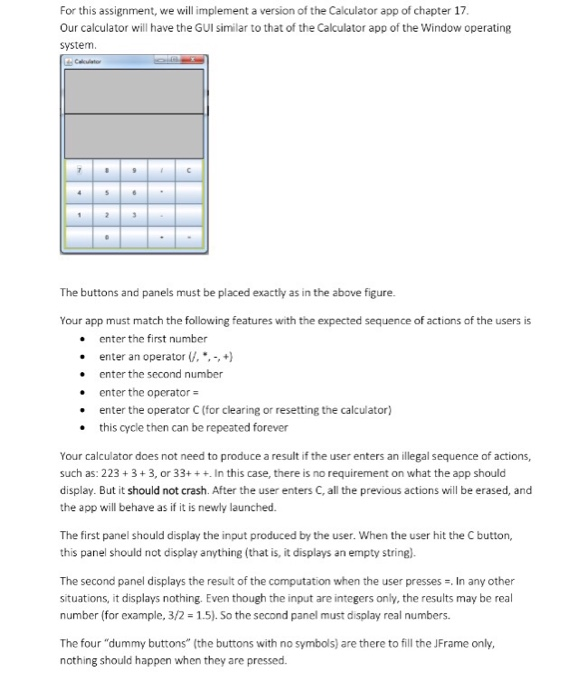
For this assignment, we will implement a version of the Calculator app of chapter 17, Our calculator will have the GUI similar to that of the Calculator app of the Window operating system The buttons and panels must be placed exactly as in the above figure. Your app must match the following features with the expected sequence of actions of the users is enter the first number enter an operator ,+) . enter the second number .enter the operator . enter the operator C (for clearing or resetting the calculator) this cycle then can be repeated forever Your calculator does not need to produce a result if the user enters an illegal sequence of actions, such as: 223 3+3, or 33+ In this case, there is no requirement on what the app should display. But it should not crash. After the user enters C, all the previous actions will be erased, and the app will behave as if it is newly launched The first panel should display the input produced by the user. When the user hit the C button, this panel should not display anything (that is, it displays an empty string). The second panel displays the result of the computation when the user presses , In any other situations, it displays nothing. Even though the input are integers only, the results may be real number (for example, 3/2-1.5). So the second panel must display real numbers. The four "dummy buttons" (the buttons with no symbols) are there to fill the JFrame only ncthing should happen when they are pressed
Step by Step Solution
There are 3 Steps involved in it

Get step-by-step solutions from verified subject matter experts
 Study Help