







Question: Need help writing the VBA code for the following: Create a form that allows the user to select a database (or any file, you do
Need help writing the VBA code for the following:
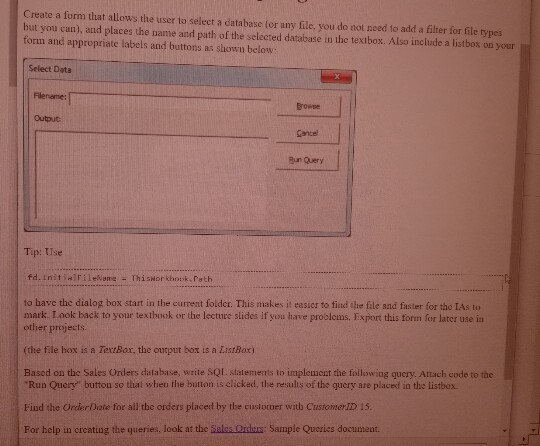
Create a form that allows the user to select a database (or any file, you do not need to add a filter for file types but you can), and places the name and path of the selected database in the textbox. Also include a listbox on your form and appropriate labels and buttons as shown below: Select Data Flename: Output Cancel Bun Query Tip: Use to have the dialog box start in the current folder. This makes it easicr to find the file and faster for the IAs to mark. Look back to your textbook or the lecture slides if you have problems. Export this form for later use in other projects. (the file hox is a TextBox, the output box is a LitstBax) Based on thc Sales Orders database, write SQL. statements to implement the following query. Attach code to the Run Query buttou so thal when the button is elicked, the results of the query are placed in the listbox Find the Order Date for all the orders placed by the customer with CustomerID 15. For help in creating the queries, look at the Salss Ordens Sample Queries document Create a form that allows the user to select a database (or any file, you do not need to add a filter for file types but you can), and places the name and path of the selected database in the textbox. Also include a listbox on your form and appropriate labels and buttons as shown below: Select Data Flename: Output Cancel Bun Query Tip: Use to have the dialog box start in the current folder. This makes it easicr to find the file and faster for the IAs to mark. Look back to your textbook or the lecture slides if you have problems. Export this form for later use in other projects. (the file hox is a TextBox, the output box is a LitstBax) Based on thc Sales Orders database, write SQL. statements to implement the following query. Attach code to the Run Query buttou so thal when the button is elicked, the results of the query are placed in the listbox Find the Order Date for all the orders placed by the customer with CustomerID 15. For help in creating the queries, look at the Salss Ordens Sample Queries document
Step by Step Solution
There are 3 Steps involved in it

Get step-by-step solutions from verified subject matter experts
 Study Help