







Question: Need help writing this script. I attached the what the data file looks like in the last picture. Only allowed to use the commands exist,
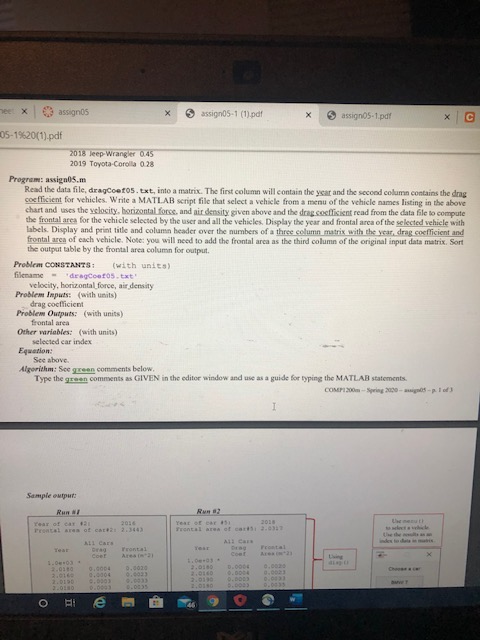
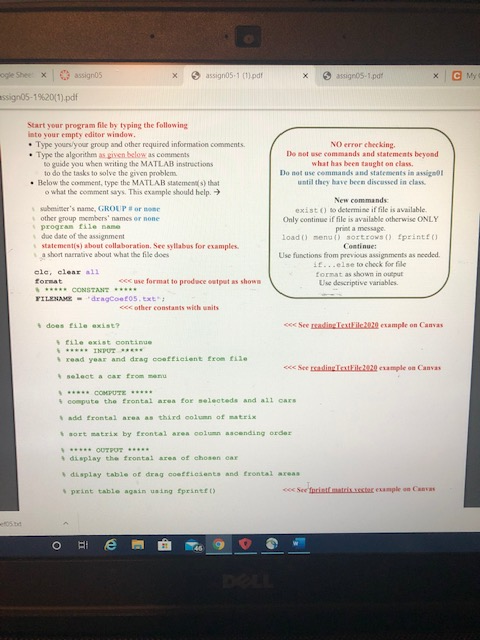
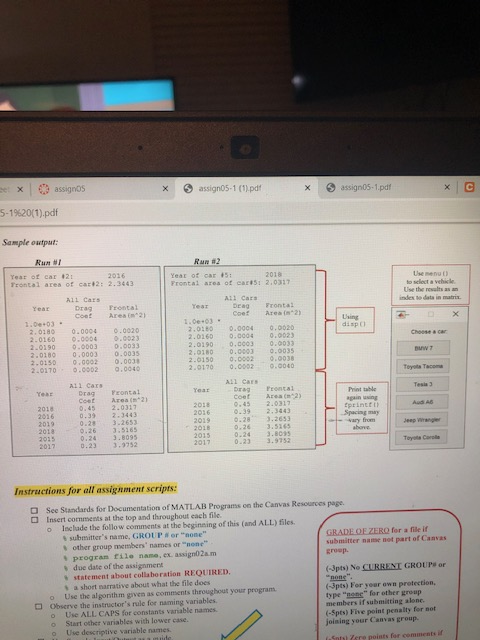
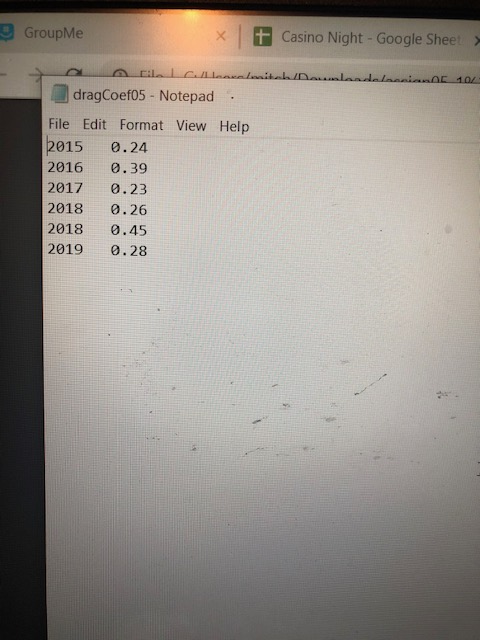
Need help writing this script. I attached the what the data file looks like in the last picture. Only allowed to use the commands exist, load, menu, sortrows, fprint, if else, and format. The outline of the script is in green in the second picture. Must be using MATLAB
* assign05-1 (1).pdf assignos-1.pdf me x assignos 05-1%20(1).pdf 2018 Jeep Wrangler 0,45 2019 Toyota Corolla 0.28 Program: assign05.m Read the data file, dragcoetos.txt, into a matrix. The first column will contain the year and the second column contains the drag coefficient for vehicles. Write a MATLAB script file that select a vehicle from a menu of the vehicle names listing in the above chart and uses the velocity, horizontal force, and air density given above and the dog cocffisient read from the data file to compute the frontal area for the vehicle selected by the user and all the vehicles. Display the year and frontal area of the selected vehicle with Labels. Display and print title and column header over the numbers of a three column matrix with the year, drag coefficient and frontal area of each vehicle. Note: you will need to add the frontal area as the third column of the original input data matrix. Sort the output table by the frontal area column for output Problem CONSTANTS: (with units) filename deacentos.txt velocity, horizontal force, air density Problem Input (with units) drag cocfficient Problem Outputs: (with units) frontal area Other wariables with units) selected car index Equation: See above Algorithm: See green comments below Type the green comments as GIVEN in the editor window and use as a guide for typing the MATLAB statements COMP1200m - Spring 2000 - - 1 od Sample output: Run NI ogle Sheex assignos x assign05-1 (1) pdf assigns-1.pdf assign05-1%20(1).pdf Start your program file by typing the following into your empty editor window. Type yours your group and other required information comments Type the algorithm as given below as comments to guide you when writing the MATLAB instructions to do the tasks to solve the given problem . Below the comment, type the MATLAB statements that what the comment says. This example should help NO error checking, De sot use commands and statements beyond what has been taught on class Do not use commands and statements in assignol until they have been discussed in class. sobster's name, GROUP or one other group members' names or none Program File name doe date of the assignment statements about collaboration. See syllabus for examples. a short narrative about what the file does New commands exist to determine if file is available. Only continue if file is available otherwise ONLY print a message load() mengi) sort rows() print Continue Use functions from previous assignments as needed 10...else to check for file format as shown in output Use descriptive variables. s show cle, clear all Format O formato produce CONSTANT TILENAME -dengco05.txt cccother constants with units Seeding the 100 emple on Canvas til exist continue read year and drag coefficient from til select a CE from me compute the frontal area for selected and all Cars add frontal area third column of matrix sont matrix by frontal are column ascending order display the frontal area of chosen car display table of drag coefficients and frontal axea print table again using fprintft) ex assignos x assign05-1(1).pdf assignos-1.pdf 5-19620(1).pdf Sample output: Rur #2 Run Year of car #21 Trontal area of cart212.3443 Year of car #5: Frontal area of ears: 2.0317 Frontal Area m2) 0.0020 0.0003 0.003 Instructions for all assignment scripts: O group See Standards for Documentation of MATLAB Programs on the Canvas Resources page Insert comments at the top and throughout each file Include the follow comments at the beginning of this and ALL) files. submitter's name. GROUP or "none" GRADE OE ZERO for a file if other group members' names or "none" submitter name not part of Canvas program tile name.ex. assignO2am due date of the assignment statement about collaboration REQUIRED. (3pts) No CURRENT GROUP or a short narrative about what the file does "none" Use the algorithm given as comments throughout your program (-3pts) For your own protection, Observe the instructor's rule for naming variables. type "none" for other group Use ALL CAPS for constants variable names members if submitting alone. Start other variables with lower case. (-5pts) Fhe point penalty for not Use descriptive variable names joining your Canvas group. Salere points for comments 9 GroupMe + Casino Night - Google Sheet > /Dawandelaani 104 AGICAL dragCoef05 - Notepad. File Edit Format View Help 2015 0.24 2016 0.39 2017 0.23 2018 0.26 2018 0.45 2019 0.28 * assign05-1 (1).pdf assignos-1.pdf me x assignos 05-1%20(1).pdf 2018 Jeep Wrangler 0,45 2019 Toyota Corolla 0.28 Program: assign05.m Read the data file, dragcoetos.txt, into a matrix. The first column will contain the year and the second column contains the drag coefficient for vehicles. Write a MATLAB script file that select a vehicle from a menu of the vehicle names listing in the above chart and uses the velocity, horizontal force, and air density given above and the dog cocffisient read from the data file to compute the frontal area for the vehicle selected by the user and all the vehicles. Display the year and frontal area of the selected vehicle with Labels. Display and print title and column header over the numbers of a three column matrix with the year, drag coefficient and frontal area of each vehicle. Note: you will need to add the frontal area as the third column of the original input data matrix. Sort the output table by the frontal area column for output Problem CONSTANTS: (with units) filename deacentos.txt velocity, horizontal force, air density Problem Input (with units) drag cocfficient Problem Outputs: (with units) frontal area Other wariables with units) selected car index Equation: See above Algorithm: See green comments below Type the green comments as GIVEN in the editor window and use as a guide for typing the MATLAB statements COMP1200m - Spring 2000 - - 1 od Sample output: Run NI ogle Sheex assignos x assign05-1 (1) pdf assigns-1.pdf assign05-1%20(1).pdf Start your program file by typing the following into your empty editor window. Type yours your group and other required information comments Type the algorithm as given below as comments to guide you when writing the MATLAB instructions to do the tasks to solve the given problem . Below the comment, type the MATLAB statements that what the comment says. This example should help NO error checking, De sot use commands and statements beyond what has been taught on class Do not use commands and statements in assignol until they have been discussed in class. sobster's name, GROUP or one other group members' names or none Program File name doe date of the assignment statements about collaboration. See syllabus for examples. a short narrative about what the file does New commands exist to determine if file is available. Only continue if file is available otherwise ONLY print a message load() mengi) sort rows() print Continue Use functions from previous assignments as needed 10...else to check for file format as shown in output Use descriptive variables. s show cle, clear all Format O formato produce CONSTANT TILENAME -dengco05.txt cccother constants with units Seeding the 100 emple on Canvas til exist continue read year and drag coefficient from til select a CE from me compute the frontal area for selected and all Cars add frontal area third column of matrix sont matrix by frontal are column ascending order display the frontal area of chosen car display table of drag coefficients and frontal axea print table again using fprintft) ex assignos x assign05-1(1).pdf assignos-1.pdf 5-19620(1).pdf Sample output: Rur #2 Run Year of car #21 Trontal area of cart212.3443 Year of car #5: Frontal area of ears: 2.0317 Frontal Area m2) 0.0020 0.0003 0.003 Instructions for all assignment scripts: O group See Standards for Documentation of MATLAB Programs on the Canvas Resources page Insert comments at the top and throughout each file Include the follow comments at the beginning of this and ALL) files. submitter's name. GROUP or "none" GRADE OE ZERO for a file if other group members' names or "none" submitter name not part of Canvas program tile name.ex. assignO2am due date of the assignment statement about collaboration REQUIRED. (3pts) No CURRENT GROUP or a short narrative about what the file does "none" Use the algorithm given as comments throughout your program (-3pts) For your own protection, Observe the instructor's rule for naming variables. type "none" for other group Use ALL CAPS for constants variable names members if submitting alone. Start other variables with lower case. (-5pts) Fhe point penalty for not Use descriptive variable names joining your Canvas group. Salere points for comments 9 GroupMe + Casino Night - Google Sheet > /Dawandelaani 104 AGICAL dragCoef05 - Notepad. File Edit Format View Help 2015 0.24 2016 0.39 2017 0.23 2018 0.26 2018 0.45 2019 0.28
Step by Step Solution
There are 3 Steps involved in it

Get step-by-step solutions from verified subject matter experts
 Study Help