







Question: need just 3 ,7 problem solution with 2 screenshoots for each solution Desktop/bdp/531/DB_ch4_PP_ - + 2 CD Page view A Read aloud V Draw Highli
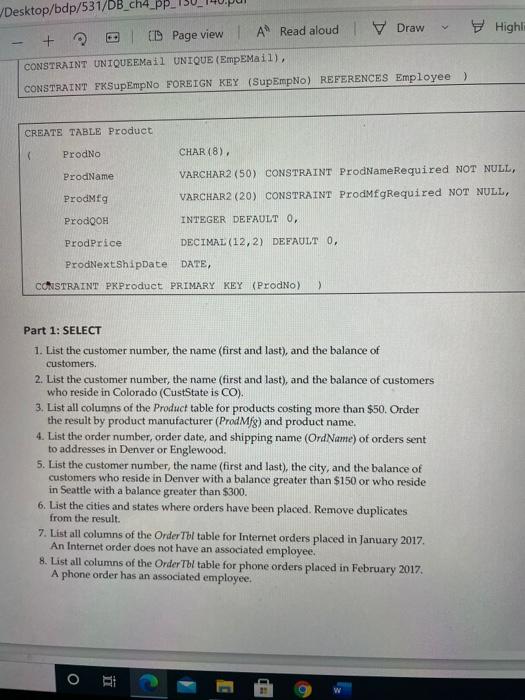
Desktop/bdp/531/DB_ch4_PP_ - + 2 CD Page view A Read aloud V Draw Highli CONSTRAINT UNIQUE EMail UNIQUE (EmpEMail), CONSTRAINT EKSupEmpNo FOREIGN KEY (SupEmpNo) REFERENCES Employee ) CREATE TABLE Product ProdNo CHAR(8) ProdName VARCHAR2(50) CONSTRAINT ProdNameRequired NOT NULL, VARCHAR2 (20) CONSTRAINT ProdMfgRequired NOT NULL, Prodig ProdQOH INTEGER DEFAULT 0, ProdPrice DECIMAL (12,2) DEFAULT O, ProdNextShipDate DATE, CONSTRAINT PKProduct PRIMARY KEY (ProdNo) > Part 1: SELECT 1. List the customer number, the name (first and last), and the balance of customers. 2. List the customer number, the name (first and last), and the balance of customers who reside in Colorado (CustState is CO), 3. List all columns of the Product table for products costing more than $50. Order the result by product manufacturer (ProdMfg) and product name. 4. List the order number, order date, and shipping name (OrdName) of orders sent to addresses in Denver or Englewood. 5. List the customer number, the name (first and last), the city, and the balance of customers who reside in Denver with a balance greater than $150 or who reside in Seattle with a balance greater than $300. 6. List the cities and states where orders have been placed. Remove duplicates from the result. 7. List all columns of the Order Tl table for Internet orders placed in January 2017 An Internet order does not have an associated employee. 8. List all columns of the Order TW table for phone orders placed in February 2017 A phone order has an associated employee. o RE
Step by Step Solution
There are 3 Steps involved in it

Get step-by-step solutions from verified subject matter experts
 Study Help