







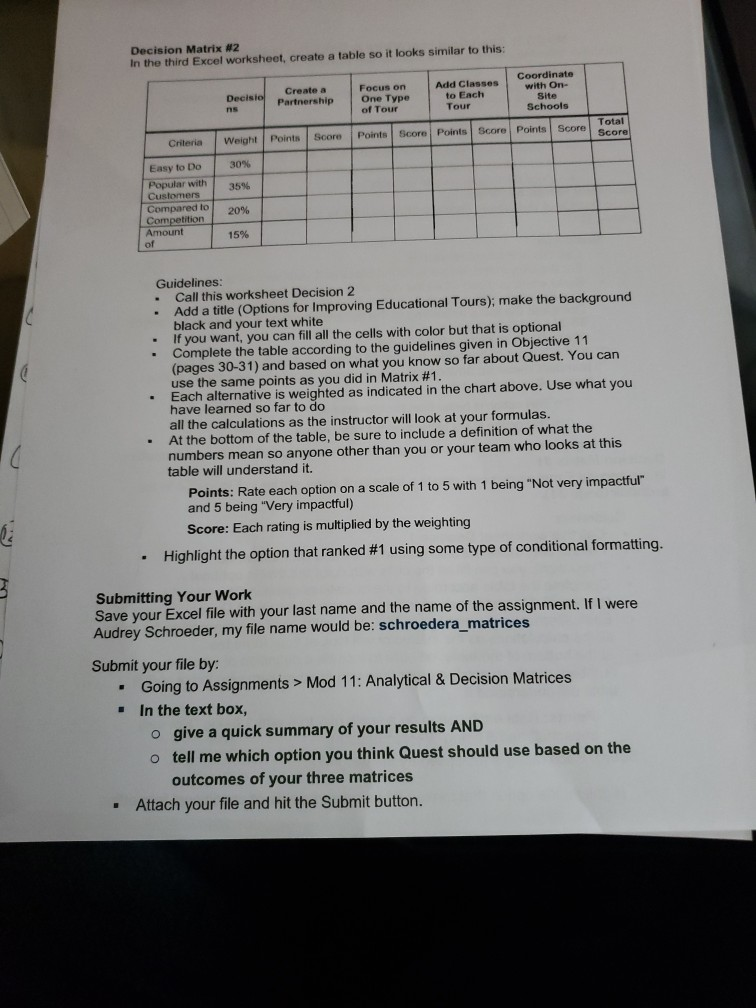
Question: need some assistance with this work Decision Matrix #2 In the third Excel worksheet, create a table so it looks similar to this: Create a
need some assistance with this work
Decision Matrix #2 In the third Excel worksheet, create a table so it looks similar to this: Create a Partnership Decisio ns Focus on One Type of Tour Coordinate with On- Site Schools Add Classes to Each Tour Total Score Points Score Points Score Score Points Score Criteria Weight Points 30% 35% Easy to Do Popular with Customers Compared to Competition Amount of 20% 15% Guidelines: Call this worksheet Decision 2 Add a title (Options for Improving Educational Tours); make the background black and your text white If you want, you can fill all the cells with color but that is optional Complete the table according to the guidelines given in Objective 11 (pages 30-31) and based on what you know so far about Quest. You can use the same points as you did in Matrix #1. Each alternative is weighted as indicated in the chart above. Use what you have learned so far to do all the calculations as the instructor will look at your formulas. At the bottom of the table, be sure to include a definition of what the numbers mean so anyone other than you or your team who looks at this table will understand it. Points: Rate each option on a scale of 1 to 5 with 1 being "Not very impactful" and 5 being "Very impactful) Score: Each rating is multiplied by the weighting Highlight the option that ranked #1 using some type of conditional formatting. Submitting Your Work Save your Excel file with your last name and the name of the assignment. If I were Audrey Schroeder, my file name would be: schroedera matrices Submit your file by: Going to Assignments > Mod 11: Analytical & Decision Matrices In the text box, o give a quick summary of your results AND o tell me which option you think Quest should use based on the outcomes of your three matrices . Attach your file and hit the Submit button. Decision Matrix #2 In the third Excel worksheet, create a table so it looks similar to this: Create a Partnership Decisio ns Focus on One Type of Tour Coordinate with On- Site Schools Add Classes to Each Tour Total Score Points Score Points Score Score Points Score Criteria Weight Points 30% 35% Easy to Do Popular with Customers Compared to Competition Amount of 20% 15% Guidelines: Call this worksheet Decision 2 Add a title (Options for Improving Educational Tours); make the background black and your text white If you want, you can fill all the cells with color but that is optional Complete the table according to the guidelines given in Objective 11 (pages 30-31) and based on what you know so far about Quest. You can use the same points as you did in Matrix #1. Each alternative is weighted as indicated in the chart above. Use what you have learned so far to do all the calculations as the instructor will look at your formulas. At the bottom of the table, be sure to include a definition of what the numbers mean so anyone other than you or your team who looks at this table will understand it. Points: Rate each option on a scale of 1 to 5 with 1 being "Not very impactful" and 5 being "Very impactful) Score: Each rating is multiplied by the weighting Highlight the option that ranked #1 using some type of conditional formatting. Submitting Your Work Save your Excel file with your last name and the name of the assignment. If I were Audrey Schroeder, my file name would be: schroedera matrices Submit your file by: Going to Assignments > Mod 11: Analytical & Decision Matrices In the text box, o give a quick summary of your results AND o tell me which option you think Quest should use based on the outcomes of your three matrices . Attach your file and hit the Submit buttonStep by Step Solution
There are 3 Steps involved in it
1 Expert Approved Answer
Step: 1 Unlock

Question Has Been Solved by an Expert!
Get step-by-step solutions from verified subject matter experts
Step: 2 Unlock
Step: 3 Unlock
 Study Help