







Question: Need some help with assignment heres code i have done. CODE: import java.util.ArrayList; import java.util.Scanner; import javax.swing.JFrame; import javax.swing.JPanel; import javax.swing.JMenu; import javax.swing.JMenuItem; import javax.swing.JOptionPane;
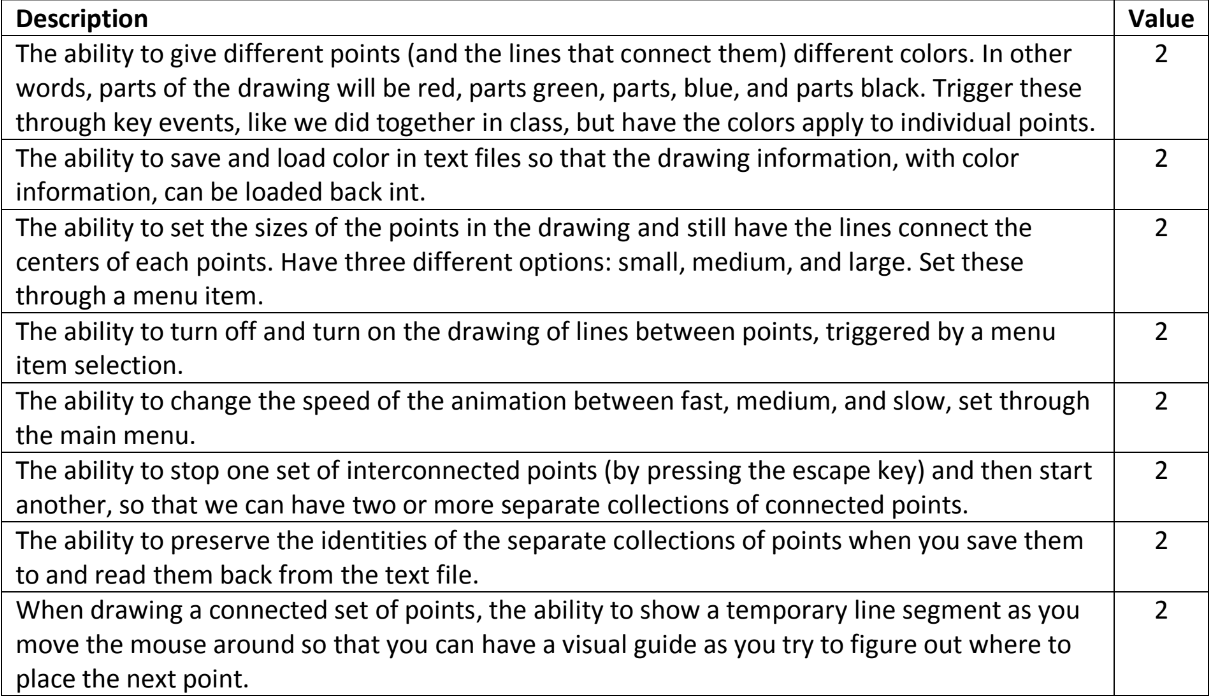 Need some help with assignment heres code i have done.
CODE:
import java.util.ArrayList; import java.util.Scanner; import javax.swing.JFrame; import javax.swing.JPanel; import javax.swing.JMenu; import javax.swing.JMenuItem; import javax.swing.JOptionPane; import javax.swing.JMenuBar; import java.awt.event.ActionEvent; import java.awt.event.ActionListener; import java.awt.event.KeyEvent; import java.awt.event.KeyListener; import java.awt.Graphics; import java.awt.Container; import java.awt.BorderLayout; import java.awt.Color; import javax.swing.JButton; import java.awt.event.MouseListener; import java.awt.event.MouseMotionListener; import java.awt.event.MouseEvent; import javax.swing.Timer; import java.util.Random; import java.io.File; import java.io.PrintWriter; import java.io.FileWriter; import java.io.BufferedWriter; import javax.swing.JFileChooser;
class Point { /** * x represents the x-axis coordinate */ private int x; /** * y represents the y-axis coordinate */ private int y; public void setX(int x) { this.x = x; } public int getX() { return x; } public void setY(int y) { this.y = y; } public int getY() { return y; } public Point() { x = 0; y = 0; } public Point(int x, int y) { setX(x); setY(y); } @Override public String toString() { return String.format("%d %d", x, y); } } class LinePanel extends JPanel implements MouseListener, MouseMotionListener, KeyListener { private ArrayList
} }); mnuFile.add(miSave); JMenuItem miExit = new JMenuItem("Exit"); miExit.addActionListener(new ActionListener() { public void actionPerformed(ActionEvent e) { System.exit(0); } }); mnuFile.add(miExit); mbar.add(mnuFile); JMenu mnuEdit = new JMenu("Edit"); JMenuItem miClear = new JMenuItem("Clear"); miClear.addActionListener(new ActionListener() { public void actionPerformed(ActionEvent e) { clearPoints(); } }); mnuEdit.add(miClear); mbar.add(mnuEdit); setJMenuBar(mbar); } public void setupUI() { setBounds(100,100,500,500); setDefaultCloseOperation(EXIT_ON_CLOSE); setTitle("Line Frame"); Container c = getContentPane(); c.setLayout(new BorderLayout()); JPanel panSouth = new JPanel(); JButton btnClear = new JButton("Clear"); btnClear.addActionListener(new ActionListener() { public void actionPerformed(ActionEvent e) { clearPoints(); } }); panSouth.add(btnClear); c.add(panSouth, BorderLayout.SOUTH); LinePanel panLines = new LinePanel(points); c.add(panLines, BorderLayout.CENTER); setupMenu(); } public LineFrame(ArrayList
Value Description The ability to give different points (and the lines that connect them) different colors. In other2 words, parts of the drawing will be red, parts green, parts, blue, and parts black. Trigger these through key events, like we did together in class, but have the colors apply to individual points. The ability to save and load color in text files so that the drawing information, with color information, can be loaded back int. The ability to set the sizes of the points in the drawing and still have the lines connect the centers of each points. Have three different options: small, medium, and large. Set these through a menu item. The ability to turn off and turn on the drawing of lines between points, triggered by a menu item selection. The ability to change the speed of the animation between fast, medium, and slow, set through 2 the main menu. The ability to stop one set of interconnected points (by pressing the escape key) and then start 2 another, so that we can have two or more separate collections of The ability to preserve the identities of the separate collections of points when you save them 2 to and read them back from the text file. When drawing a connected set of points, the ability to show a temporary line segment as you2 move the mouse around so that you can have a visual guide as you try to figure out where to place the next point. 2 2 connected points
Step by Step Solution
There are 3 Steps involved in it

Get step-by-step solutions from verified subject matter experts
 Study Help