







Question: Need the codes for this in Matlab with a step for step explanation please! 1. Create a row vector that has the elements: 6,83,81,e2.5,65,sin(/3), and
Need the codes for this in Matlab with a step for step explanation please! 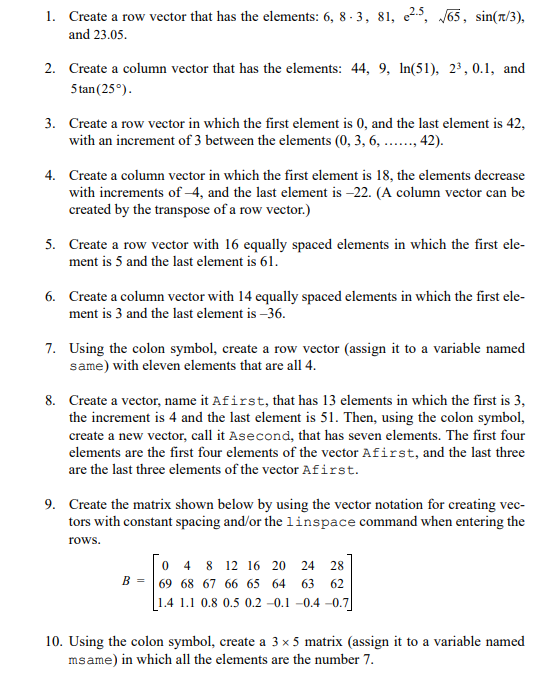
1. Create a row vector that has the elements: 6,83,81,e2.5,65,sin(/3), and 23.05. 2. Create a column vector that has the elements: 44,9,ln(51),23,0.1, and 5tan(25). 3. Create a row vector in which the first element is 0 , and the last element is 42 , with an increment of 3 between the elements (0,3,6,,42). 4. Create a column vector in which the first element is 18 , the elements decrease with increments of 4, and the last element is 22. (A column vector can be created by the transpose of a row vector.) 5. Create a row vector with 16 equally spaced elements in which the first element is 5 and the last element is 61 . 6. Create a column vector with 14 equally spaced elements in which the first element is 3 and the last element is 36. 7. Using the colon symbol, create a row vector (assign it to a variable named same) with eleven elements that are all 4. 8. Create a vector, name it Afirst, that has 13 elements in which the first is 3 , the increment is 4 and the last element is 51 . Then, using the colon symbol, create a new vector, call it Asecond, that has seven elements. The first four elements are the first four elements of the vector Afirst, and the last three are the last three elements of the vector Afirst. 9. Create the matrix shown below by using the vector notation for creating vectors with constant spacing and/or the linspace command when entering the rows. B=0691.44681.18670.812660.516650.220640.124630.428620.7 10. Using the colon symbol, create a 35 matrix (assign it to a variable named msame) in which all the elements are the number 7
Step by Step Solution
There are 3 Steps involved in it

Get step-by-step solutions from verified subject matter experts
 Study Help