







Question: Need this in Visual Basic Create calculator that reads two numbers, add them up, and displays the results to the user: 1. Button 1 (btn
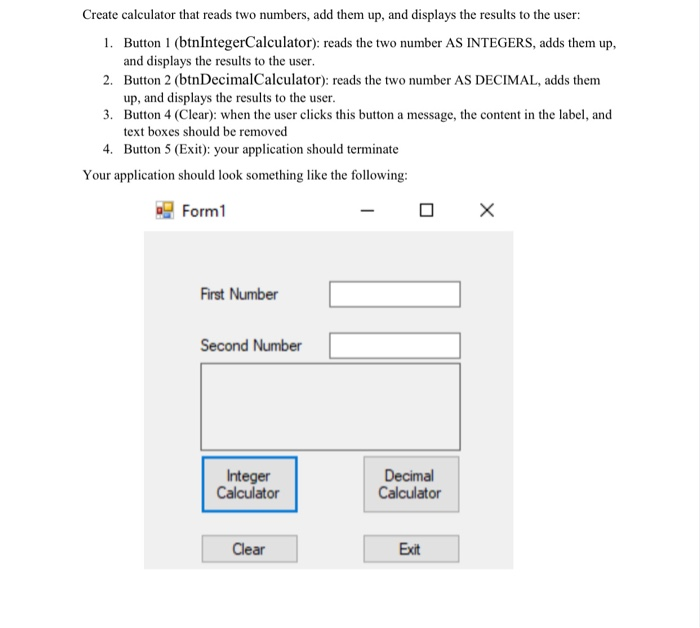
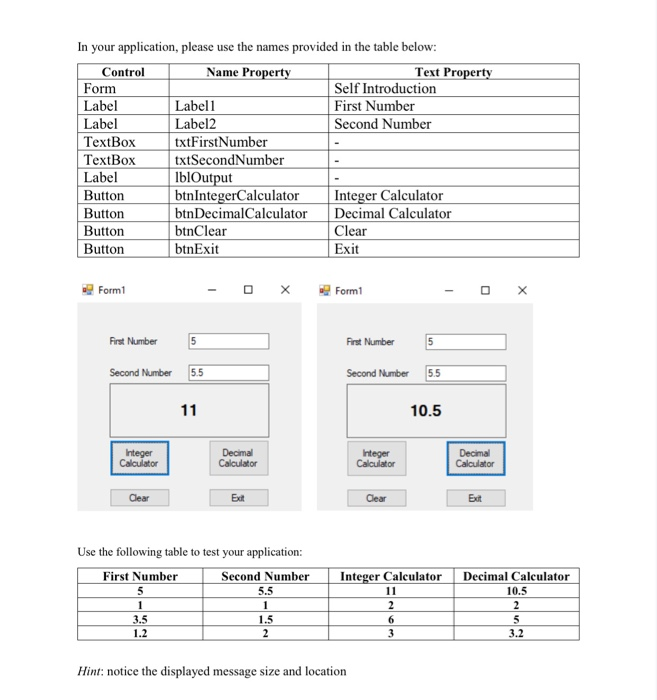
Create calculator that reads two numbers, add them up, and displays the results to the user: 1. Button 1 (btn IntegerCalculator): reads the two number AS INTEGERS, adds them up, and displays the results to the user. 2. Button 2 (btnDecimalCalculator): reads the two number AS DECIMAL, adds them up, and displays the results to the user. 3. Button 4 (Clear): when the user clicks this button a message, the content in the label, and text boxes should be removed 4. Button 5 (Exit): your application should terminate Your application should look something like the following: Form1 - O X First Number C Second Number Integer Calculator Decimal Calculator Clear Exit In your application, please use the names provided in the table below: Control Name Property Text Property Form Self Introduction Label Labell First Number Label Label2 Second Number TextBox txtFirstNumber TextBox txtSecondNumber - Label IblOutput Button btn IntegerCalculator Integer Calculator Button btnDecimalCalculator Decimal Calculator Button btnClear Clear Button btnExit Exit Form1 - X Form First Number First Number 5 Second Number 5.5 Second Number 5.5 10.5 Integer Calculator Decimal Calculator Integer Calculator Decimal Calculator Clear - Ext Clear Exit Use the following table to test your application: First Number Second Number 55.5 Integer Calculator Decimal Calculator 10.5 22 6 5 3 3.2 3.5 1. 1. 5 2 2 Hint: notice the displayed message size and location
Step by Step Solution
There are 3 Steps involved in it

Get step-by-step solutions from verified subject matter experts
 Study Help