







Question: Need this to be anwsered in Excel Days Function, Excel IF and AND Functions. Need 1,2 and 3 anwsered ASAP! Excel SIM: Aging of accounts
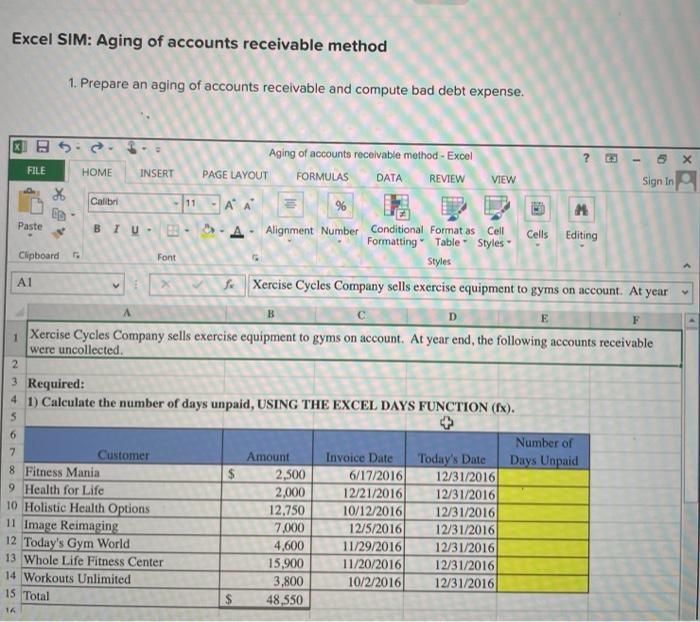
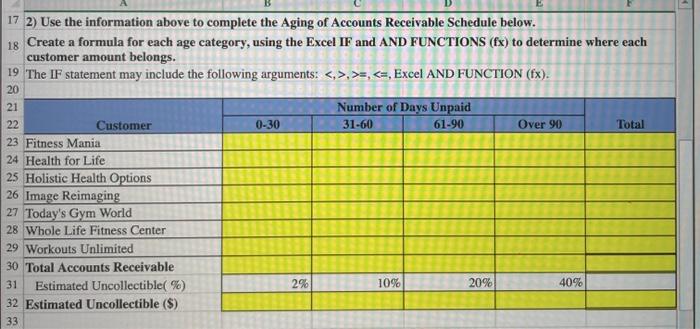
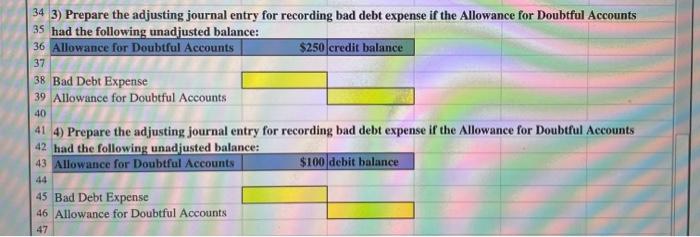
Excel SIM: Aging of accounts receivable method 1. Prepare an aging of accounts receivable and compute bad debt expense. x 25. - 5 FILE HOME INSERT VIEW X ED Calibri 11 M Paste Aging of accounts receivable method - Excel PAGE LAYOUT FORMULAS DATA REVIEW Sign In % BIU.. A Alignment Number Conditional Format as Cell Cells Editing Formatting Table Styles Styles e Xercise Cycles Company sells exercise equipment to gyms on account. At year Clipboard Font A1 E Xercise Cycles Company sells exercise equipment to gyms on account. At year end, the following accounts receivable were uncollected 2 3 Required: 4 1) Calculate the number of days unpaid, USING THE EXCEL DAYS FUNCTION (Ex). $ 7 Customer 8 Fitness Mania 9 Health for Life 10 Holistic Health Options 11 Image Reimaging 12 Today's Gym World 13 Whole Life Fitness Center 14 Workouts Unlimited 15 Total Amount 2,500 2,000 12.750 7.000 4.600 15,900 3,800 48,550 Invoice Date 6/17/2016 12/21/2016 10/12/2016 12/5/2016 11/29/2016 11/20/2016 10/2/2016 Number of Today's Date Days Unpaid 12/31/2016 12/31/2016 12/31/2016 12/31/2016 12/31/2016 12/31/2016 12/31/2016 17 2) Use the information above to complete the Aging of Accounts Receivable Schedule below. 18 Create a formula for each age category, using the Excel IF and AND FUNCTIONS (Ex) to determine where each customer amount belongs. 19 The IF statement may include the following arguments: <.>.>>,
Step by Step Solution
There are 3 Steps involved in it

Get step-by-step solutions from verified subject matter experts
 Study Help