







Question: need to do this in Python, heres the link to the csv file: https://sourceforge.net/projects/zips/files/#files Only need 1c heres the states capitals: https://cocalc.com/dcf6b567-f89a-4789-8d59-8cfdb7b112e0/raw/assignments/2018-02-16/state_capitals.xlsx import numpy as
 need to do this in Python, heres the link to the csv file: https://sourceforge.net/projects/zips/files/#files Only need 1c heres the states capitals:
https://cocalc.com/dcf6b567-f89a-4789-8d59-8cfdb7b112e0/raw/assignments/2018-02-16/state_capitals.xlsx
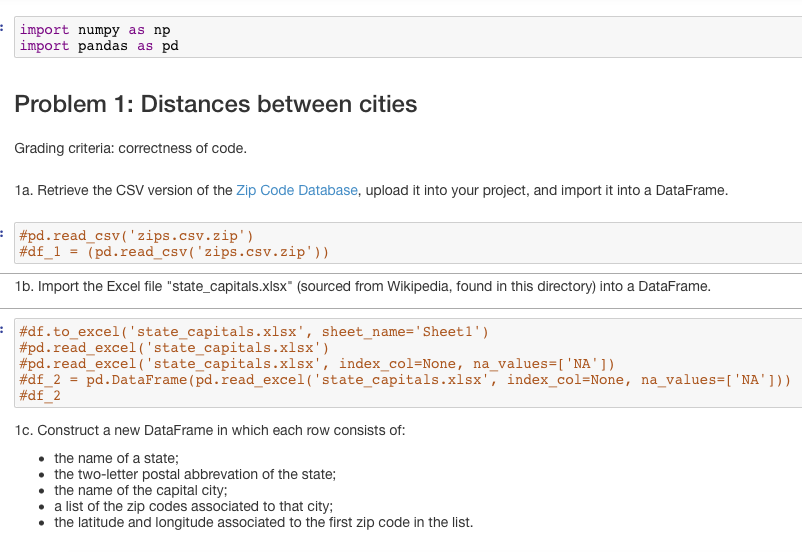
import numpy as np import pandas as pd Problem 1: Distances between cities Grading criteria: correctness of code. 1a. Retrieve the CSV version of the Zip Code Database, upload it into your project, and import it into a DataFrame. | #pd. read-csv ( ' zips. csv. zip' ) #df-1 = (pd . read csv("zips.csv.zip.)) 1b. Import the Excel file "state_capitals.xlsx" (sourced from Wikipedia, found in this directory) into a DataFrame. #df.to-excel ('state. Capitals .xlsx'' sheet-name-'Sheet 1.) #pd. read-excel ( ' state-capitals. xlsx' ) | #pd . read-excel ('state-capitals .xlsx', index-col=None, na-values-['NA,1) #df-2 -pd . DataFrame (pd.read-excel( 'state-capitals.xlsx', index-col-None , | #df-2 na-values-NA'])) 1c. Construct a new DataFrame in which each row consists of: the name of a state; the two-letter postal abbrevation of the state; the name of the capital city; . a list of the zip codes associated to that city; the latitude and longitude associated to the first zip code in the list. import numpy as np import pandas as pd Problem 1: Distances between cities Grading criteria: correctness of code. 1a. Retrieve the CSV version of the Zip Code Database, upload it into your project, and import it into a DataFrame. | #pd. read-csv ( ' zips. csv. zip' ) #df-1 = (pd . read csv("zips.csv.zip.)) 1b. Import the Excel file "state_capitals.xlsx" (sourced from Wikipedia, found in this directory) into a DataFrame. #df.to-excel ('state. Capitals .xlsx'' sheet-name-'Sheet 1.) #pd. read-excel ( ' state-capitals. xlsx' ) | #pd . read-excel ('state-capitals .xlsx', index-col=None, na-values-['NA,1) #df-2 -pd . DataFrame (pd.read-excel( 'state-capitals.xlsx', index-col-None , | #df-2 na-values-NA'])) 1c. Construct a new DataFrame in which each row consists of: the name of a state; the two-letter postal abbrevation of the state; the name of the capital city; . a list of the zip codes associated to that city; the latitude and longitude associated to the first zip code in the list
Step by Step Solution
There are 3 Steps involved in it

Get step-by-step solutions from verified subject matter experts
 Study Help