







Question: Need to include CSS Create a Web page that uses a table to display information about your favorite music CDs. It must validate as an
Need to include CSS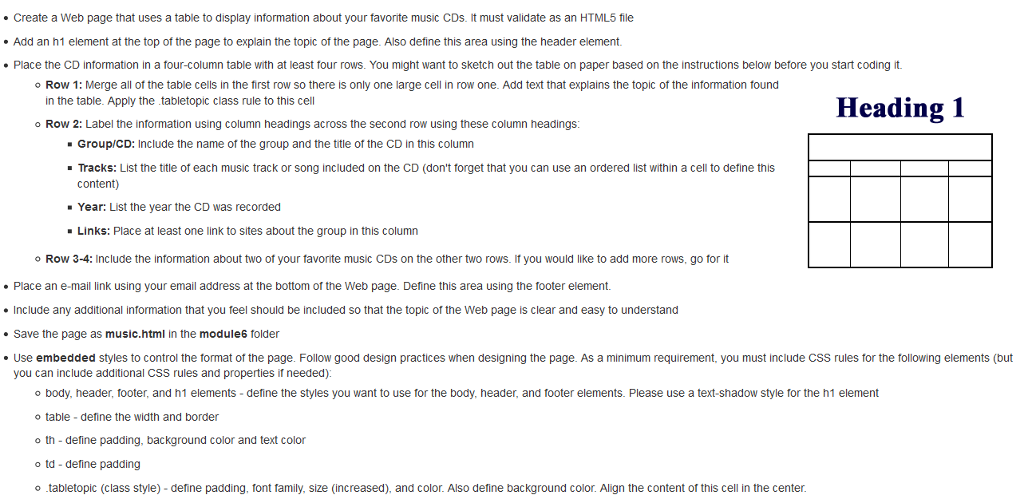
Create a Web page that uses a table to display information about your favorite music CDs. It must validate as an HTML5 file . Add an h1 element at the top of the page to explain the topic of the page. Also define this area using the header element Place the CD information in a four-column table with at least tour rows. You might want to sketch out the table on paper based on the instructions below before you start coding it Row 1: Merge all of the table cells in the first row so there is only one large cell in row one. Add text that explains the topic of the information found in the table. Apply the tabletopic class rule to this cell o Row 2: Label the information using column headings across the second row using these column headings: Heading 1 Group/CD: Include the name of the group and the title of the CD in this column Tracks: List the title of each music track or song included on the CD (don't forget that you can use an ordered list within a cell to define this content) Year: List the year the CD was recorded Links: Place at least one link to sites about the group in this column o Row 3-4: Include the information about two of your favorite music CDs on the other two rows. If you would like to add more rows, go for it Place an e-mail link using your email address at the bottom of the Web page Define this area using the toter element Include any additional information that you feel should be included so that the topic of the Web page is clear and easy to understand Save the page as music.html in the module6 folder Use embedded styles to control the format of the page. Follow good design practices when designing the page. As a minimum requirement, you must include Css rules for the tollowing elements (but you can include additional CSS rules and properties if needed) o body, header, footer, and h1 elements - deine the styles you want to use for the body, header, and footer elements. Please use a text-shadow style for the h1 element table-define the width and border o th- define padding, background color and text color td-define padding otabletopic (class style) - define padding, font family, size (increased), and color. Also define background color. Align the content of this cell in the center
Step by Step Solution
There are 3 Steps involved in it

Get step-by-step solutions from verified subject matter experts
 Study Help