Question: Need your help regarding this Lesson/Activities I'll surely give you Feedback. LESSON 9: Inserting, Uploading, and Sharing of Images over the Internet One of the

Need your help regarding this Lesson/Activities I'll surely give you Feedback.
Need your help regarding this Lesson/ActivitiesNeed your help regarding this Lesson/Activities
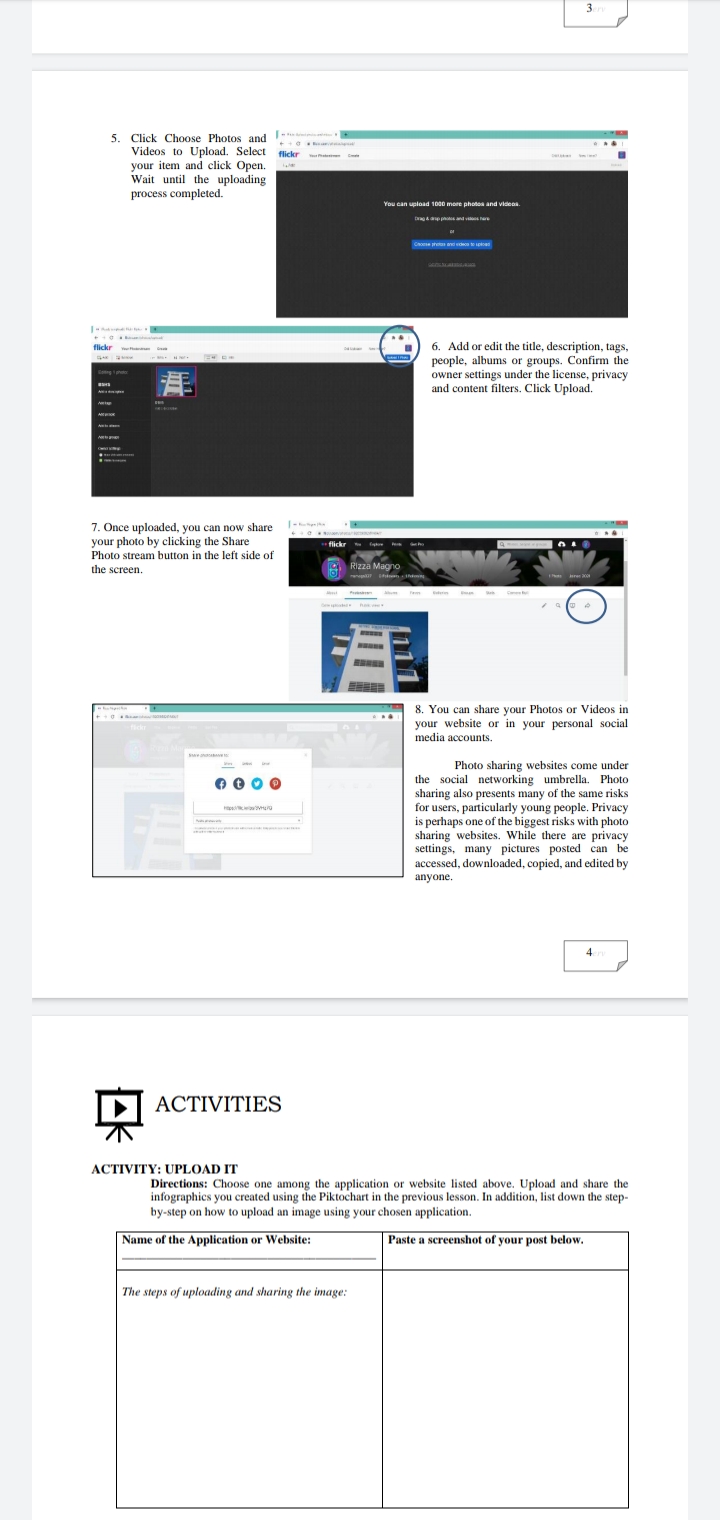
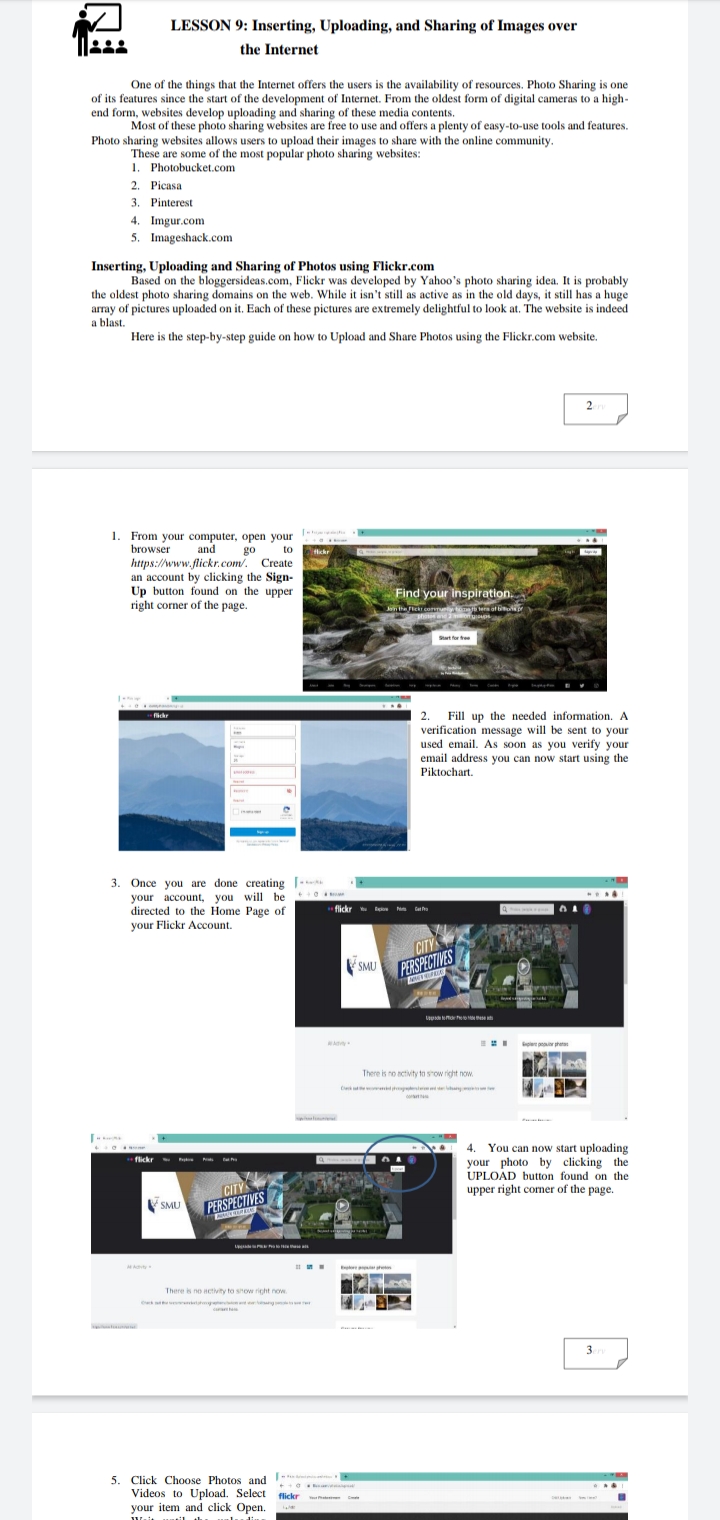
LESSON 9: Inserting, Uploading, and Sharing of Images over the Internet One of the things that the Internet offers the users is the availability of resources. Photo Sharing is one of its features since the start of the development of Internet. From the oldest form of digital cameras to a high- end form, websites develop uploading and sharing of these media contents, Most of these photo sharing websites are free to use and offers a plenty of easy-to-use tools and features. Photo sharing websites allows users to upload their images to share with the online community. These are some of the most popular photo sharing websites: 1. Photobucket.com 2. Picasa 3. Pinterest 4. Imgur.com 5. Imageshack.com Inserting, Uploading and Sharing of Photos using Flickr.com Based on the bloggersideas.com, Flickr was developed by Yahoo's photo sharing idea. It is probably the oldest photo sharing domains on the web. While it isn't still as active as in the old days, it still has a huge array of pictures uploaded on it. Each of these pictures are extremely delightful to look at. The website is indeed a blast. Here is the step-by-step guide on how to Upload and Share Photos using the Flickr.com website. 2 From your computer, open your browser and go to flickr https://www.flickr.com/. Create an account by clicking the Sign- Up button found on the upper Find your inspiration right corner of the page. Start for free 1 - - flickr 2. Fill up the needed information. A verification message will be sent to your used email. As soon as you verify your email address you can now start using the Piktochart. Once you are done creating [ - your account, you will be directed to the Home Page of flickr Eachone Pima Catfra your Flickr Account. CITY SMU PERSPECTIVES There is no activity to show right now. 4. You can now start uploading .. flickr Boston Beats Find Fra your photo by clicking the CITY UPLOAD button found on the upper right corner of the page. SMU PERSPECTIVES At Actity " There is no activity to show right rows. 3erv 5. Click Choose Photos and - Videos to Upload. Select flickr your item and click Open.5. Click Choose Photos and ';" Videos to Upload Select your item and click Open. Wait until the uploading process completed. 7. Once uploaded. you can now share your photo by clicking the Share Photo stream button in the left side of the screen. ACTIVITIES dCTWITY: UPLOAD IT & Add oredit the one, desmiplion. tags. people, albums or groups. Conrm the owner settings under the license, privacy and content lters. Click Upload. B. You can share your Photos or Videos in your website or in your personal social media accounts. Photo sharing websites come under the social networking umbrella Photo sharing also presents many of the same risks for users. particularly young people. Privacy is perhaps one ofthe biggest risks with photo sharing websites. While there are privacy settings, many pictures posted can be accessed. downloaded,copied. and edited by anyone. j Dmom: (Timon: one among the application or website listed above. Upload and sham: the inl'uglaphics you cleated using the Piklochun in the previous lesson. In addition. list down the slep- hy-atep on how to upload an image using your chosen application. Name or the Application or Weballe: The steps of Wielding rmr.' whoring .ri'lr imrrgr: hate it memhot or your post below

Step by Step Solution

There are 3 Steps involved in it

1 Expert Approved Answer
Step: 1 Unlock blur-text-image

Question Has Been Solved by an Expert!

Get step-by-step solutions from verified subject matter experts

Step: 2 Unlock
Step: 3 Unlock

Students Have Also Explored These Related Accounting Questions!