







Question: New to Android Need help to complete this code ? Here is what i got so far package com.kean.hibye_olanread; import android.support.v7.app.AppCompatActivity; import android.os.Bundle; public class
New to Android






Need help to complete this code ? Here is what i got so far
package com.kean.hibye_olanread; import android.support.v7.app.AppCompatActivity; import android.os.Bundle; public class MainActivity extends AppCompatActivity { @Override protected void onCreate(Bundle savedInstanceState) { super.onCreate(savedInstanceState); setContentView(R.layout.activity_main); } } I want the code to be abble to print this resuit... 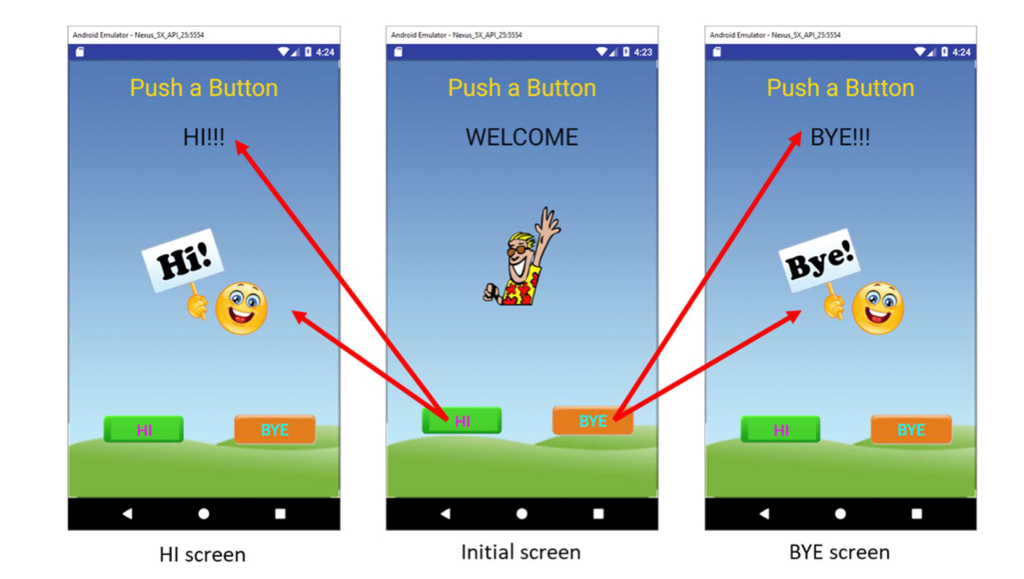 ------------------------------------------------------------------------------------
 Here is what is on my activity_main.xml
xml version="1.0" encoding="utf-8"?> android.support.constraint.ConstraintLayout xmlns:android="http://schemas.android.com/apk/res/android" xmlns:app="http://schemas.android.com/apk/res-auto" xmlns:tools="http://schemas.android.com/tools" android:layout_width="match_parent" android:layout_height="match_parent" android:background="@drawable/background" tools:context="com.kean.hibye_olanread.MainActivity"> TextView android:id="@+id/textView" android:layout_width="wrap_content" android:layout_height="wrap_content" android:text="Push a Button" android:textAppearance="@android:style/TextAppearance.Large" android:textColor="@color/color_gold" tools:text="@string/push_string" android:layout_marginRight="8dp" app:layout_constraintRight_toRightOf="parent" android:layout_marginLeft="8dp" app:layout_constraintLeft_toLeftOf="parent" app:layout_constraintTop_toTopOf="parent" android:layout_marginTop="8dp" app:layout_constraintBottom_toBottomOf="parent" android:layout_marginBottom="8dp" app:layout_constraintVertical_bias="0.038" /> TextView android:id="@+id/textView2" android:layout_width="wrap_content" android:layout_height="wrap_content" android:text="Welcome" android:textAppearance="@android:style/TextAppearance.Large" android:textColor="@android:color/black" tools:text="@string/initial_string" android:layout_marginLeft="8dp" app:layout_constraintLeft_toLeftOf="parent" android:layout_marginRight="8dp" app:layout_constraintRight_toRightOf="parent" app:layout_constraintTop_toTopOf="parent" android:layout_marginTop="8dp" app:layout_constraintBottom_toBottomOf="parent" android:layout_marginBottom="8dp" app:layout_constraintVertical_bias="0.149" /> ImageView android:id="@+id/imageView" android:layout_width="wrap_content" android:layout_height="wrap_content" android:contentDescription="@string/waving_img" app:srcCompat="@drawable/waving" app:layout_constraintTop_toTopOf="parent" android:layout_marginTop="8dp" app:layout_constraintBottom_toBottomOf="parent" android:layout_marginBottom="8dp" android:layout_marginRight="8dp" app:layout_constraintRight_toRightOf="parent" android:layout_marginLeft="8dp" app:layout_constraintLeft_toLeftOf="parent" app:layout_constraintHorizontal_bias="0.502" app:layout_constraintVertical_bias="0.347" /> Button android:id="@+id/button" android:layout_width="wrap_content" android:layout_height="wrap_content" android:background="@drawable/btn_green" android:text="@string/hi_btn" android:textAppearance="@android:style/TextAppearance.Large" android:textColor="@color/color_magenta" android:layout_marginRight="8dp" app:layout_constraintRight_toRightOf="parent" android:layout_marginLeft="8dp" app:layout_constraintLeft_toLeftOf="parent" app:layout_constraintBottom_toBottomOf="parent" android:layout_marginBottom="8dp" app:layout_constraintTop_toTopOf="parent" android:layout_marginTop="8dp" app:layout_constraintHorizontal_bias="0.143" app:layout_constraintVertical_bias="0.812" /> Button android:id="@+id/button2" android:layout_width="wrap_content" android:layout_height="wrap_content" android:background="@drawable/btn_orange" android:text="@string/bye_btn" android:textAppearance="@android:style/TextAppearance.Large" android:textColor="@color/color_cyan" android:layout_marginRight="8dp" app:layout_constraintRight_toRightOf="parent" android:layout_marginLeft="8dp" app:layout_constraintLeft_toLeftOf="parent" app:layout_constraintBottom_toBottomOf="parent" android:layout_marginBottom="8dp" app:layout_constraintTop_toTopOf="parent" android:layout_marginTop="8dp" app:layout_constraintHorizontal_bias="0.829" app:layout_constraintVertical_bias="0.812" /> android.support.constraint.ConstraintLayout>
Step by Step Solution
There are 3 Steps involved in it
1 Expert Approved Answer
Step: 1 Unlock

Question Has Been Solved by an Expert!
Get step-by-step solutions from verified subject matter experts
Step: 2 Unlock
Step: 3 Unlock
 Study Help