







Question: Newton-Raphson Method for GUI why isn't it working?? where is wrong?? case newtonraphson str get (handles.equat ioninput, String') Fn inline(str) str1 diff (sym(str) Fn1 inline(str):
Newton-Raphson Method for GUI why isn't it working?? where is wrong??
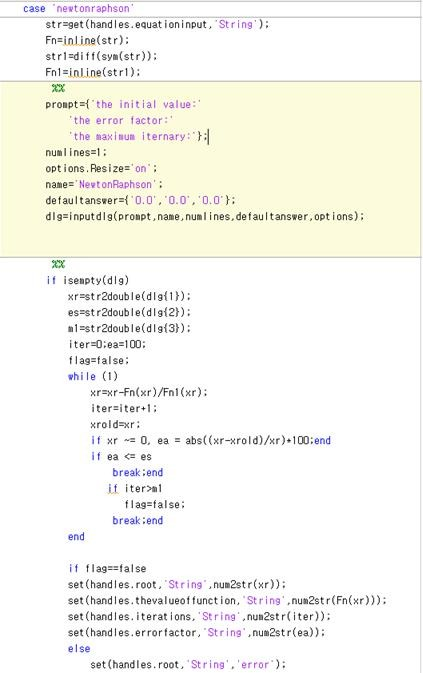
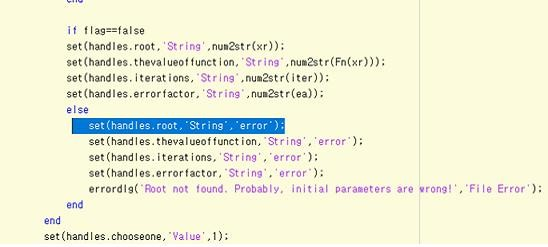
case newtonraphson str get (handles.equat ioninput, String') Fn inline(str) str1 diff (sym(str) Fn1 inline(str): pronpt-f the initial value: the error factor the maxinum iternary: numl ines-1: options. Resize- on neNeetonRaphson defaul t answers dIg-inputdlg(pronpt,name,numl ines,defaultanswer, opt ions): if isenpty(dlg) xrestr2double(dl): es str2double(dlg) n1-str2double(dlgi3t): iter-D:ea 100: flag false: while (1) xrxr-Fn(xr)/Fn1(xr): iter iter xroldaxr if r ~ 0, ea = abs( (xr-arold)/xr)+100:end if ea nl flag false: break:end end if flag false set (handles.root, String,num2str)): set (handles.thevalueoffunction, String num2str Fn(x))) set (handles. iterat ions, 'String ,nun2striter)): set (handles.errorfactor, String ,num2sta)): else set (handles . root,'String','error'); case newtonraphson str get (handles.equat ioninput, String') Fn inline(str) str1 diff (sym(str) Fn1 inline(str): pronpt-f the initial value: the error factor the maxinum iternary: numl ines-1: options. Resize- on neNeetonRaphson defaul t answers dIg-inputdlg(pronpt,name,numl ines,defaultanswer, opt ions): if isenpty(dlg) xrestr2double(dl): es str2double(dlg) n1-str2double(dlgi3t): iter-D:ea 100: flag false: while (1) xrxr-Fn(xr)/Fn1(xr): iter iter xroldaxr if r ~ 0, ea = abs( (xr-arold)/xr)+100:end if ea nl flag false: break:end end if flag false set (handles.root, String,num2str)): set (handles.thevalueoffunction, String num2str Fn(x))) set (handles. iterat ions, 'String ,nun2striter)): set (handles.errorfactor, String ,num2sta)): else set (handles . root,'String','error')
Step by Step Solution
There are 3 Steps involved in it

Get step-by-step solutions from verified subject matter experts
 Study Help