







Question: No paperwork. Excel work inserting formulas step by step Q8. (20 points) PART ONE OF TWO PARTS Student Tech is a computer retailer that sells
No paperwork. Excel work inserting formulas step by step 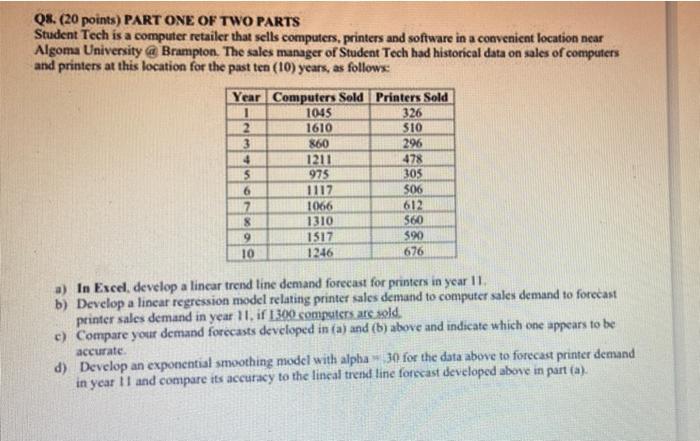
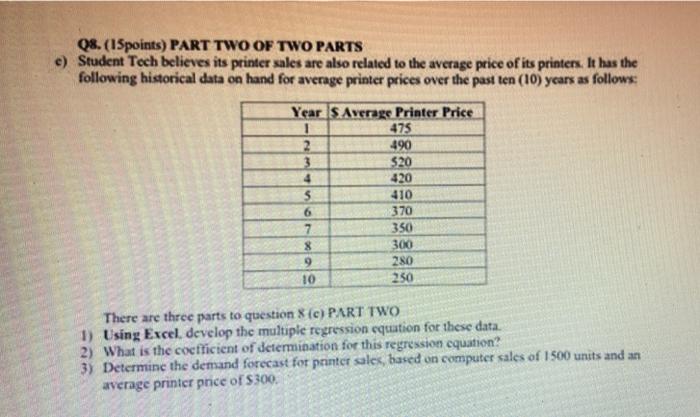
Q8. (20 points) PART ONE OF TWO PARTS Student Tech is a computer retailer that sells computers, printers and software in a convenient location near Algoma University @ Brampton. The sales manager of Student Tech had historical data on sales of computers and printers at this location for the past ten (10) years, as follows: Year Computers Sold Printers Sold 1045 326 2 1610 510 3 860 296 4 1211 478 5 975 305 6 1117 506 7 1066 612 8 1310 $60 9 1517 $90 10 1246 676 a) In Excel, develop a lincar trend line demand forecast for printers in year 11 b) Develop a linear regression model relating printer sales demand to computer sales demand to forecast printer sales demand in year 11, if 1300 computers are sold. e) Compare your demand forecasts developed in (a) and (b) above and indicate which one appears to be accurate d) Develop an exponential smoothing model with alpha 30 for the data above to forecast printer demand in year 11 and compare its accuracy to the lineal trend line forecast developed above in part (a). 08. (15points) PART TWO OF TWO PARTS e) Student Toch believes its printer sales are also related to the average price of its printers. It has the following historical data on hand for average printer prices over the past ten (10) years as follows: Year S Average Printer Price 475 2 490 3 $20 4 420 5 410 6 370 7 350 8 300 9 280 10 250 There are three parts to question 8 (c) PART TWO 1) Using Excel, develop the multiple regression equation for these data. 2) What is the cocfficient of determination for this regression equation? 3) Determine the demand forecast for printer sales, based on computer sales of 1500 units and an average printer price of $300 Step by Step Solution
There are 3 Steps involved in it
1 Expert Approved Answer
Step: 1 Unlock

Question Has Been Solved by an Expert!
Get step-by-step solutions from verified subject matter experts
Step: 2 Unlock
Step: 3 Unlock
 Study Help