







Question: Normal No Spacing Heading 1 Heading 2 Title Subtitle Question 5 Read the scenario below and its corresponding Excel workbook (Figure 2) and answer the
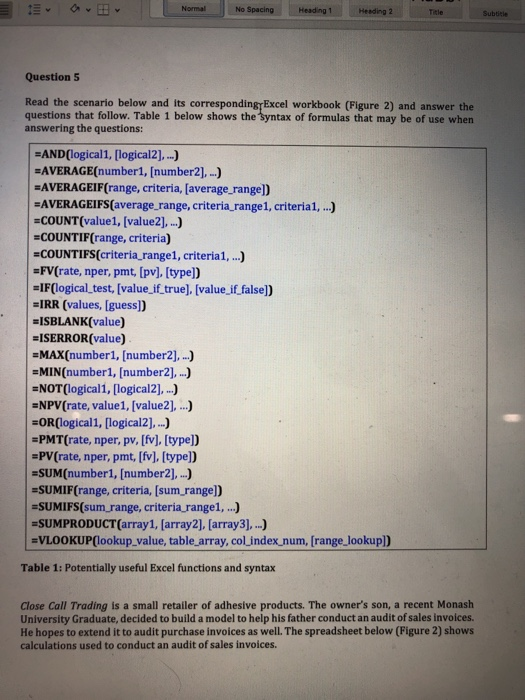
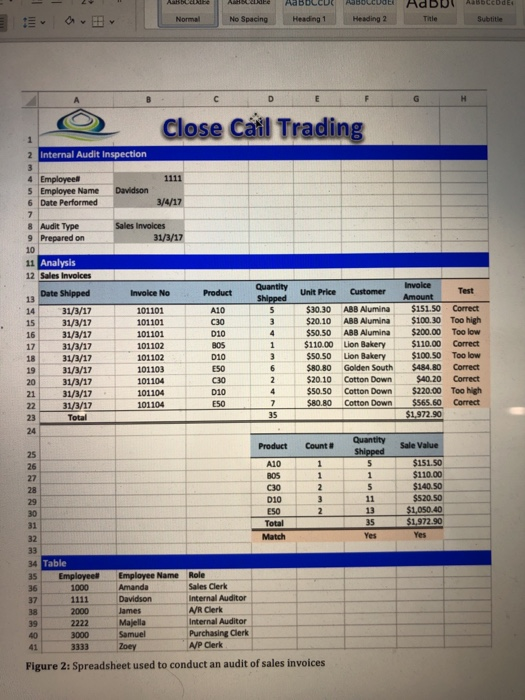
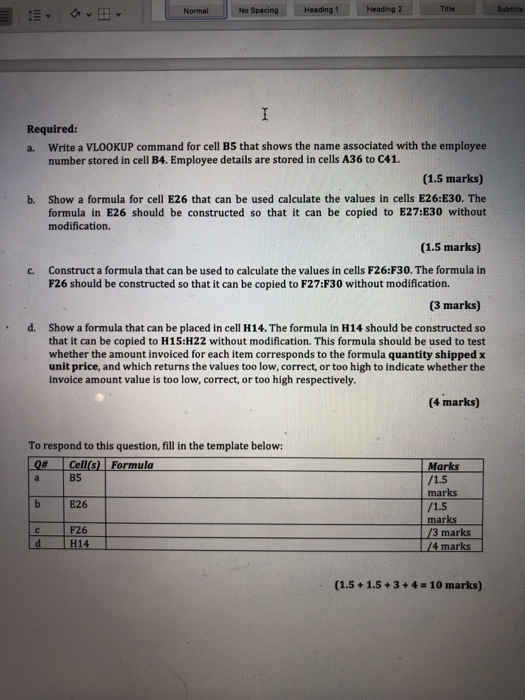
Normal No Spacing Heading 1 Heading 2 Title Subtitle Question 5 Read the scenario below and its corresponding Excel workbook (Figure 2) and answer the questions that follow. Table 1 below shows the Syntax of formulas that may be of use when answering the questions: =AND(logical1, [logical2],...) =AVERAGE(number1, [number2),...) =AVERAGEIF(range, criteria, (average_range]) =AVERAGEIFS(average range, criteria_range1, criteria1, ...) =COUNT(value1, [value2], ...) =COUNTIF(range, criteria) =COUNTIFS(criteria_rangel, criteria1, ...) =FV(rate, nper, pmt, (pv), [type]) =IF(logical_test, [value_if_true) [value_if_false]) =IRR (values, (guess]) =ISBLANK(value) =ISERROR(value) =MAX(number1, [number2], ...) =MIN(number1, (number2], ..) =NOT(logical1, [logical2], ...) =NPV(rate, value1, [value2], ...) =OR(logical1, [logical2],...) =PMT(rate, nper, pv, [fv), [type]) =PV(rate, nper, pmt, [fv), (type]) =SUM(number1, [number2),..) =SUMIF(range, criteria, (sum_range]) =SUMIFS(sum range, criteria_rangel, ...) =SUMPRODUCT (array1, (array2), (array3], ...) =VLOOKUP(lookup_value, table_array, col_index_num, (range_lookup]) Table 1: Potentially useful Excel functions and syntax Close Call Trading is a small retailer of adhesive products. The owner's son, a recent Monash University Graduate, decided to build a model to help his father conduct an audit of sales invoices. He hopes to extend it to audit purchase invoices as well. The spreadsheet below (Figure 2) shows calculations used to conduct an audit of sales invoices. Acte Aabo CUDE co d Aabo CDS Heading 1 Normal No Spacing Heading 2 Title Subtitle D E H Close Cail Trading 2 Internal Audit Inspection 3 4 Employee 1111 5 Employee Name Davidson 6 Date Performed 3/4/17 7 8 Audit Type Sales Invoices 9 Prepared on 31/3/17 10 11 Analysis 12 Sales Invoices Invoice No Product Unit Price Customer 13 14 15 16 17 18 19 20 21 22 23 24 Date Shipped 31/3/17 31/3/17 31/3/17 31/3/17 31/3/17 31/3/17 31/3/17 31/3/17 31/3/17 Total 101101 101101 101101 101102 101102 101103 101104 101104 101104 A10 C30 010 BOS D10 E50 030 D10 E50 Quantity Shipped 5 3 4 1 3 6 2 4 7 35 $30.30 ABB Alumina $20.10 ABB Alumina $50.50 ABB Alumina $110.00 Lion Bakery $50.50 Lion Bakery $80.80 Golden South $20.10 Cotton Down $50.50 Cotton Down $80.80 Cotton Down Invoice Test Amount $151.50 Correct $100.30 Too high $200.00 Too low $110.00 Correct $100.50 Too low $484.80 Correct $40.20 Correct $220.00 Too high $565.60 Correct $1,972.90 Sale Value 1 Quantity Shipped 5 1 5 11 13 35 Yes $151.50 $110.00 $140.50 $520.50 $1,050.40 $1.972.90 Yes Product Count 25 26 A10 27 BOS 1 28 C30 2 29 010 3 30 ESO 2 31 Total 32 Match 33 34 Table 35 Employee Employee Name Role 36 1000 Amanda Sales Clerk 37 Davidson Internal Auditor 38 2000 James AVR Clerk 39 2222 Majella Internal Auditor 40 3000 Samuel Purchasing Clerk 41 3333 Zoey A/P Clerk Figure 2: Spreadsheet used to conduct an audit of sales invoices Normal No Spacing Heading 1 Heading 2 Title Subtitle I Required: a. Write a VLOOKUP command for cell B5 that shows the name associated with the employee number stored in cell B4. Employee details are stored in cells A36 to C41. (1.5 marks) b. Show a formula for cell E26 that can be used calculate the values in cells E26:E30. The formula in E26 should be constructed so that it can be copied to E27:E30 without modification. C. . (1.5 marks) Construct a formula that can be used to calculate the values in cells F26:F30. The formula in F26 should be constructed so that it can be copied to F27:F30 without modification. (3 marks) d. Show a formula that can be placed in cell H14. The formula in H14 should be constructed so that it can be copied to H15:H22 without modification. This formula should be used to test whether the amount invoiced for each item corresponds to the formula quantity shipped x unit price, and which returns the values too low, correct, or too high to indicate whether the invoice amount value is too low, correct, or too high respectively. (4 marks) To respond to this question, fill in the template below: O# Cell s Formula a B5 b E26 Marks /1.5 marks /1.5 marks /3 marks /4 marks d F26 H14 (1.5 +1.5 + 3 + 4 = 10 marks)
Step by Step Solution
There are 3 Steps involved in it

Get step-by-step solutions from verified subject matter experts
 Study Help