





Question: Note: don't run the code just give me answer in 5 to 6 lines thanks. Question: D escribe your observation. If there are differences, describe
Note: don't run the code just give me answer in 5 to 6 lines thanks.
Question: Describe your observation. If there are differences, describe them and why you think this may be happening.  Note: don't run the code just give me answer in 5

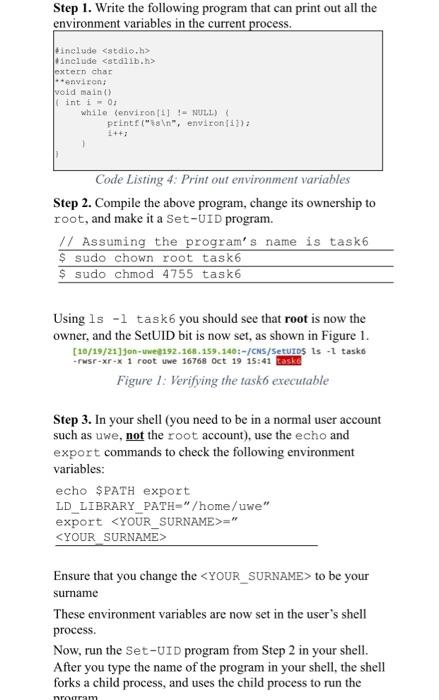
Step 1. Write the following program that can print out all the environment variables in the current process. include include extern char environ void main() (int i0 while (environ :) != NULL) printf(" ", environ 11): Code Listing 4: Print out environment variables Step 2. Compile the above program, change its ownership to root, and make it a Set-UID program. // Assuming the program's name is task6 $ sudo chown root task6 $ sudo chmod 4755 task6 Using ls -l task6 you should see that root is now the owner, and the SetUID bit is now set, as shown in Figure 1. [10/19/21]jon - wwe9192.168.159.140:-/CNS/SetUIDS ts - tasko -rwsr-xr-x 1 root uwe 16768 Oct 19 15:41 taske Figure 1: Verifying the task executable Step 3. In your shell (you need to be in a normal user account such as uwe, not the root account), use the echo and export commands to check the following environment variables: echo $PATH export LD LIBRARY PATH="/home/uwe" export " Ensure that you change the to be your surname These environment variables are now set in the user's shell process. Now, run the Set-UID program from Step 2 in your shell. After you type the name of the program in your shell, the shell forks a child process, and uses the child process to run the niniram

Step by Step Solution

There are 3 Steps involved in it

1 Expert Approved Answer
Step: 1 Unlock blur-text-image
Question Has Been Solved by an Expert!

Get step-by-step solutions from verified subject matter experts

Step: 2 Unlock
Step: 3 Unlock

Students Have Also Explored These Related Databases Questions!