



Question: Note: In this chapter and in all succeeding work throughout the course, unless instructed otherwise, use the following rates, ceilling, and maximum taxes. Employee and
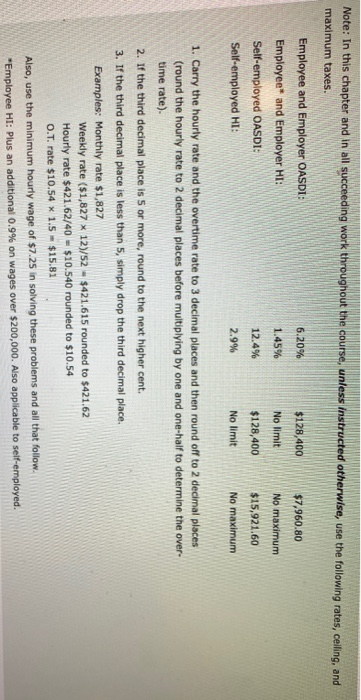
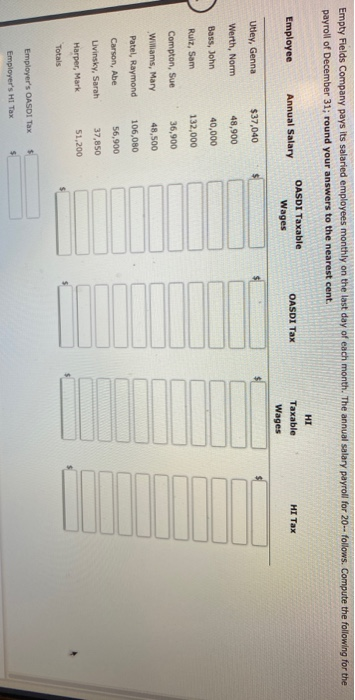
Note: In this chapter and in all succeeding work throughout the course, unless instructed otherwise, use the following rates, ceilling, and maximum taxes. Employee and Employer OASDI: 6.20% $128,400 $7,960.80 Employee* and Employer HI: 1.45% No limit No maximum Self-employed OASDI: 12.4% $128,400 $15,921.60 Self-employed HI: 2.9% No limit No maximum 1. Carry the hourly rate and the overtime rate to 3 decimal places and then round off to 2 decimal places (round the hourly rate to 2 decimal places before multiplying by one and one-half to determine the over- time rate). 2. If the third decimal place is 5 or more, round to the next higher cent. 3. If the third decimal place is less than 5, simply drop the third decimal place. Examples: Monthly rate $1,827 Weekly rate ($1,827 x 12)/52 - $421.615 rounded to $421.62 Hourly rate $421.62/40 - $10.540 rounded to $10.54 O.T. rate $10.54 x 1.5 $15.81 Also, use the minimum hourly wage of $7.25 in solving these problems and all that follow. "Employee HI: Plus an additional 0.9% on wages over $200,000. Also applicable to self-employed. Empty Fields Company pays its salaried employees monthly on the last day of each month. The annual salary payroll for 20-- follows. Compute the following for the payroll of December 31; round your answers to the nearest cent. HI OASDI Taxable Employee Annual Salary OASDI Tax able HI Tax Wages Wages Utley, Genna $37,040 Werth, Norm 48,900 Bass, John 40,000 Ruiz, Sam 132,000 Compton, Sue 36,900 Williams, Mary 48,500 Patel, Raymond 106,080 Carson, Abe 56,900 Livinsky, Sarah 37,850 Harper, Mark 51,200 Totals Employer's OASDI Tax Employer's HI Tax
Step by Step Solution
There are 3 Steps involved in it

Get step-by-step solutions from verified subject matter experts