







Question: Note: Modify the code below using specific functions as stated in the question. Please do not use arrays or struct statements. I'm yet to take
Note: Modify the code below using specific functions as stated in the question. Please do not use arrays or struct statements. I'm yet to take that this semseter. Obviously, you can/should use if/switch/while/do statemets to make functions work properly.
Here is the code that needs to be modified:
//header files
#include
using namespace std;
//main function
int main()
{
//variable declaraion
double area=0.0, // the area of the shape
firstDimension=0.0,
// the first dimension of the shape: the circle's area,
// the rectangle's width, the triangles height, and the
// base of the trapezoid
secondDimension=0.0,
// the second dimension (if any) of the shape: the rectangle's width,
// the triangle's base, and the top of the trapezoid
thirdDimension=0.0;
// the third (if any) of the shape: the height of the trapezoid
char choice; //the menu choice by the user
//user menu choice
cout
//user input
cout
cin >> choice;
switch(choice)
{
//calculating and printing the area of a circle
case 'C': case 'c':
cout
cin >> firstDimension;
area = 3.1415 * firstDimension * firstDimension;
cout
break;
//calculating and printing the area of a rectangle
case 'R': case 'r':
cout
cin >> firstDimension;
cout
cin >> secondDimension;
area = firstDimension * secondDimension;
cout
break;
//calculating and printing the area of a triangle
case 'T': case 't':
cout
cin >> firstDimension;
cout
cin >> secondDimension;
area = 0.5 * firstDimension * secondDimension;
cout
break;
//calculating and printing the area of a trapezoid
case 'P': case 'p':
cout
cin >> firstDimension;
cout
cin >> secondDimension;
cout
cin >> thirdDimension;
area = ((firstDimension + secondDimension)/2) * thirdDimension;
cout
break;
//defalut case, when user selects wrong option from menu
default:
cout
}
return 0;
}
This is how the code must be executable:
Shape Menu
[C]ircle
[R]ectangle
[T]riangle
Tra[p]ezoid
[Q]uit
Shape (C, R, T, P, or Q)? C
Radius? 7.8
The area of your shape is 191.134 square units.
Shape Menu
[C]ircle
[R]ectangle
[T]riangle
Tra[p]ezoid
[Q]uit
Shape (C, R, T, P, or Q)? R
Width? 12.2
Height? 7.8
The area of your shape is 95.16 square units.
Shape Menu
[C]ircle
[R]ectangle
[T]riangle
Tra[p]ezoid
[Q]uit
Shape (C, R, T, P, or Q)? T
Base? 7.2
Height? 4.44
The area of your shape is 15.984 square units.
Shape Menu
[C]ircle
[R]ectangle
[T]riangle
Tra[p]ezoid
[Q]uit
Shape (C, R, T, P, or Q)? P
Top? 10.5
Base? 17.2
Height? 5.72
The area of your shape is 79.222 square units.
Shape Menu
[C]ircle
[R]ectangle
[T]riangle
Tra[p]ezoid
[Q]uit
Shape (C, R, T, P, or Q)? Q
Good-bye!
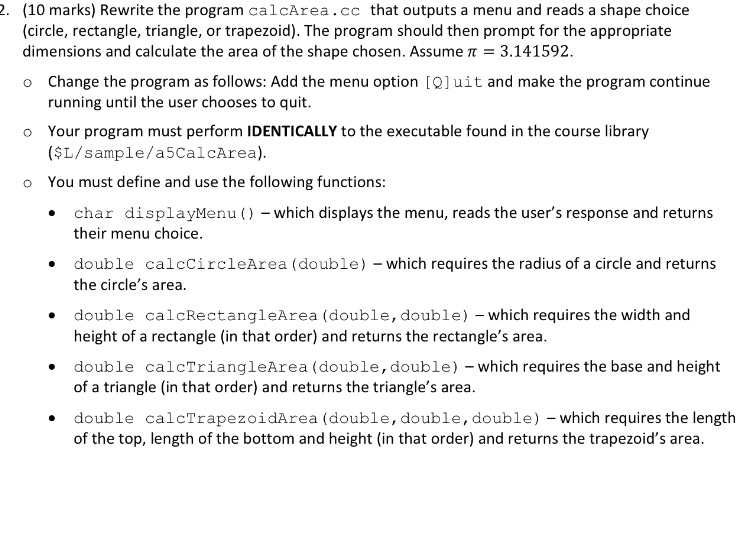
2. (10 marks) Rewrite the program caloArea.CC that outputs a menu and reads a shape choice (circle, rectangle, triangle, or trapezoid). The program should then prompt for the appropriate dimensions and calculate the area of the shape chosen. Assume J 3.141592 o Change the program as follows: Add the menu option CQ]uit and make the program continue running until the user chooses to quit. o Your program must perform IDENTICALLY to the executable found in the course library (SL/sample/a5CalcArea). o You must define and use the following functions: char display Menu which displays the menu, reads the user's response and returns their menu choice. double calcCircleArea (double) which requires the radius of a circle and returns the circle's area. double calcRectangleArea (double, double) which requires the width and height of a rectangle (in that order) and returns the rectangle's area. double calcTriangleArea (double, double) which requires the base and height of a triangle (in that order) and returns the triangle's area. double calcTrapezoidArea (double, double, double) which requires the length of the top, length of the bottom and height (in that order) and returns the trapezoid's area
Step by Step Solution
There are 3 Steps involved in it

Get step-by-step solutions from verified subject matter experts
 Study Help