







Question: Note: Please follow the instructions below and write a report by answering the questions and upload the report (named as Lab4 _P1 FirstNameLastName.pdf or Lab4_FirstNameLastName.doc)
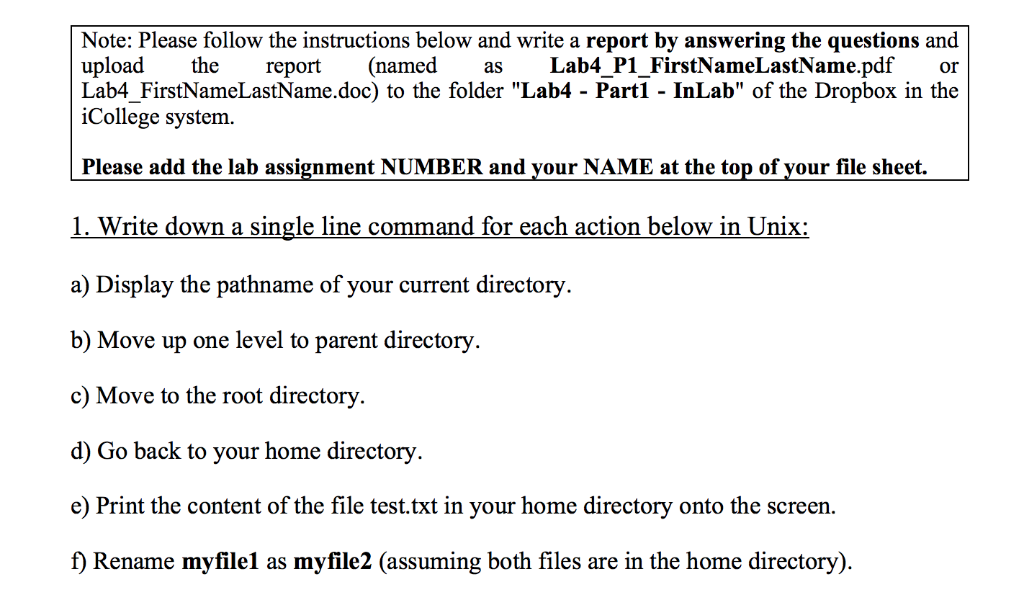
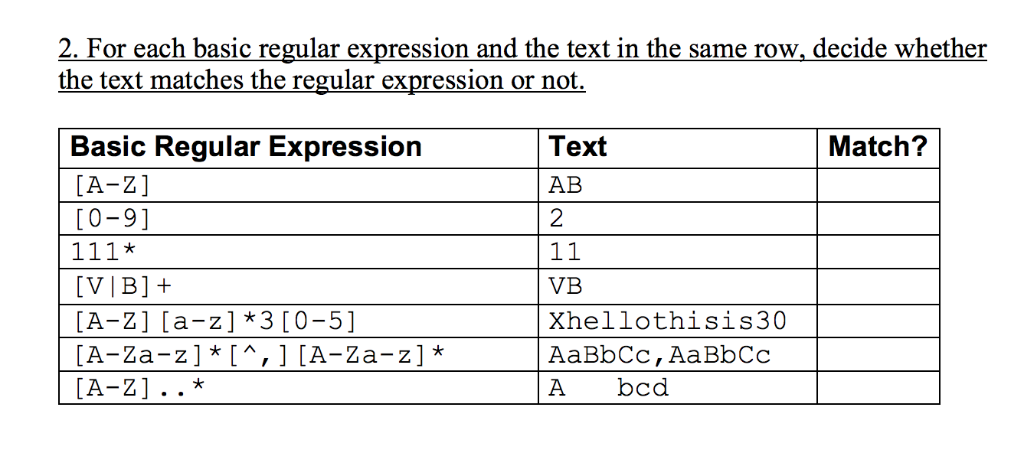
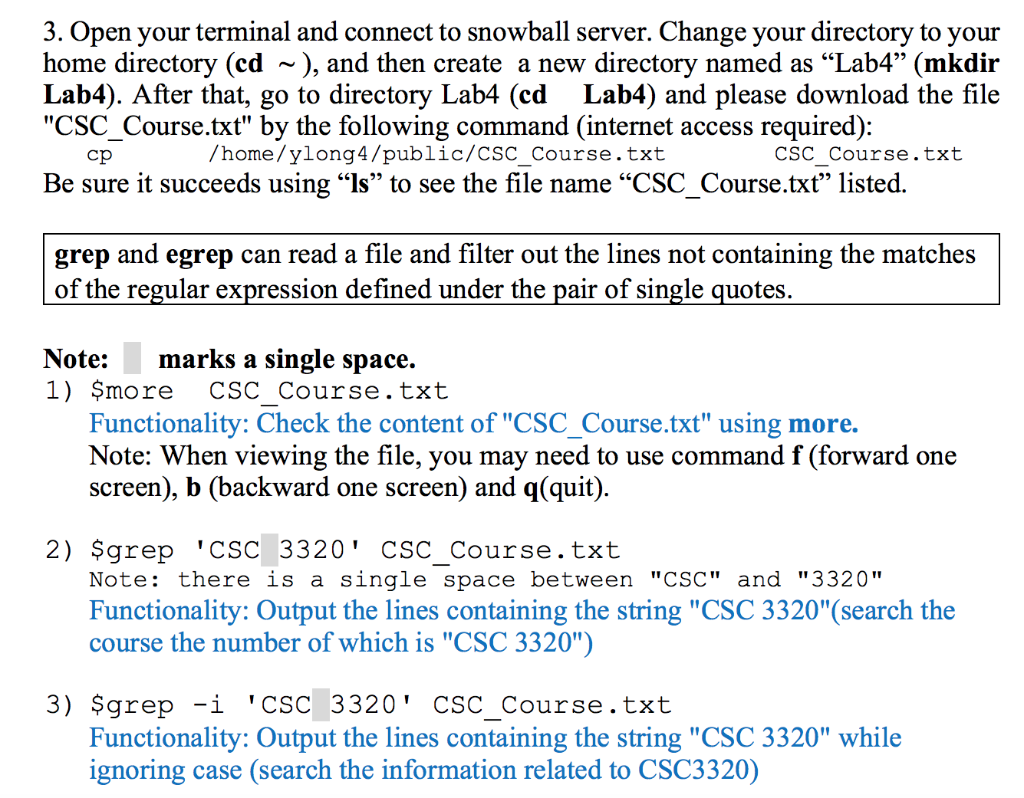
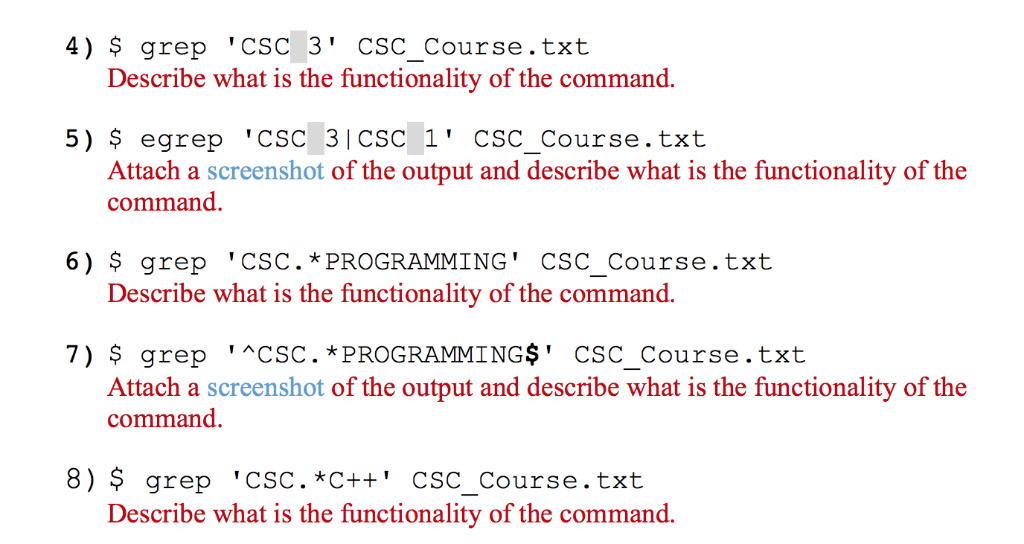
Note: Please follow the instructions below and write a report by answering the questions and upload the report (named as Lab4 _P1 FirstNameLastName.pdf or Lab4_FirstNameLastName.doc) to the folder "Lab4 - Part1 - InLab" of the Dropbox in the iCollege system. Please add the lab assignment NUMBER and your NAME at the top of your file sheet. 1. Write down a single line command for each action below in Unix: a) Display the pathname of your current directory b) Move up one level to parent directory c) Move to the root directory. d) Go back to your home directory e) Print the content of the file test.txt in your home directory onto the screen. f) Rename myfile1 as myfile2 (assuming both files are in the home directory) 2. For each basic regular expression and the text in the same row, decide whether the text matches the regular expression or not. Text AB 2 Basic Regular Expression Match? [A-Z] 0-9] [A-Z] [a-z] 3 [0-5] [A-Za-z]*[A-Za-z VB Xhellothisis30 AaBbCc, AaBbCc A bcd 3. Open your terminal and connect to snowball server. Change your directory to your home directory (cd ~), and then create a new directory named as "Lab4" (mkdir Lab4). After that, go to directory Lab4 (cd Lab4) and please download the file "CSC_Course.txt" by the following command (internet access required): home/ylonq4/public/CSC Course.txt CSC Course.txt Be sure it succeeds using "Is to see the file name "CSC-Course.txt" listed grep and egrep can read a file and filter out the lines not containing the matches of the regular expression defined under the pair of single quotes. Note:marks a single space. 1) more CSC Course.txt Functionality: Check the content of "CSC_Course.txt" using more. Note: When viewing the file, you may need to use command f (forward one screen), b (backward one screen) and q(quit) 2) qrep 'CSC 3320' CSC Course.txt Note: there is a single space between "CSC" and "3320" Functionality: Output the lines containing the string "CSC 3320"(search the course the number of which is "CSC 3320" 3) $grep -i 'CSC 3320' CSC Course.txt Functionality: Output the lines containing the string "CSC 3320" while ignoring case (search the information related to CSC3320) 4) $ qrep 'CSC 3' CSC Course.txt Describe what is the functionality of the command. 5) egrep 'CSC 31CSC 1' csC Course.txt Attach a screenshot of the output and describe what is the functionality of the command 6) $ grep 'CSC. * PROGRAMMING' CSC Course.txt Describe what is the functionality of the command. 7) $ grep 'CSC. *PROGRAMMINGS' CSC_Course.txt Attach a screenshot of the output and describe what is the functionality of the command. 8) $grep 'CSC. *C++' CSC_Course.txt Describe what is the functionality of the command
Step by Step Solution
There are 3 Steps involved in it

Get step-by-step solutions from verified subject matter experts
 Study Help