Question: Note: Remember, there may be more than one command or syntax that can help you make the modification. Check all that apply. Add a new
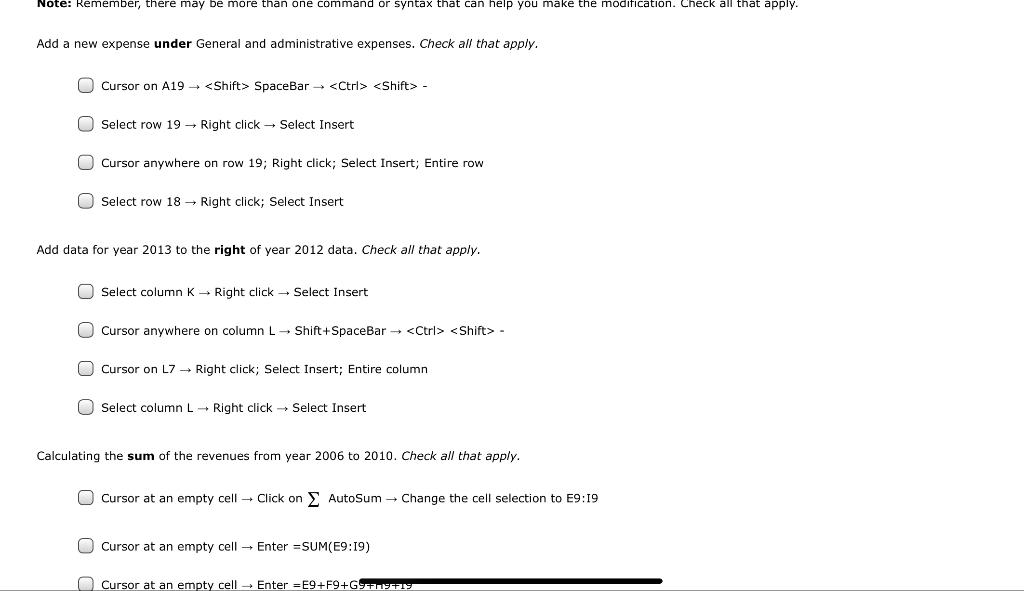
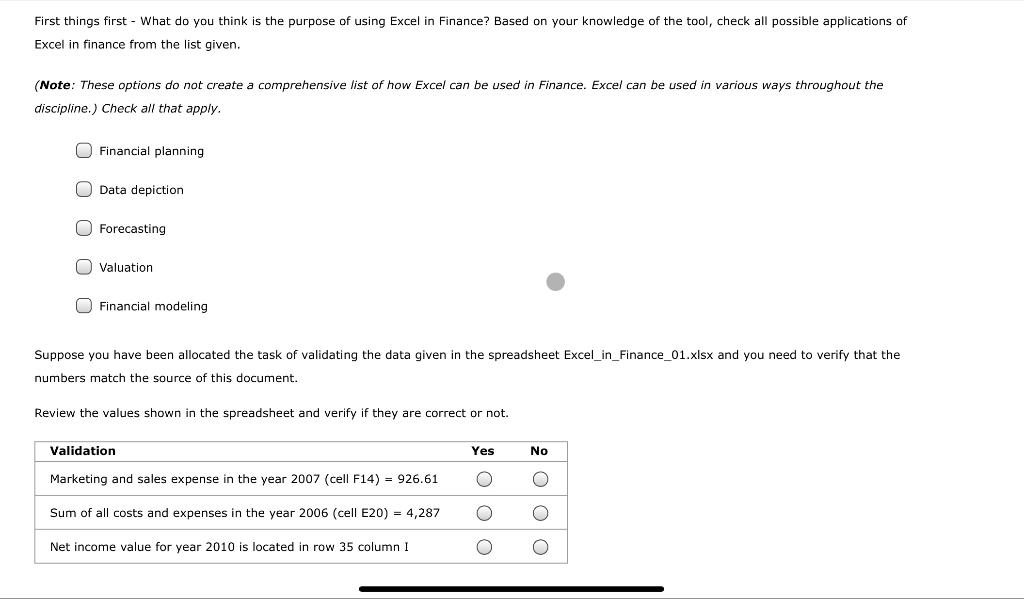
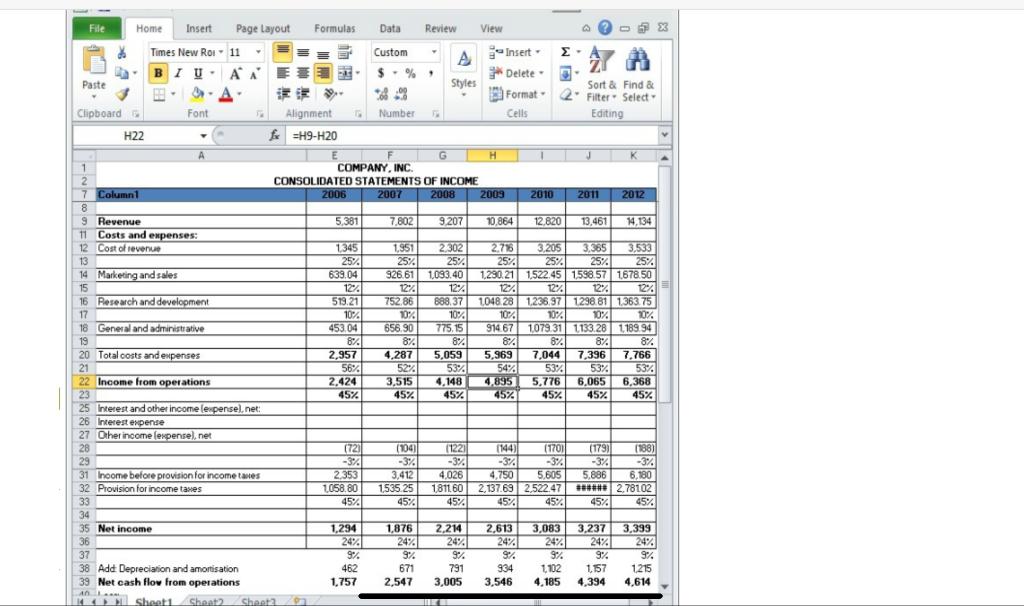
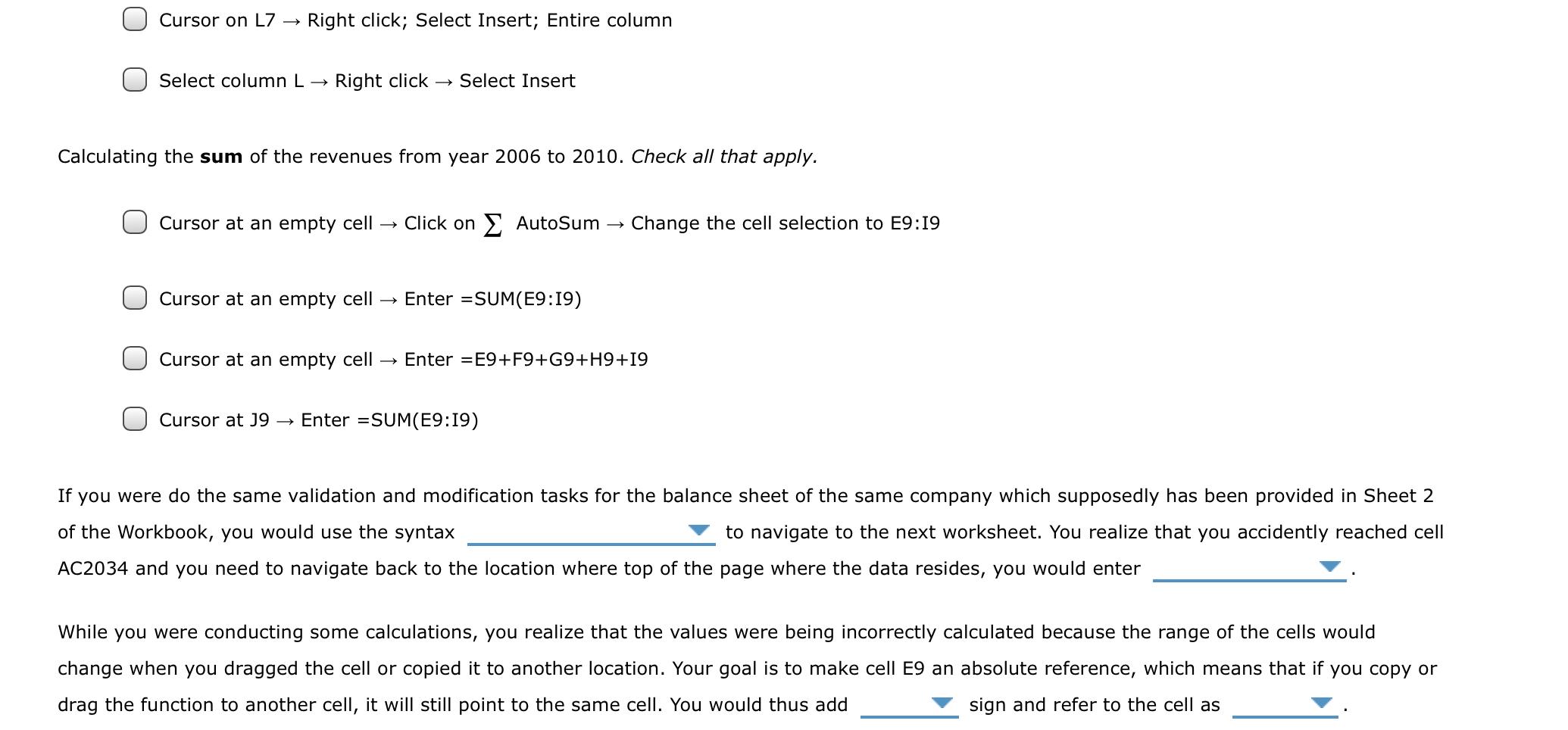
Note: Remember, there may be more than one command or syntax that can help you make the modification. Check all that apply. Add a new expense under General and administrative expenses. Check all that apply. O Cursor on A19 - SpaceBar + - O Select row 19 - Right click Select Insert O Cursor anywhere on row 19; Right click; Select Insert; Entire row O Select row 18 Right click; Select Insert Add data for year 2013 to the right of year 2012 data. Check all that apply. O Select column K - Right click Select Insert O Cursor anywhere on column L-Shift+SpaceBar - Cursor on L7 Right click; Select Insert; Entire column O Select column L Right click Select Insert Calculating the sum of the revenues from year 2006 to 2010. Check all that apply. Cursor at an empty cell Click on AutoSum - Change the cell selection to E9:19 O Cursor at an empty cell - Enter =SUM(E9:19) O Cursor at an empty cell + Enter E9+F9+GFERTE First things first - What do you think is the purpose of using Excel in Finance? Based on your knowledge of the tool, check all possible applications of Excel in finance from the list given. (Note: These options do not create a comprehensive list of how Excel can be used in Finance. Excel can be used in various ways throughout the discipline.) Check all that apply. O Financial planning O Data depiction O Forecasting O Valuation O Financial modeling Suppose you have been allocated the task of validating the data given in the spreadsheet Excel_in_Finance_01.xlsx and you need to verify that the numbers match the source of this document. Review the values shown in the spreadsheet and verify if they are correct or not. Validation Yes No Marketing and sales expense in the year 2007 (cell F14) = 926.61 Sum of all costs and expenses in the year 2006 (cell E20) = 4,287 a OOO Net income value for year 2010 is located in row 35 column I O File Home Insert Page Layout Formulas Data Review View A Times New Roi 11 Custom A Insert BIU. A $ % * Delete Paste Styles Sort & Find & | Format 2" Filter Select Clipboard Font Alignment Number Cells Editing H22 E =H9-H20 G H K 1 COMPANY, INC. 2 CONSOLIDATED STATEMENTS OF INCOME 7 7 Column1 2006 2007 2008 2009 2010 2011 2012 8 9 Revenue 5.381 7,802 9.207 10,864 12.820 13,461 14,134 11 Costs and expenses: 12 Cost of revenue 1345 1.951 2 302 2.716 3,205 3,365 3,533 13 25% 25% 25% 25% 25% 25% 25% 14 Marketing and sales 639.04 926.61 1,093.40 1.230.21 1522.45 1598.57 1678.50 15 124 12% 12% 12%. 12% 12% 12% 16 Research and development 519.21 752.86 888.37 1048 28 1.238.97 1298.81 1363.75 17 10% 10% 10% 10% 10% 10% 10% 18 General and administrative 453.04 656.90 775.15 914.67 1.079,31 1133.281189.94 19 8% 8% 8% 8/4 8% 8% 8% 20 Total costs and expenses 2,957 4,287 5,059 5.969 7,044 7,396 7.766 21 56% 52% 53% 54% 53% 53% 53% 22 Income from operations 2.424 3,515 4,148 4,895 5,776 6.065 6,368 23 45% 45% 45%. 45% 45% 45% 45% 25 Interest and other income expensel.net 26 Interest expense 27 Other income lexpense), net 28 (72) (104) (122) (144) (17011 (179) (188) 29 -3% -3% -3% -3% -3% -3% 31 Income before provision for income tantes 2 353 3,412 4,026 4,750 5,605 5.886 6,180 32 Provision for income taxes 1.058.80 1535 25 181160 2.137.69 2.522.47 ****** 2.78102 33 45% 45% 45% 45%. 45% 45% 45% 34 35 Net income 1,294 1,876 2.214 2,613 3,083 3.237 3,399 36 24% 24% 24% 24% 24% 24% 24% 37 9%. 9% 97 9% 3% 9% 9% 38 Add Depreciation and amortisation 462 671 791 934 1102 1,157 1215 39 Net cash flow from operations 1,757 2,547 3,005 3,546 4.185 4,394 4.614 AL Sheet Shent? Shanta Cursor on L7 Right click; Select Insert; Entire column Select column L Right click Select Insert Calculating the sum of the revenues from year 2006 to 2010. Check all that apply. Cursor at an empty cell Click on AutoSum Change the cell selection to E9:19 Cursor at an empty cell Enter =SUM(E9:19) Cursor at an empty cell Enter =E9+F9+G9+H9+19 Cursor at 39 Enter =SUM(E9:19) If you were do the same validation and modification tasks for the balance sheet of the same company which supposedly has been provided in Sheet 2 of the Workbook, you would use the syntax to navigate to the next worksheet. You realize that you accidently reached cell AC2034 and you need to navigate back to the location where top of the page where the data resides, you would enter While you were conducting some calculations, you realize that the values were being incorrectly calculated because the range of the cells would change when you dragged the cell or copied it to another location. Your goal is to make cell E9 an absolute reference, which means that if you copy or drag the function to another cell, it will still point to the same cell. You would thus add sign and refer to the cell as









 Study Help