







Question: NOTE: The 3 files needed are below. The main goal is just add GUI to the code along with the needed text files. VendingMachineDriver.java import
![import java.io.FileNotFoundException; import java.util.Scanner; public class VendingMachineDriver { public static void main(String[]](https://dsd5zvtm8ll6.cloudfront.net/si.experts.images/questions/2024/09/66f57f754cb8a_98066f57f74a788f.jpg) NOTE: The 3 files needed are below. The main goal is just add GUI to the code along with the needed text files.
NOTE: The 3 files needed are below. The main goal is just add GUI to the code along with the needed text files.
VendingMachineDriver.java
import java.io.FileNotFoundException;
import java.util.Scanner;
public class VendingMachineDriver {
public static void main(String[] args){
boolean exit = false;
Scanner scnr = new Scanner(System.in);
VendingMachine drinks = null;// creates a VendingMachine object for the drink machine
VendingMachine snacks = null;// creates a VendingMachine object for the snacks machine
//reads in the correct file and sends it to VendingMachine constructor to create a stock[]
//of each file
try {
drinks = new VendingMachine("data/drinks.txt");
snacks = new VendingMachine("data/snacks.txt");
} catch (FileNotFoundException e) {
// TODO Auto-generated catch block
e.printStackTrace();
}
System.out.println("Welcome to Matt's Super Vending Machines!");
System.out.println(" I sense that you are hungry or thirsty...");
// allows user to chose their machine or exit the program
while(!exit){
System.out.println(" Please select a vending machine:");
System.out.print("A-Drinks, B-Snacks, X-Exit: ");
String machineChoice = scnr.next();
if(machineChoice.equalsIgnoreCase("a")){
drinks.printMenu(drinks.getStock());
}
else if(machineChoice.equalsIgnoreCase("b")){
snacks.printMenu(snacks.getStock());
}else if(machineChoice.equalsIgnoreCase("x")){
exit = true;
break;
}
else{
System.out.println("Invalid selection try again.");
}
}
//gets the money earned from snack machine and drink machine and displays it for the total earnings
System.out.printf(" The vending machine has made $%.02f. Thank you for your business!", (snacks.getMoney()+drinks.getMoney()));
scnr.close();
}
}
VendingMachine.java
import java.io.*; import java.util.InputMismatchException; import java.util.Scanner;
public class VendingMachine {
//data members
private Item[] stock; //Array of Item objects in machine
private double money; //Amount of revenue earned by machine
/*********************************************************************
* This is the constructor of the VendingMachine class that take a
* file name for the items to be loaded into the vending machine.
*
* It creates objects of the Item class from the information in the
* file to populate into the stock of the vending machine. It does
* this by looping the file to determine the number of items and then
* reading the items and populating the array of stock.
*
* @param filename Name of the file containing the items to stock into
* this instance of the vending machine.
* @throws FileNotFoundException If issues reading the file.
*********************************************************************/
public VendingMachine(String filename) throws FileNotFoundException{
//Open the file to read with the scanner
File file = new File(filename);
Scanner scan = new Scanner(file);
//Determine the total number of items listed in the file
int totalItem = 0;
while (scan.hasNextLine()){
scan.nextLine();
totalItem++;
} //End while another item in file
//Create the array of stock with the appropriate number of items
stock = new Item[totalItem];
scan.close();
//Open the file again with a new scanner to read the items
scan = new Scanner(file);
int itemQuantity = -1;
double itemPrice = -1;
String itemDesc = "";
int count = 0;
String line = "";
//Read through the items in the file to get their information
//Create the item objects and put them into the array of stock
while(scan.hasNextLine()){
line = scan.nextLine();
String[] tokens = line.split(",");
try {
itemDesc = tokens[0];
itemPrice = Double.parseDouble(tokens[1]);
itemQuantity = Integer.parseInt(tokens[2]);
stock[count] = new Item(itemDesc, itemPrice, itemQuantity);
count++;
} catch (NumberFormatException nfe) {
System.out.println("Bad item in file " + filename +
" on row " + (count+1) + ".");
}
} //End while another item in file
scan.close();
//Initialize the money data variable.
money = 0.0;
} //End VendingMachine constructor
public void setMoney(Double money){
this.money = this.money + money;
}
public double getMoney(){
return money;
}
public Item[] getStock(){
return stock;
}
//method to handle the vending transaction
public void vend(Item[] userMachine){
Scanner scnr = new Scanner(System.in);
double userMoney = 0;
double userChoice = 0;
int userInput = 0;
do{
try{
System.out.print(" Please enter some money into the machine.(Enter -1 to exit.)");
userChoice = scnr.nextFloat();
}catch(InputMismatchException e){
scnr.next();
System.out.println("Invalid input try again.");
continue;
}
userMoney += userChoice;
//exits the machine if user desires
if(userChoice == -1){
System.out.printf("You did not buy anything from this machine. Your change is $%.2f. ",(userMoney+1));
break;
}
if(userMoney
userMoney -= userChoice;
System.out.println("Please input a proper amount.");
continue;
}
//lets user make a choice of item in the vending machine and handles the transaction appropriately
else if(userChoice >= 0){
System.out.printf(" You now have $%.02f to spend. Please make a selection (enter 0 to exit)",userMoney );
boolean success = false;
while(!success){
try{
userInput = scnr.nextInt();
success = true;
}catch(InputMismatchException e){
scnr.next();
System.out.print("Invalid entry try again: ");
continue;
}
}
}
if(userInput == 0){
continue;
}
while(userInput > userMachine.length){
System.out.print("Invalid selection please try again: ");
userInput = scnr.nextInt();
}
if(userInput != 0){
if(userMoney
System.out.print(outputMessage(1));
continue;
}
while(userMachine[userInput-1].getQuantity() == 0){
System.out.print(outputMessage(2));
System.out.printf(" You now have $%.02f to spend. Please make a selection (enter 0 to exit)",userMoney );
userInput = scnr.nextInt();
}
System.out.printf("You bought %s for $%.02f your change is $%.02f. ",userMachine[userInput-1].getDescription(),userMachine[userInput-1].getPrice(), (userMoney - userMachine[userInput-1].getPrice()));
userMachine[userInput-1].setQuantity(userMachine[userInput-1].getQuantity() - 1);
setMoney(userMachine[userInput-1].getPrice());
break;
}
else{
System.out.println("Invalid choice. Please try again");
continue;
}
}while(userMoney != -1);
scnr.nextLine();
}
//returns the proper message if vend has an issue
public String outputMessage(Integer message){
String msg = "";
String msg1 = "You do not have enough money. Please add more money or exit.";
String msg2 = "Sorry the machine is currently out of that item.";
switch(message){
case(1):
msg = msg1;
break;
case(2):
msg = msg2;
break;
}
return msg;
}
//Creates and prints the menu of the vending machine
public void printMenu(Item[] machineChoice){
System.out.format("Menu: %s %5s %10s %5s ","Item#","Item","Price","Qty");
for(int i=0; i
System.out.printf(" %-4s %-9s %-7.2f %s ", (i+1), machineChoice[i].getDescription(),machineChoice[i].getPrice(),machineChoice[i].getQuantity());
}
vend(machineChoice);
}
}
Item.java
public class Item {
private String description;
private double price;
private int quantity;
public Item(String itemDesc, double itemPrice, int itemQuantity){
this.description = itemDesc;
this.price = itemPrice;
this.quantity = itemQuantity;
}
public void setQuantity(int itemQuantity){
this.quantity = itemQuantity;
}
public void setPrice(double itemPrice){
this.price = itemPrice;
}
public void setDescription(String itemDesc){
this.description = itemDesc;
}
public String getDescription(){
return description;
}
public double getPrice(){
return price;
}
public int getQuantity(){
return quantity;
}
}
snacks.txt
Gummies,1.50,6 Chips,1.00,6 Raisins,1.25,5 Pretzels,1.50,6 Cookies,1.75,5 Peanuts,1.25,4 Gum,0.75,2
drinks.txt
Milk,2.00,1 OJ,2.50,6 Water,1.50,10 Soda,2.25,6 Coffee,1.25,4 Monster,3.00,5
Test.txt
Test 1: VendingMachineDriver.java- This test is to make sure the main program starts ok and allows the user to select the proper vendingmachines or exit the machines when done. Making sure it handles recieving impropper inputs.
Input tests and desired outcome for select a vendingmachine A-drinks B-Snacks X-Exit:
Input A or a, desired outcome:display the drinks vending machine. success
Input B or b, desired outcome:display the snacks vending machine. success
Input -1 or 55555 or aB, desired outcome display invalid selection and continue asking for input success
Input x or X, desired outcome display money earned and thank the user. success
Test 2) Snack machine- This test was to make sure the snack machine is working properly Will test ordering a variety of snacks making sure money is excepted and properly displayed as well as making sure quantity is updated correctly. Also make sure the machine lets the user exit if they input that. Make sure improper inputs aren't accepted. It will also inform user if they need to add more money to complete purchase.
Input for money and item
Input 2, 1. desired outcome to add $2.00 to the machine and order item 1 which is gummies that cost 1.50. Complete the purchase and give the user .50 in change back and change quantity of gummies to 5. success
input 1,4,1,4 desired outcome is to add $1 to the machine and try to purchase item 4 pretzels that cost 1.50. The machine should inform that there isn't enough money and ask the user to add more. The user adds another dollar machine displays $2 and the purchase is completed like normal. success
input -1. desired outcome tell the user they didn't buy anything and exit the machine. success
input 1,0,-1. desired outcome add $1 to machine then user changes mind and wants to exit. exits the machine and gives the user their dollar back. success
input 3,66666,6 desired outcome put $3 in machine tell the user invalid selection and to retry then succesfully complete the transaction. success
test 3) Make sure income of the machine is calculated correctly.
Inputs From the start.
A,3,4,b,3,4,x. desired result drink machine, add $3 and buy soda for $2.25. Then snack machine add $3 and buy pretzels for $1.50 then exit the program and display money earned by the machine to be $3.75. success
Test 4) Make sure the text files are read in correctly and all the information is correct.
try/catch during file reading no issues updated quantities and names inside text files and everything was updated accordingly. changed all information back to original file and still works.
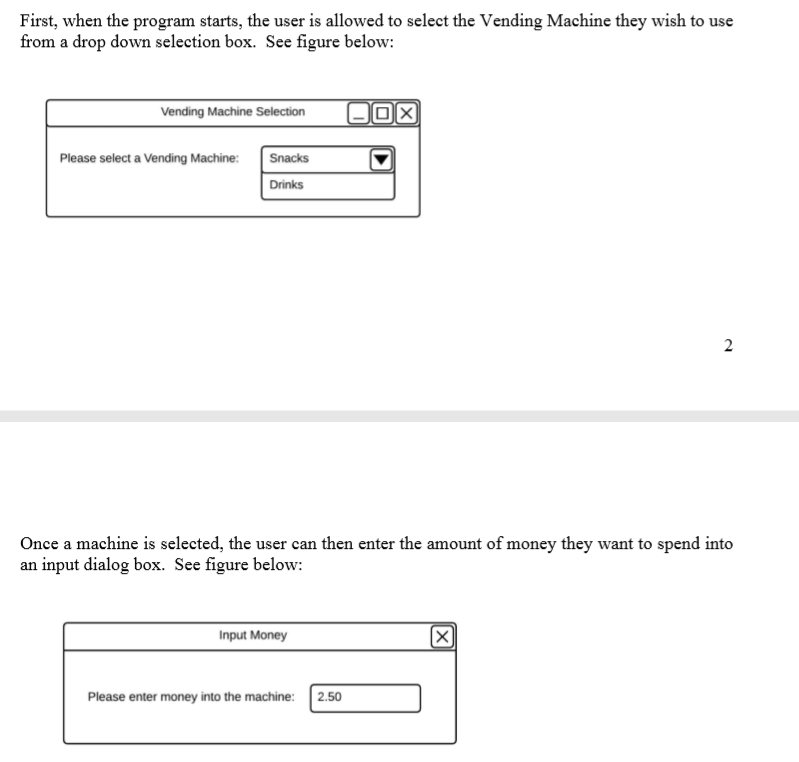
First, when the program starts, the user is allowed to select the Vending Machine they wish to use from a drop down selection box. See figure below: Vending Machine SelectionDX Please select a Vending Machine: Snacks Drinks Once a machine is selected, the user can then enter the amount of money they want to spend into an input dialog box. See figure below: Input Money Please enter money into the machine: 2.50
Step by Step Solution
There are 3 Steps involved in it

Get step-by-step solutions from verified subject matter experts
 Study Help