Question: Please help implement FileSystem.java using the BST structure. The FIleData class is here The BST.java is here, you don't need to implement it. You can
Please help implement FileSystem.java using the BST structure.
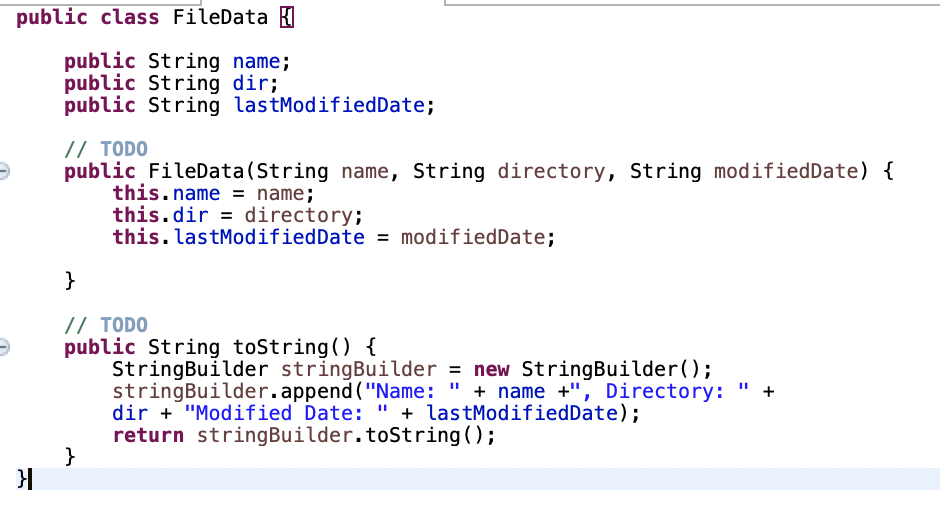
The FIleData class is here
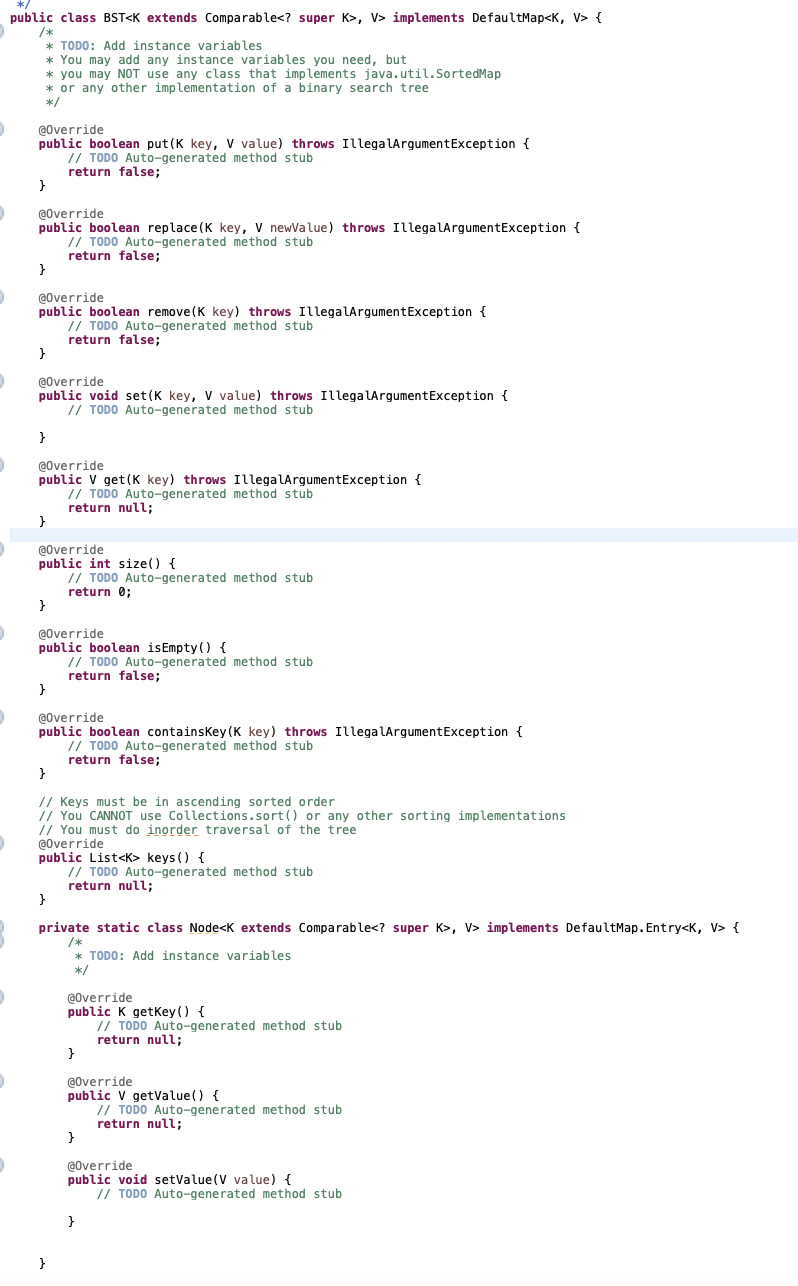
The BST.java is here, you don't need to implement it. You can use the methods in it.
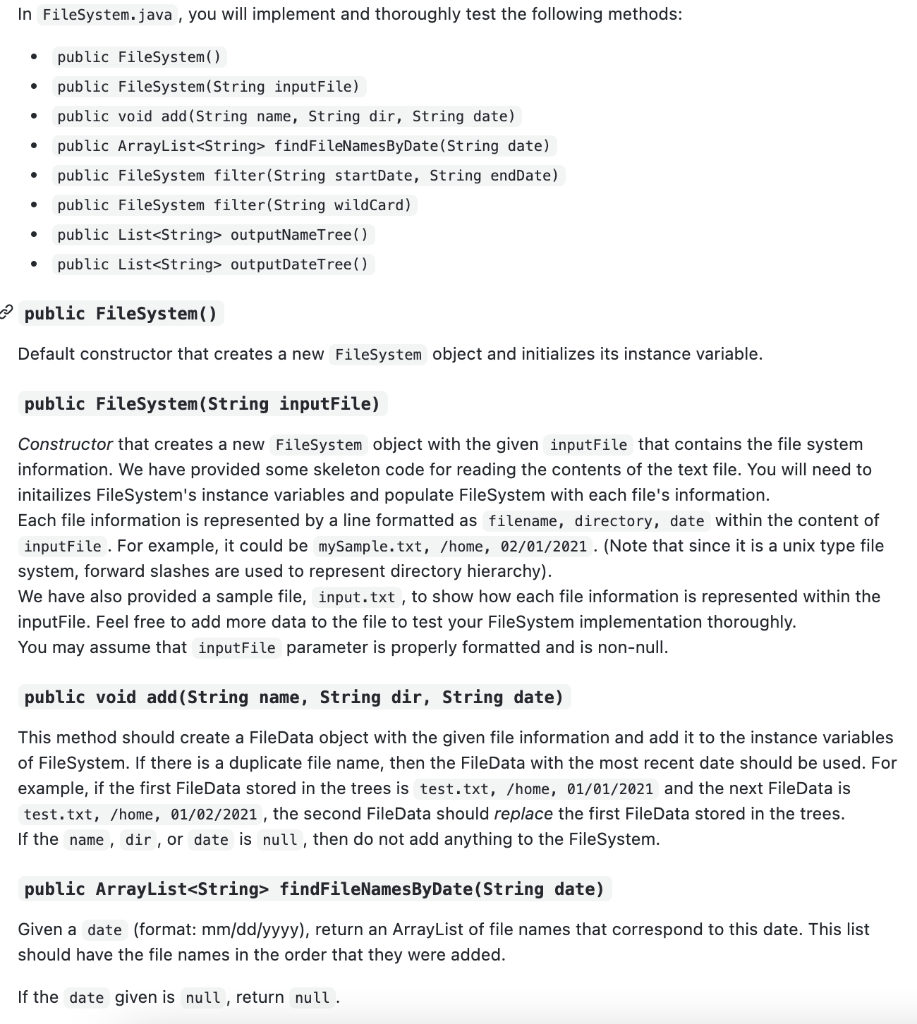
This is some description:
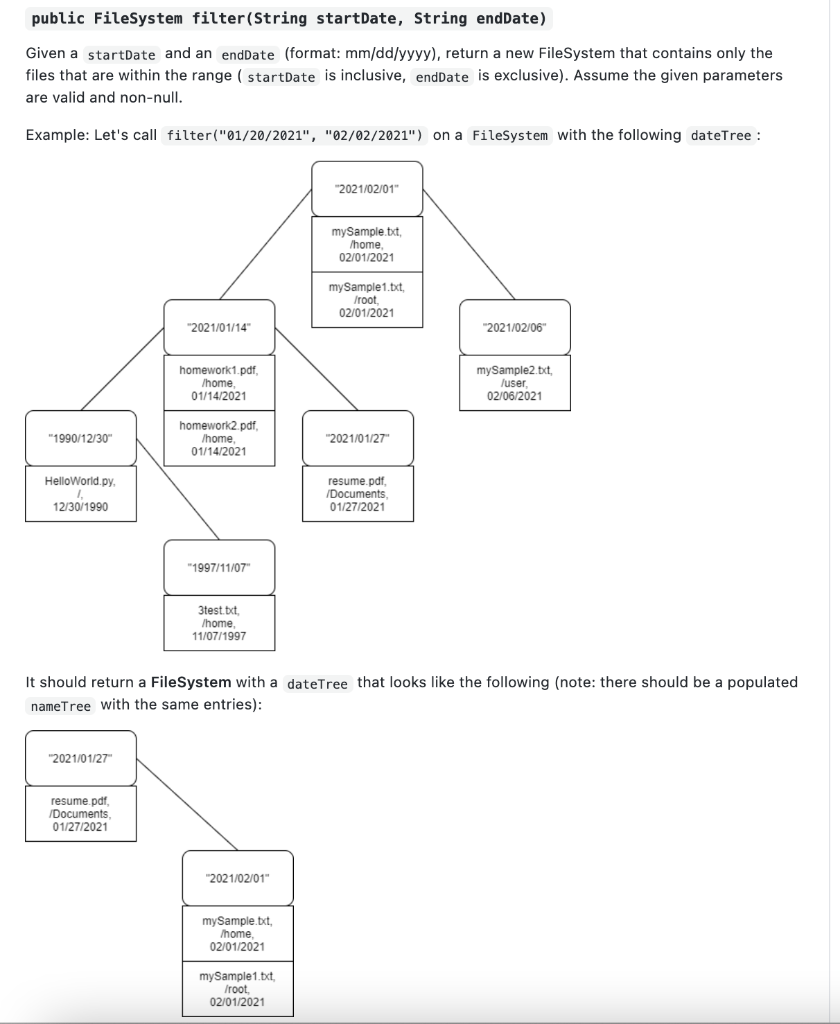
There is a class to be implemented
import java.util.List; import java.util.ArrayList; import java.util.LinkedList; import java.util.Comparator; import java.io.File; import java.io.FileNotFoundException; import java.util.Scanner;
public class FileSystem {
BST nameTree; BST> dateTree; DateComparator dc; // TODO public FileSystem() {
}
// TODO public FileSystem(String inputFile) { // Add your code here try { File f = new File(inputFile); Scanner sc = new Scanner(f); while (sc.hasNextLine()) { String[] data = sc.nextLine().split(", "); // Add your code here } sc.close(); } catch (FileNotFoundException e) { System.out.println(e);
} }
// TODO public void add(String name, String dir, String date) { }
// TODO public ArrayList findFileNamesByDate(String date) {
}
// TODO public FileSystem filter(String startDate, String endDate) { } // TODO public FileSystem filter(String wildCard) {
} // TODO public List outputNameTree(){
} // TODO public List outputDateTree(){
}
class DateComparator implements Comparator { //TODO public int compare(String date1, String date2) {
} }
}
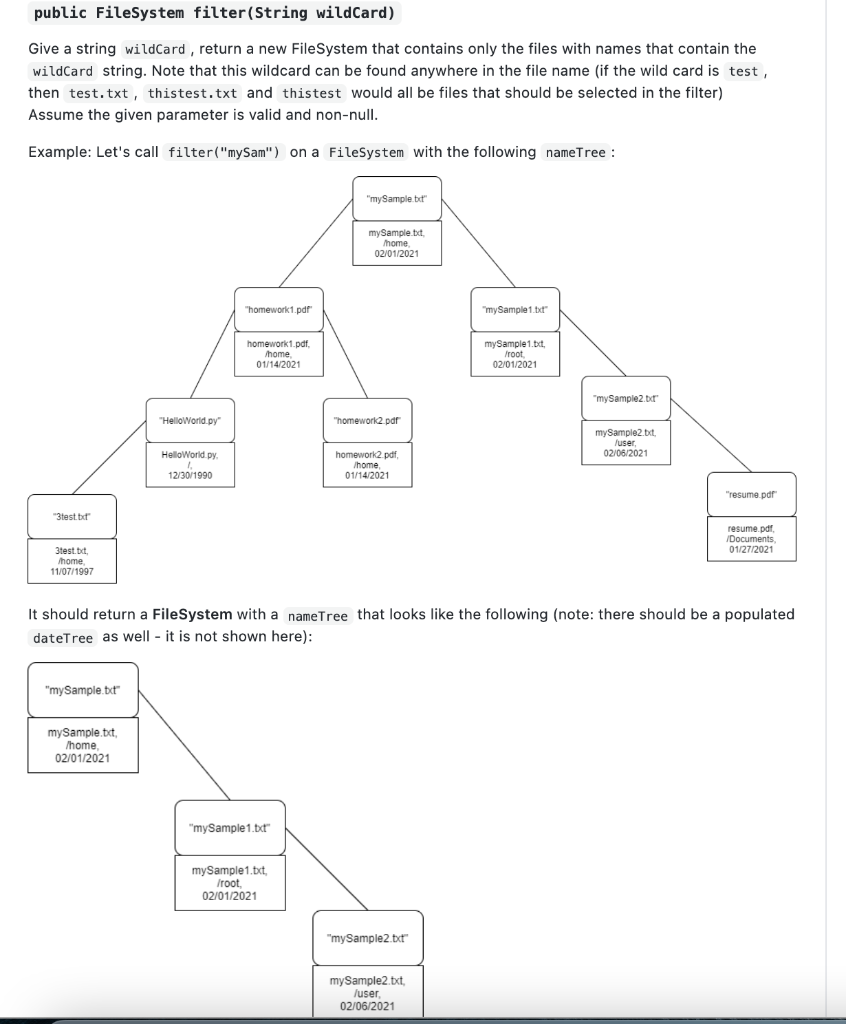
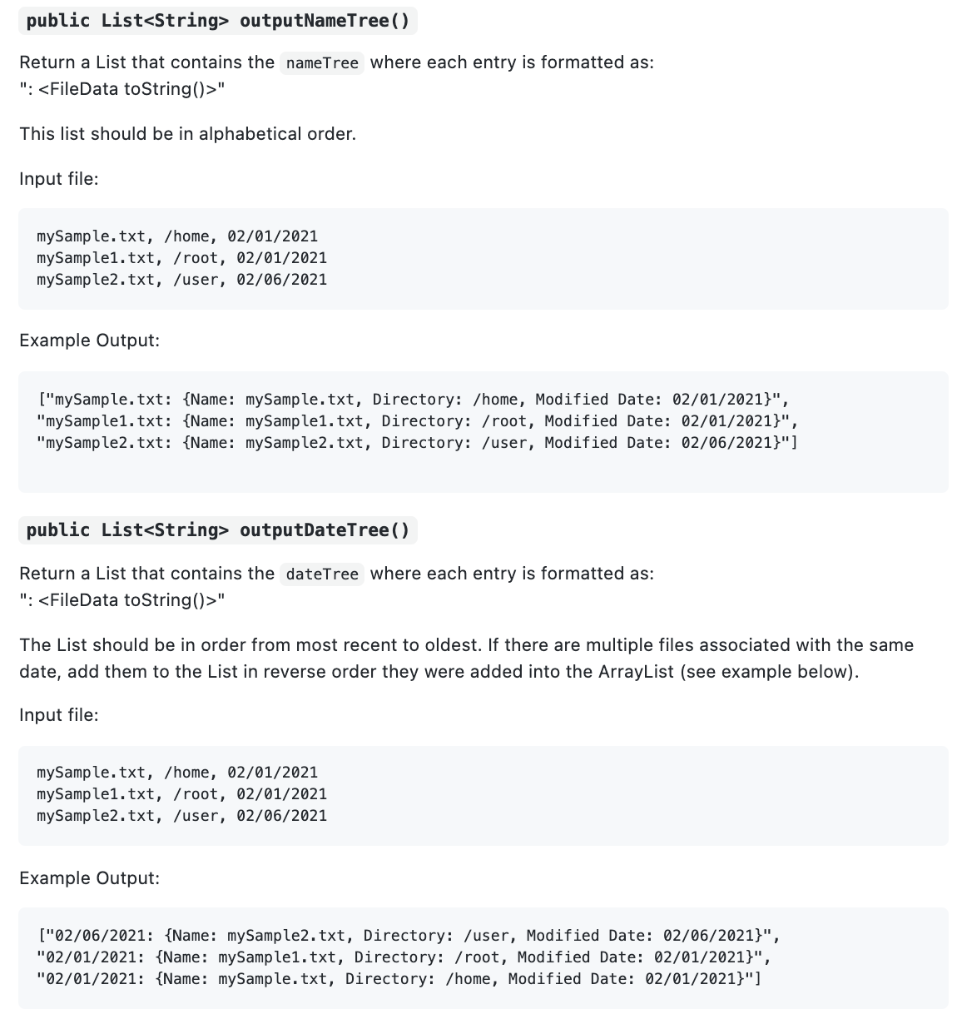
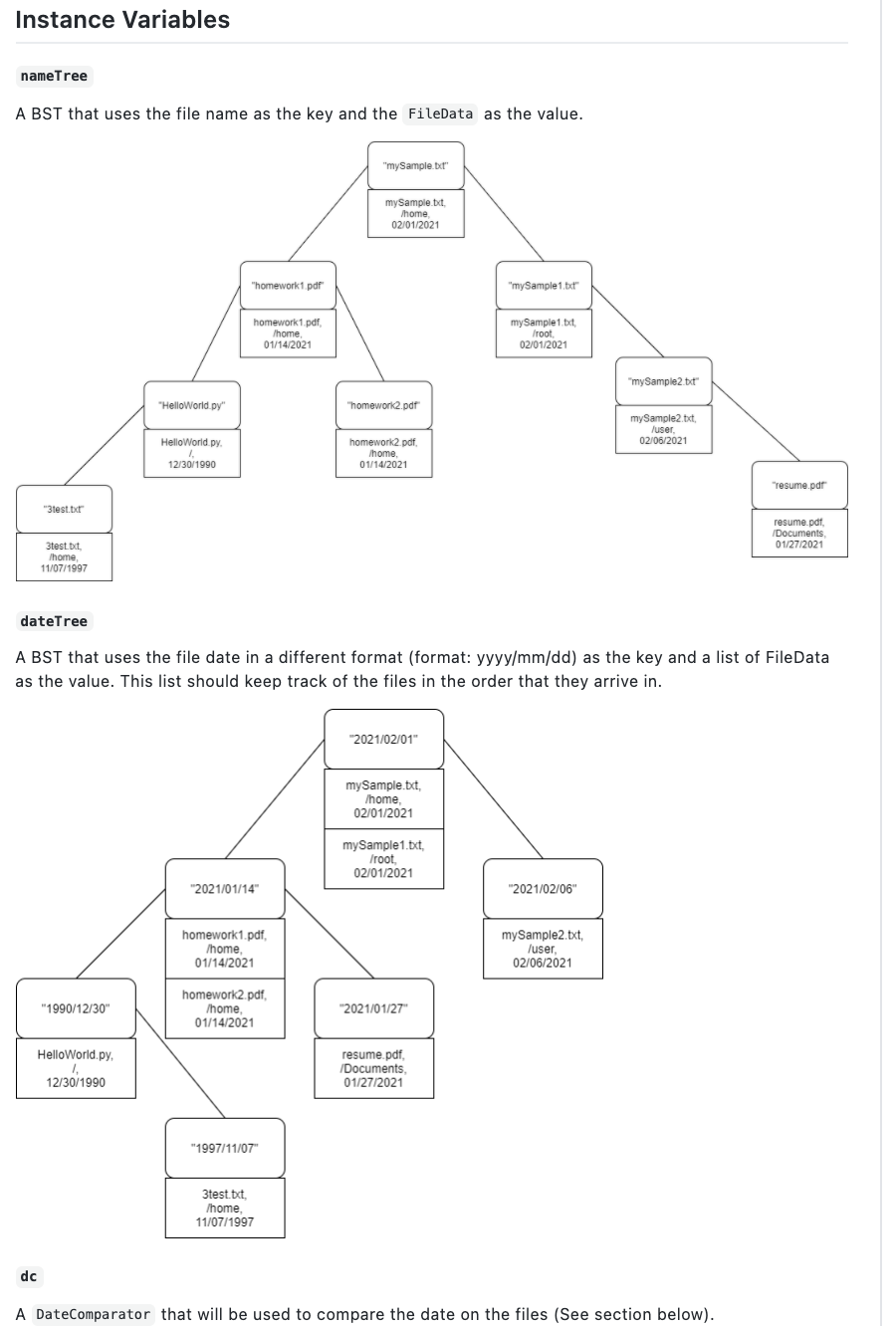
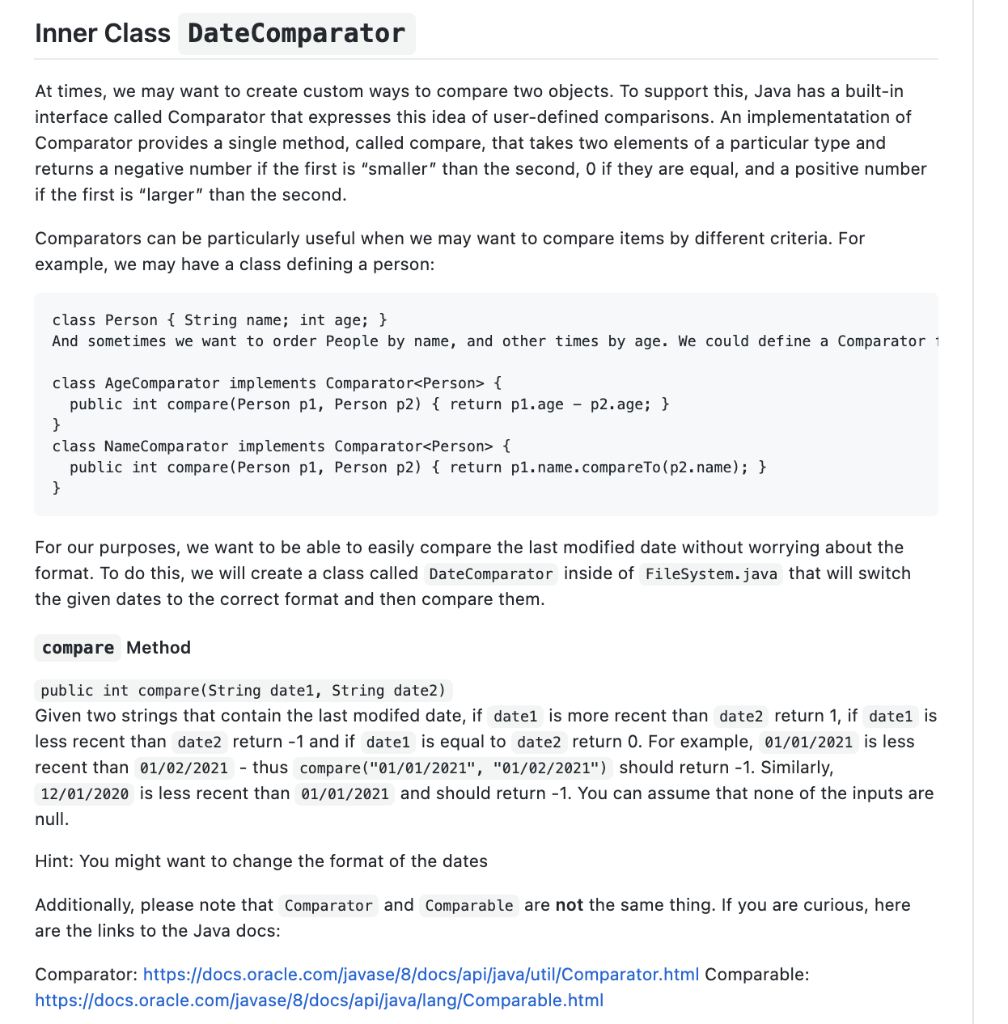
public class FileData | public String name; public String dir; public String lastModifiedDate; // TODO public FileData(String name, String directory, String modifiedDate) { this.name = name; this.dir = directory; this. last ModifiedDate = modifiedDate; } // TODO public String toString() { StringBuilder stringBuilder = new StringBuilder(); stringBuilder.append("Name: " + name +", Directory: dir + "Modified Date: " + lastModifiedDate); return stringBuilder.toString(); } + }| public class BST, V> implements DefaultMap { /* * TODO: Add instance variables * You may add any instance variables you need, but * you may NOT use any class that implements java.util.SortedMap * or any other implementation of a binary search tree */ @Override public boolean put(K key, V value) throws IllegalArgumentException { // TODO Auto-generated method stub return false; } @Override public boolean replace(K key, V newValue) throws IllegalArgumentException { // TODO Auto-generated method stub return false; } @Override public boolean remove(K key) throws IllegalArgumentException { // TODO Auto-generated method stub return false; } @Override public void set(K key, V value) throws IllegalArgumentException { // TODO Auto-generated method stub } @Override public V get(K key) throws IllegalArgumentException { // TODO Auto-generated method stub return null; } @Override public int size() { // TODO Auto-generated method stub return 0; } @Override public boolean isEmpty() { // TODO Auto-generated method stub return false; } @Override public boolean containsKey(K key) throws IllegalArgumentException { // TODO Auto-generated method stub return false; } // Keys must be in ascending sorted order // You CANNOT use Collections. sort() or any other sorting implementations // You must do inorder traversal of the tree @Override public List keys () { // TODO Auto-generated method stub return null; } private static class Nodesk extends Comparable super k>, V> implements DefaultMap.Entryck, V> { * TODO: Add instance variables */ @Override public K getKey() { // TODO Auto-generated method stub return null; } @Override public V getValue() { // TODO Auto-generated method stub return null; } @Override public void setValue(V value) { // TODO Auto-generated method stub } } In FileSystem.java, you will implement and thoroughly test the following methods: public FileSystem) public FileSystem(String inputFile) public void add(String name, String dir, String date) public ArrayList findFileNamesByDate(String date) public FileSystem filter(String startDate, String endDate) public FileSystem filter(String wildCard) public List outputNameTree) public List outputDateTree) . . . . public FileSystem() Default constructor that creates a new FileSystem object and initializes its instance variable. public FileSystem(String inputFile) Constructor that creates a new FileSystem object with the given inputFile that contains the file system information. We have provided some skeleton code for reading the contents of the text file. You will need to initailizes File System's instance variables and populate File System with each file's information. Each file information is represented by a line formatted as filename, directory, date within the content of inputFile. For example, it could be mySample.txt, /home, 02/01/2021. (Note that since it is a unix type file system, forward slashes are used to represent directory hierarchy). We have also provided a sample file, input.txt, to show how each file information is represented within the inputFile. Feel free to add more data to the file to test your FileSystem implementation thoroughly. You may assume that inputFile parameter is properly formatted and is non-null. public void add(String name, String dir, String date) This method should create a FileData object with the given file information and add it to the instance variables of File System. If there is a duplicate file name, then the FileData with the most recent date should be used. For example, if the first FileData stored in the trees is test.txt, /home, 01/01/2021 and the next FileData is test.txt, /home, 01/02/2021, the second FileData should replace the first FileData stored in the trees. If the name, dir, or date is null, then do not add anything to the File System. public ArrayList findFileNamesByDate(String date) Given a date (format: mm/dd/yyyy), return an ArrayList of file names that correspond to this date. This list should have the file names in the order that they were added. If the date given is null, return null. public FileSystem filter(String startDate, String endDate) Given a startDate and an endDate (format: mm/dd/yyyy), return a new FileSystem that contains only the files that are within the range (startDate is inclusive, endDate is exclusive). Assume the given parameters are valid and non-null. Example: Let's call filter("01/20/2021", "02/02/2021") on a FileSystem with the following dateTree : 2021/02/01" mySample.txt /home 02/01/2021 my Sample 1.txt, /root 02/01/2021 "2021/01/14" 2021/02/06 homework1.pdf /home 01/14/2021 mySample2.txt /user 02/06/2021 "1990/12/30" homework2.pdf Ihome, 01/14/2021 "2021/01/27" HelloWorld.py resume.pdf /Documents 01/27/2021 12/30/1990 "1997/11/07" 3test.txt. /home 11/07/1997 It should return a File System with a dateTree that looks like the following (note: there should be a populated nameTree with the same entries): "2021/01/27 resume.pdf /Documents 01/27/2021 "2021/02/01" mySample.txt, /home 02/01/2021 mySample1.txt. /root. 02/01/2021 public FileSystem filter(String wildcard) Give a string wildCard, return a new FileSystem that contains only the files with names that contain the wildcard string. Note that this wildcard can be found anywhere in the file name (if the wild card is test, then test.txt, thistest.txt and thistest would all be files that should be selected in the filter) Assume the given parameter is valid and non-null. Example: Let's call filter("mySam") on a FileSystem with the following nameTree : "my Sample but mySample.txt Ihome 02/01/2021 "homework1.pdf "my Sample 1.txt" homework1.pdf /home 01/14/2021 mySample1.txt, froot 02/01/2021 "mySample2.br "HelloWorld.py "homework 2.pdf mySample2.bt. /user 02/06/2021 Hello World py homework.pdf Thome 01/14/2021 12/30/1990 "resume.pdf "3test.but resume.pdf /Documents 01/27/2021 3test.bct /home 11/07/1997 It should return a File System with a nameTree that looks like the following (note: there should be a populated dateTree as well - it is not shown here): "mySample but mySample.txt, /home 02/01/2021 "mySample 1.txt" mySample 1.txt. Iroot 02/01/2021 "mySample2.txt" mySample2.txt, /user 02/06/2021 public List outputNameTree() Return a List that contains the name Tree where each entry is formatted as: ": " This list should be in alphabetical order. Input file: mySample.txt, /home, 02/01/2021 mySample1.txt, /root, 02/01/2021 mySample2.txt, /user, 02/06/2021 Example Output: ("mySample.txt: {Name: mySample.txt, Directory: /home, Modified Date: 02/01/2021}", "mySample1. txt: {Name: mySample1.txt, Directory: /root, Modified Date: 02/01/2021}", "mySample2. txt: {Name: mySample2. txt, Directory: /user, Modified Date: 02/06/2021}"] public List outputDateTree() Return a List that contains the dateTree where each entry is formatted as: ": " The List should be in order from most recent to oldest. If there are multiple files associated with the same date, add them to the List in reverse order they were added into the ArrayList (see example below). Input file: mySample.txt, /home, 02/01/2021 mySample1.txt, /root, 02/01/2021 mySample2.txt, /user, 02/06/2021 Example Output: ["02/06/2021: {Name: mySample2.txt, Directory: /user, Modified Date: 02/06/2021}", "02/01/2021: {Name: mySample1.txt, Directory: /root, Modified Date: 02/01/2021}", "02/01/2021: {Name: mySample.txt, Directory: /home, Modified Date: 02/01/2021}"] Instance Variables name Tree A BST that uses the file name as the key and the FileData as the value. "mySample.bar mySample txt. Ihome 02/01/2021 "homework1.pdf "mySample 1.txt" homework1.pdf Ihome 01/14/2021 my Sample1.txt root 02/01/2021 "mySample2.txt" "HelloWorld.py" "homework2.pdf mySample2.txt /user 02/06/2021 Hello World py homework 2.pdf Ihome, 01/14/2021 12/30/1990 "resume.pdf "3test.txt resume.pdf Documents 01/27/2021 3test.it Ihome 11/07/1997 dateTree A BST that uses the file date in a different format (format: yyyy/mm/dd) as the key and a list of FileData as the value. This list should keep track of the files in the order that they arrive in. "2021/02/01" mySample.txt, /home 02/01/2021 mySample 1.txt, Iroot 02/01/2021 "2021/01/14" "2021/02/06" homework1.pdf /home 01/14/2021 mySample2.txt /user 02/06/2021 "1990/12/30" homework2.pdf /home, 01/14/2021 "2021/01/27" HelloWorld.py resume.pdf /Documents, 01/27/2021 12/30/1990 "1997/11/07" 3test.bct, /home . 11/07/1997 dc A DateComparator that will be used to compare the date on the files (See section below). Inner Class DateComparator At times, we may want to create custom ways to compare two objects. To support this, Java has a built-in interface called Comparator that expresses this idea of user-defined comparisons. An implementatation of Comparator provides a single method, called compare, that takes two elements of a particular type and returns a negative number if the first is "smaller" than the second, if they are equal, and a positive number if the first is "larger" than the second. Comparators can be particularly useful when we may want to compare items by different criteria. For example, we may have a class defining a person: class Person { String name; int age; } And sometimes we want to order People by name, and other times by age. We could define a Comparator 1 class AgeComparator implements Comparator { public int compare(Person pl, Person p2) { return pl. age - p2.age; } } class NameComparator implements Comparator { public int compare(Person pl, Person p2) { return p1.name.compareTo(p2.name); } } For our purposes, we want to be able to easily compare the last modified date without worrying about the format. To do this, we will create a class called DateComparator inside of Filesystem.java that will switch the given dates to the correct format and then compare them. compare Method public int compare(String date1, String date2) Given two strings that contain the last modifed date, if datel is more recent than date2 return 1, if datel is less recent than date2 return -1 and if datel is equal to date2 return O. For example, 01/01/2021 is less recent than 01/02/2021 - thus compare("01/01/2021", "01/02/2021") should return -1. Similarly, 12/01/2020 is less recent than 01/01/2021 and should return -1. You can assume that none of the inputs are null. Hint: You might want to change the format of the dates Additionally, please note that comparator and comparable are not the same thing. If you are curious, here are the links to the Java docs: Comparator: https://docs.oracle.com/javase/8/docs/api/java/util/Comparator.html Comparable: https://docs.oracle.com/javase/8/docs/api/java/lang/Comparable.html public class FileData | public String name; public String dir; public String lastModifiedDate; // TODO public FileData(String name, String directory, String modifiedDate) { this.name = name; this.dir = directory; this. last ModifiedDate = modifiedDate; } // TODO public String toString() { StringBuilder stringBuilder = new StringBuilder(); stringBuilder.append("Name: " + name +", Directory: dir + "Modified Date: " + lastModifiedDate); return stringBuilder.toString(); } + }| public class BST, V> implements DefaultMap { /* * TODO: Add instance variables * You may add any instance variables you need, but * you may NOT use any class that implements java.util.SortedMap * or any other implementation of a binary search tree */ @Override public boolean put(K key, V value) throws IllegalArgumentException { // TODO Auto-generated method stub return false; } @Override public boolean replace(K key, V newValue) throws IllegalArgumentException { // TODO Auto-generated method stub return false; } @Override public boolean remove(K key) throws IllegalArgumentException { // TODO Auto-generated method stub return false; } @Override public void set(K key, V value) throws IllegalArgumentException { // TODO Auto-generated method stub } @Override public V get(K key) throws IllegalArgumentException { // TODO Auto-generated method stub return null; } @Override public int size() { // TODO Auto-generated method stub return 0; } @Override public boolean isEmpty() { // TODO Auto-generated method stub return false; } @Override public boolean containsKey(K key) throws IllegalArgumentException { // TODO Auto-generated method stub return false; } // Keys must be in ascending sorted order // You CANNOT use Collections. sort() or any other sorting implementations // You must do inorder traversal of the tree @Override public List keys () { // TODO Auto-generated method stub return null; } private static class Nodesk extends Comparable super k>, V> implements DefaultMap.Entryck, V> { * TODO: Add instance variables */ @Override public K getKey() { // TODO Auto-generated method stub return null; } @Override public V getValue() { // TODO Auto-generated method stub return null; } @Override public void setValue(V value) { // TODO Auto-generated method stub } } In FileSystem.java, you will implement and thoroughly test the following methods: public FileSystem) public FileSystem(String inputFile) public void add(String name, String dir, String date) public ArrayList findFileNamesByDate(String date) public FileSystem filter(String startDate, String endDate) public FileSystem filter(String wildCard) public List outputNameTree) public List outputDateTree) . . . . public FileSystem() Default constructor that creates a new FileSystem object and initializes its instance variable. public FileSystem(String inputFile) Constructor that creates a new FileSystem object with the given inputFile that contains the file system information. We have provided some skeleton code for reading the contents of the text file. You will need to initailizes File System's instance variables and populate File System with each file's information. Each file information is represented by a line formatted as filename, directory, date within the content of inputFile. For example, it could be mySample.txt, /home, 02/01/2021. (Note that since it is a unix type file system, forward slashes are used to represent directory hierarchy). We have also provided a sample file, input.txt, to show how each file information is represented within the inputFile. Feel free to add more data to the file to test your FileSystem implementation thoroughly. You may assume that inputFile parameter is properly formatted and is non-null. public void add(String name, String dir, String date) This method should create a FileData object with the given file information and add it to the instance variables of File System. If there is a duplicate file name, then the FileData with the most recent date should be used. For example, if the first FileData stored in the trees is test.txt, /home, 01/01/2021 and the next FileData is test.txt, /home, 01/02/2021, the second FileData should replace the first FileData stored in the trees. If the name, dir, or date is null, then do not add anything to the File System. public ArrayList findFileNamesByDate(String date) Given a date (format: mm/dd/yyyy), return an ArrayList of file names that correspond to this date. This list should have the file names in the order that they were added. If the date given is null, return null. public FileSystem filter(String startDate, String endDate) Given a startDate and an endDate (format: mm/dd/yyyy), return a new FileSystem that contains only the files that are within the range (startDate is inclusive, endDate is exclusive). Assume the given parameters are valid and non-null. Example: Let's call filter("01/20/2021", "02/02/2021") on a FileSystem with the following dateTree : 2021/02/01" mySample.txt /home 02/01/2021 my Sample 1.txt, /root 02/01/2021 "2021/01/14" 2021/02/06 homework1.pdf /home 01/14/2021 mySample2.txt /user 02/06/2021 "1990/12/30" homework2.pdf Ihome, 01/14/2021 "2021/01/27" HelloWorld.py resume.pdf /Documents 01/27/2021 12/30/1990 "1997/11/07" 3test.txt. /home 11/07/1997 It should return a File System with a dateTree that looks like the following (note: there should be a populated nameTree with the same entries): "2021/01/27 resume.pdf /Documents 01/27/2021 "2021/02/01" mySample.txt, /home 02/01/2021 mySample1.txt. /root. 02/01/2021 public FileSystem filter(String wildcard) Give a string wildCard, return a new FileSystem that contains only the files with names that contain the wildcard string. Note that this wildcard can be found anywhere in the file name (if the wild card is test, then test.txt, thistest.txt and thistest would all be files that should be selected in the filter) Assume the given parameter is valid and non-null. Example: Let's call filter("mySam") on a FileSystem with the following nameTree : "my Sample but mySample.txt Ihome 02/01/2021 "homework1.pdf "my Sample 1.txt" homework1.pdf /home 01/14/2021 mySample1.txt, froot 02/01/2021 "mySample2.br "HelloWorld.py "homework 2.pdf mySample2.bt. /user 02/06/2021 Hello World py homework.pdf Thome 01/14/2021 12/30/1990 "resume.pdf "3test.but resume.pdf /Documents 01/27/2021 3test.bct /home 11/07/1997 It should return a File System with a nameTree that looks like the following (note: there should be a populated dateTree as well - it is not shown here): "mySample but mySample.txt, /home 02/01/2021 "mySample 1.txt" mySample 1.txt. Iroot 02/01/2021 "mySample2.txt" mySample2.txt, /user 02/06/2021 public List outputNameTree() Return a List that contains the name Tree where each entry is formatted as: ": " This list should be in alphabetical order. Input file: mySample.txt, /home, 02/01/2021 mySample1.txt, /root, 02/01/2021 mySample2.txt, /user, 02/06/2021 Example Output: ("mySample.txt: {Name: mySample.txt, Directory: /home, Modified Date: 02/01/2021}", "mySample1. txt: {Name: mySample1.txt, Directory: /root, Modified Date: 02/01/2021}", "mySample2. txt: {Name: mySample2. txt, Directory: /user, Modified Date: 02/06/2021}"] public List outputDateTree() Return a List that contains the dateTree where each entry is formatted as: ": " The List should be in order from most recent to oldest. If there are multiple files associated with the same date, add them to the List in reverse order they were added into the ArrayList (see example below). Input file: mySample.txt, /home, 02/01/2021 mySample1.txt, /root, 02/01/2021 mySample2.txt, /user, 02/06/2021 Example Output: ["02/06/2021: {Name: mySample2.txt, Directory: /user, Modified Date: 02/06/2021}", "02/01/2021: {Name: mySample1.txt, Directory: /root, Modified Date: 02/01/2021}", "02/01/2021: {Name: mySample.txt, Directory: /home, Modified Date: 02/01/2021}"] Instance Variables name Tree A BST that uses the file name as the key and the FileData as the value. "mySample.bar mySample txt. Ihome 02/01/2021 "homework1.pdf "mySample 1.txt" homework1.pdf Ihome 01/14/2021 my Sample1.txt root 02/01/2021 "mySample2.txt" "HelloWorld.py" "homework2.pdf mySample2.txt /user 02/06/2021 Hello World py homework 2.pdf Ihome, 01/14/2021 12/30/1990 "resume.pdf "3test.txt resume.pdf Documents 01/27/2021 3test.it Ihome 11/07/1997 dateTree A BST that uses the file date in a different format (format: yyyy/mm/dd) as the key and a list of FileData as the value. This list should keep track of the files in the order that they arrive in. "2021/02/01" mySample.txt, /home 02/01/2021 mySample 1.txt, Iroot 02/01/2021 "2021/01/14" "2021/02/06" homework1.pdf /home 01/14/2021 mySample2.txt /user 02/06/2021 "1990/12/30" homework2.pdf /home, 01/14/2021 "2021/01/27" HelloWorld.py resume.pdf /Documents, 01/27/2021 12/30/1990 "1997/11/07" 3test.bct, /home . 11/07/1997 dc A DateComparator that will be used to compare the date on the files (See section below). Inner Class DateComparator At times, we may want to create custom ways to compare two objects. To support this, Java has a built-in interface called Comparator that expresses this idea of user-defined comparisons. An implementatation of Comparator provides a single method, called compare, that takes two elements of a particular type and returns a negative number if the first is "smaller" than the second, if they are equal, and a positive number if the first is "larger" than the second. Comparators can be particularly useful when we may want to compare items by different criteria. For example, we may have a class defining a person: class Person { String name; int age; } And sometimes we want to order People by name, and other times by age. We could define a Comparator 1 class AgeComparator implements Comparator { public int compare(Person pl, Person p2) { return pl. age - p2.age; } } class NameComparator implements Comparator { public int compare(Person pl, Person p2) { return p1.name.compareTo(p2.name); } } For our purposes, we want to be able to easily compare the last modified date without worrying about the format. To do this, we will create a class called DateComparator inside of Filesystem.java that will switch the given dates to the correct format and then compare them. compare Method public int compare(String date1, String date2) Given two strings that contain the last modifed date, if datel is more recent than date2 return 1, if datel is less recent than date2 return -1 and if datel is equal to date2 return O. For example, 01/01/2021 is less recent than 01/02/2021 - thus compare("01/01/2021", "01/02/2021") should return -1. Similarly, 12/01/2020 is less recent than 01/01/2021 and should return -1. You can assume that none of the inputs are null. Hint: You might want to change the format of the dates Additionally, please note that comparator and comparable are not the same thing. If you are curious, here are the links to the Java docs: Comparator: https://docs.oracle.com/javase/8/docs/api/java/util/Comparator.html Comparable: https://docs.oracle.com/javase/8/docs/api/java/lang/Comparable.html









 Study Help