







Question: NOTE: Use this SAS programming document as a guide. For example, I want to know how to write a forziat statement and I want to
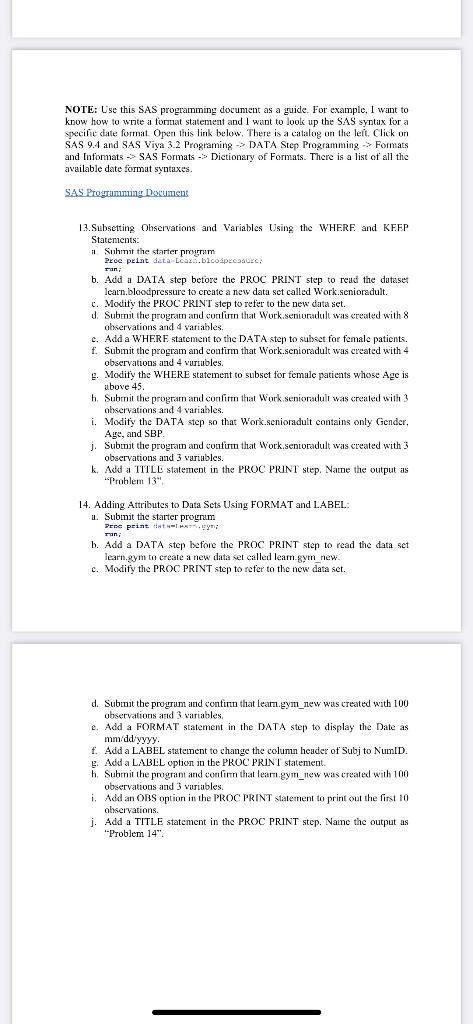
NOTE: Use this SAS programming document as a guide. For example, I want to know how to write a forziat statement and I want to look up the SAS syntax for a Specific date format. Open this link below. There is a catalog on the left. Click on SAS 9.4 and SAS Viya 3.2 Programing -> DATA Step Programming > Formats and Informats -> SAS Formats -> Dictionary of Formats. There is a list of all the available date format syntaxes. SAS Progrumunung Document 1.2. Subsetting Observations and Variables Using the WHERE and KEEP Statements: 1 Submit the starter prom Proc print detalcars.bloodpecador, b. Add a DATA step before the PROC PRINT step to read the dataset learn.bloodpressure to create a new data set called Work.seniora.dult. c. Modify the PROC PRINT step to refer to the new data set. d. Subenit the program and confirm that Work.senioradult was created with 8 observations and 4 variables. c. Add a WHERE statement to the DATA step to subset for female patients. f. Submit the program and contirm that Work.senioradult was created with 4 observations and 4 variables 2. Modity the WHERE statement to subset for female patients whose Age is above 45. h. Submit the program and confirm that Work senioradult was created with 3 observations and 4 variables. i. Modify the DATA step so that Work.senioradult contains only Gender, Aye, and SBP j. Submit the program and confirm that Work.senioradult was created with 3 observations and 3 variables. k. Add a TITLL statement in the PROC PRINT step. Name the output as Problem 13" 14. Adding Attributes to Data Scts Using FORMAT and LABEL: 1. Submit the starter program Pee printti, ran; b. Add a DATA step before the PROC PRINT step to read the data set learn.gym to create a new data set called leam gym new c. Modify the PROC PRINT step to refer to the new data set. d. Submit the progrum and continu that leam.gym_new was created with 100 observations and 3 variables, e. Add a FORMAT statement in the DATA step to display the Date as mm/dd/yyyy. f. Add a LABEL statement to change the column header of Subj to NumID. 3. Add a LABEL option in the PROC PRINT statement h. Submit the program and confirm that lean gym_rew was created with 100 observations and 3 variables. i Add an OBS option in the PROC PRINT statement to print out the first 10 observations. j. Add a TITLE statement in the PROC PRINT step. Name the output as "Problem 14
Step by Step Solution
There are 3 Steps involved in it

Get step-by-step solutions from verified subject matter experts
 Study Help